Run your own
agent.
Simple, secure, reliable agents.
An AI agent that runs on your hardware, connects to the communications tools you and your team use — Slack, Discord, and more. Built with .NET. Open source.
Channels, web search, and network exposure are set up after install with netclaw config.
Get Started
Up and running in two minutes
curl -sSL https://releases.netclaw.dev/install.sh | bash Installs CLI + daemon to ~/.netclaw/bin. Supports x64 and arm64. Open a new terminal, or run . ~/.netclaw/env, before netclaw init.
curl -sSL https://releases.netclaw.dev/install.sh | bash Same install script. Apple Silicon only (M1 and later). Open a new terminal, or run . ~/.netclaw/env, before netclaw init.
iwr -useb https://releases.netclaw.dev/install.ps1 | iex PowerShell. Installs to %LOCALAPPDATA%\Programs\netclaw and adds it to your User PATH. Restart your terminal before netclaw init.
docker run -d --name netclaw -v netclaw-home:/home/netclaw/.netclaw ghcr.io/netclaw-dev/netclaw Persists config and state in a named volume (the image runs as non-root netclaw). Configure with NETCLAW_ env vars.
Every AI agent you use works for someone else.
Your data trains their models. Your access disappears when they change their pricing.
Netclaw runs on your hardware, connects to your channels, and stays on — 24/7, no exceptions. It handles the stuff you keep putting off: triaging alerts, posting updates, running the checks nobody remembers to run.
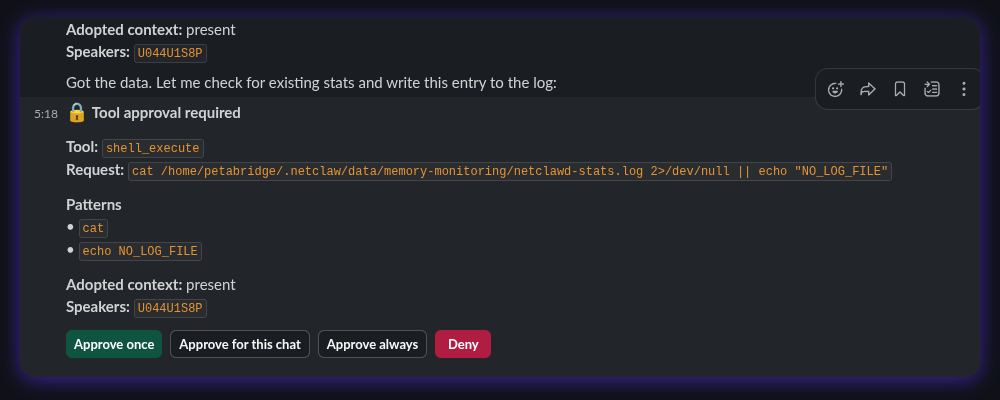
You control what requires approval and what doesn't.
How It Works
How Netclaw handles a request
Something triggers Netclaw. It figures out what to do, checks whether it needs your OK, then does it and tells you what happened.
netclawd
Evaluates context,
picks tools
approval?
Asks in Slack
Runs automatically
Reports back
Full audit trail
in your channel
Event arrives
Webhook, Slack message, or scheduled task
netclawd evaluates
Picks the right tools for the job
Approval check
Asks in Slack if needed, runs automatically if safe
Reports back
Full audit trail in your channel
Features
What's included
Secure by default
Three permission levels — Private, Team, Public — control what each agent can see and do. Default-deny. If a rule is missing, the answer is no.
MCP-first
Native Model Context Protocol support with OAuth. You decide which tools each audience can use and which ones need your approval first.
Automatic memory
Ask it to book a flight once. Next time, it already knows your airline, your home airport, your seat preference. Memory segregated by audience — private stays private.
Small models welcome
Works with models as small as 9B parameters. Netclaw only loads 10-20 tools per call, so small models don't choke even when you have dozens of MCP servers connected.
Webhooks & schedules
Point a webhook at Netclaw and it handles the rest. Cron-style schedules run tasks on their own. You stop being the bottleneck.
Deploy a fleet
Each instance uses ~80MB of RAM. Run one per project, one per client, one per domain — each with its own permissions and memory.
All of these are configured after install with netclaw config.
Architecture
Three pieces, one agent
netclawd
Always-on daemon. LLM sessions, tool execution, persistence. Built on Akka.NET actors.
netclaw
Thin CLI client. Config, management, interactive chat over SignalR.
SkillServer
Self-hosted skill registry. Publish reusable skills and share them between agents.