
Security Architecture
Netclaw gives an LLM shell access, file access, and the ability to talk to external services. Without strong guardrails, that’s a loaded weapon pointed at your infrastructure. The security architecture exists to make the agent useful without making it dangerous.
All of this is enforced automatically from daemon startup — no additional setup required for the defaults to protect you.
The core bet: explicit grants are safer than implicit restrictions. Rather than trying to enumerate everything dangerous and blocking it, netclaw starts from zero permissions and requires you to opt in to each capability. This inverts the typical “sandbox” approach — instead of poking holes in a wall, you’re building up from nothing.
Design Decisions
Section titled “Design Decisions”Default-deny over default-allow
Section titled “Default-deny over default-allow”Most tools start permissive and add restrictions. Netclaw does the opposite. A freshly initialized daemon with no config file binds to loopback, disables shell access, and limits tools to basic file operations in a temporary session directory that’s wiped on session end. You build up from there.
Misconfiguration fails safe. Forget to add a tool grant? The tool is invisible. Typo in a channel ID? That channel gets nothing. Config file corrupted? Daemon won’t start.
Audience as the trust primitive
Section titled “Audience as the trust primitive”Rather than per-user ACLs (which require identity infrastructure most self-hosted deployments don’t have), netclaw classifies trust by channel type. A message from the TUI (terminal interface, launched by netclaw chat) is from the operator sitting at the machine — high trust. A message from Slack could be anyone in the workspace — lower trust. An unknown channel gets the lowest trust.
Three audiences, ordered by trust:
Personal > Team > Public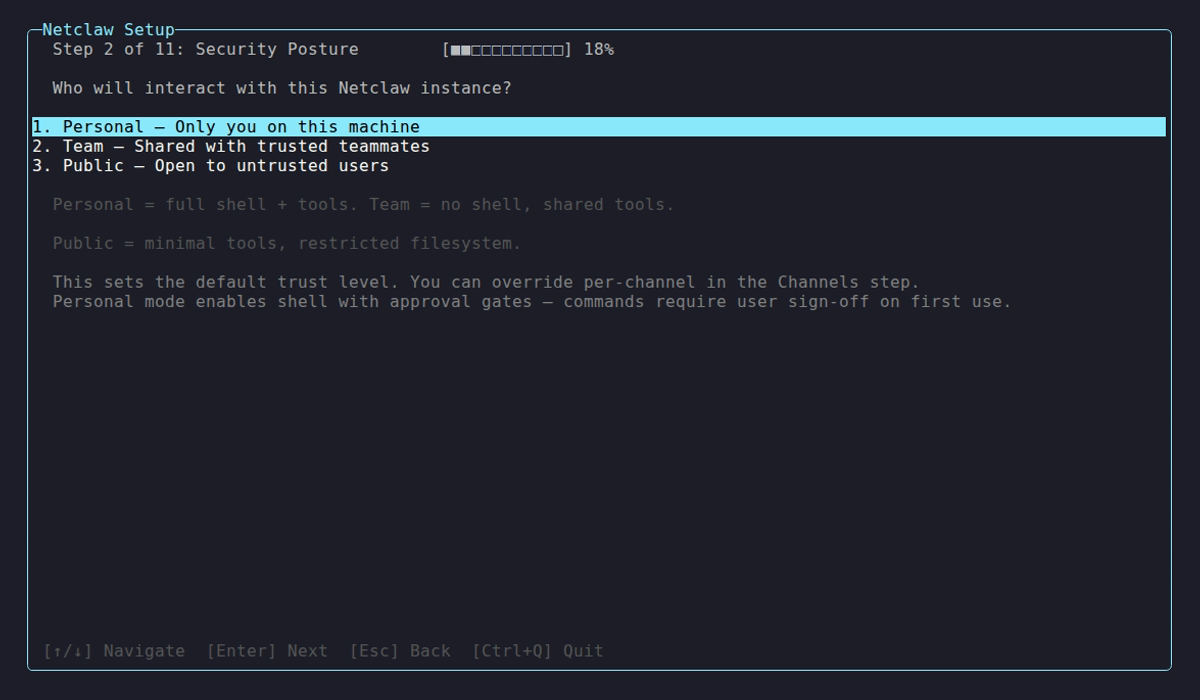
Posture selection during netclaw init — the choice that establishes the baseline trust tier for your deployment.
This maps to how people actually deploy: you trust yourself on your own machine, partially trust your coworkers in Slack, and don’t trust unknown sources at all. During setup, you assign each channel to an audience tier individually:
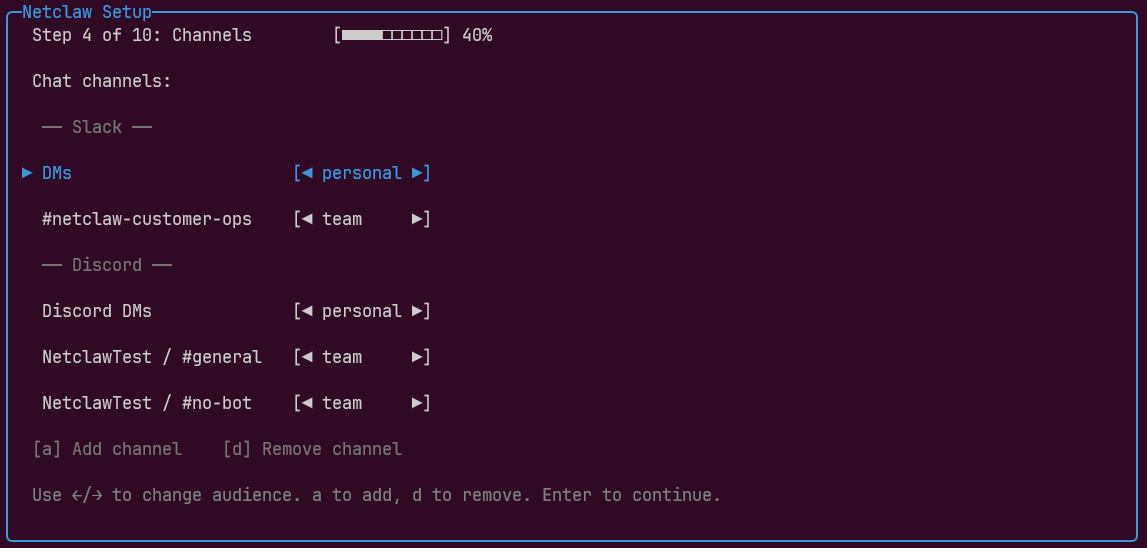
The same platform can span multiple audience tiers — Slack DMs as Personal, a shared ops channel as Team. The exact per-audience permission tables are in the Security Model reference.
Four layers, not one
Section titled “Four layers, not one”No tool executes without passing four independent checks. Each layer can only deny — none can override a denial from another.
| Layer | Class | What it does |
|---|---|---|
| Operation hard deny | ShellCommandPolicy | Blocks unconditionally dangerous commands — rm -rf /, sudo, fork bombs, daemon self-kill. Structural matching on tokenized verb chains. Not approvable. |
| Resource hard deny | ToolPathPolicy | Blocks access to protected paths — secrets.json, key material, control-plane files. Symlink-aware. Maintains separate deny surfaces for reads, writes, and shell path references. |
| Tool access grant | ToolAccessPolicy | Audience-scoped allowlist. If a tool isn’t granted to the current audience, the model never sees it. Binary — available or invisible. |
| Approval gate | IToolApprovalService | Human-in-the-loop confirmation for operations that pass the first three checks but are operationally risky. Approvals can be scoped to once, session, or persistent. |
The execution order in code doesn’t match this conceptual ordering — ToolAccessPolicy runs first (fail fast on unavailable tools before evaluating shell commands), then ShellCommandPolicy, then ToolPathPolicy, then the approval gate. The deny-only semantics are the same regardless of order. See the reference page for exact deny lists and configuration syntax.
Policy before dispatch
Section titled “Policy before dispatch”Inbound message ACL checks run in the gateway boundary, before messages reach the session layer. Tool execution policy (shell denies, path checks, approval gates) runs in the session’s tool executor, synchronously before any tool fires. The three-boundary design (gateway → session → subscriber) enforces this structurally — the gateway is the only ingress point for messages, and the tool executor is the only execution path for tools.
Human-in-the-loop as a layer, not a crutch
Section titled “Human-in-the-loop as a layer, not a crutch”Approval gates sit at Layer 4 — after hard denies and access grants have already filtered. The human only sees requests that are structurally permitted but operationally risky. You’re not approving every ls — you’re approving git push to a remote.
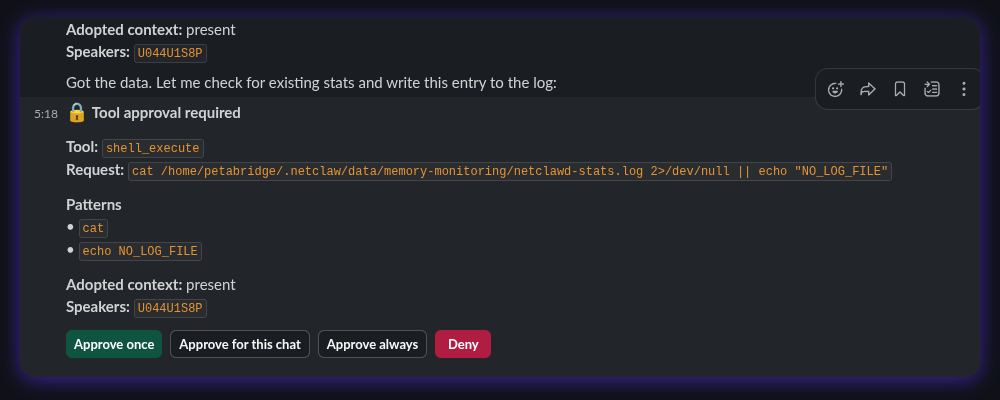
The approval system extracts verb-chain patterns from shell commands. A verb-chain is the leading command tokens (git push, docker compose up) without paths or flags — so approving git push covers git push origin main and git push --force-with-lease. Compound commands (cmd1 && cmd2) are split and each segment is checked independently.
Channels that don’t support interactive prompts (scheduled reminders, webhooks, headless automation) auto-deny tools that require approval — unless those tools have been persistently pre-approved or appear on the safe-list for non-interactive execution.
Trust Context Model
Section titled “Trust Context Model”Every inbound message carries a trust context assembled from:
| Signal | Source | Purpose |
|---|---|---|
| Principal classification | Channel adapter | Who is speaking? (operator, team member, external, automation) |
| Transport authenticity | Connection type | Can we verify the sender? (local process, verified, unverified) |
| Payload taint | Content origin | Where did this data come from? (trusted, community, public) |
| Audience | Channel type | What trust level does this channel get? |
The audience resolves the final permission set. The other signals flow through to audit logs for post-hoc review.
MCP Security: Two-Gate Model
Section titled “MCP Security: Two-Gate Model”External tool servers connecting via the Model Context Protocol (MCP) are doubly gated:
- Server allowlist — the MCP server must be explicitly permitted for the audience
- Tool allowlist — if per-tool grants are configured for that server, only listed tools are available
When no per-tool grants are configured for a server, all tools on that server are accessible (subject to the server-level gate). Configure McpServerToolGrants to restrict individual tools — see netclaw mcp permissions for the operational details.
Netclaw doesn’t load MCP tools into the model’s context until explicitly searched via search_tools. Granted-but-unused tools don’t consume context window or influence behavior — the model doesn’t know they exist until it asks.
Self-Configuration Boundaries
Section titled “Self-Configuration Boundaries”The agent can modify its own personality, instructions, scheduled tasks, and project registry — but security policy is off-limits. ACL rules, exposure mode, tool grants, and audience mappings are read-only from the agent’s perspective.
This is enforced at two levels: the config_write tool category (one of seven grant categories in the ACL policy) requires explicit grants, and the resource hard-deny layer blocks direct file access to config paths regardless of tool grants.
Threat Model Scope
Section titled “Threat Model Scope”What the security model protects against:
- The LLM deciding to run destructive commands
- Prompt injection via tool output or file contents attempting privilege escalation
- Overly broad tool access from misconfiguration
- Credential leakage through command output
- Unauthorized network exposure
What it explicitly does not protect against:
- A malicious operator with direct machine access (they can edit config files)
- Side-channel attacks against the LLM provider’s API
- Denial of service against the daemon process itself
- Vulnerabilities in third-party MCP servers (netclaw gates access, not behavior)
Limitations
Section titled “Limitations”- Prompt injection detection is regex-based, not semantic — novel phrasings can evade it
- Approval gates require an interactive channel — headless sessions (scheduled jobs, reminders, webhooks with no connected user) auto-deny gated tools unless persistently pre-approved
- No per-user identity within a channel — all Slack users in an allowed channel get the same audience
- Secret redaction catches known patterns only — custom formats need custom path deny rules
- No formal sandboxing (seccomp, namespaces) for shell execution — defense is policy-based, not kernel-based
Related
Section titled “Related”- Security Model reference — operational details: exact deny lists, configuration syntax, per-audience permissions
- Hardening — production lockdown beyond the defaults
- Architecture Overview — the three-boundary design that enforces policy-before-dispatch
netclaw init— where you first choose your security posturenetclaw doctor— verify what’s actually being enforced at runtime
External Resources
Section titled “External Resources”- OWASP LLM Top 10 — the attack taxonomy netclaw’s security model is designed against
- NIST AI Risk Management Framework — federal guidance on AI system risk management
- Principle of Least Privilege (POLP) — the access control philosophy behind default-deny
- Defense in Depth (NIST) — the layered-security model behind the four-layer stack
 Built by Petabridge