
netclaw model
Assign LLMs to roles: Main, Fallback, and Compaction. Run netclaw model for an interactive TUI, or use subcommands to script it.
You need at least one provider configured first. If you haven’t added one, see netclaw provider.
netclaw model # launch TUInetclaw model <subcommand> [options] # CLI modeModel roles
Section titled “Model roles”Three roles — only Main is required:
| Role | Purpose | When unset |
|---|---|---|
| Main | Primary model for all interactions | Required — cannot be cleared |
| Fallback | Automatic failover when Main is unavailable (rate limits, network errors, provider outages) | Falls back to Main |
| Compaction | Context summarization with a cheaper/faster model | Falls back to Main |
Role names are case-insensitive.
Compaction runs automatically when a session’s context approaches the model’s token limit.
Model Manager TUI
Section titled “Model Manager TUI”netclaw model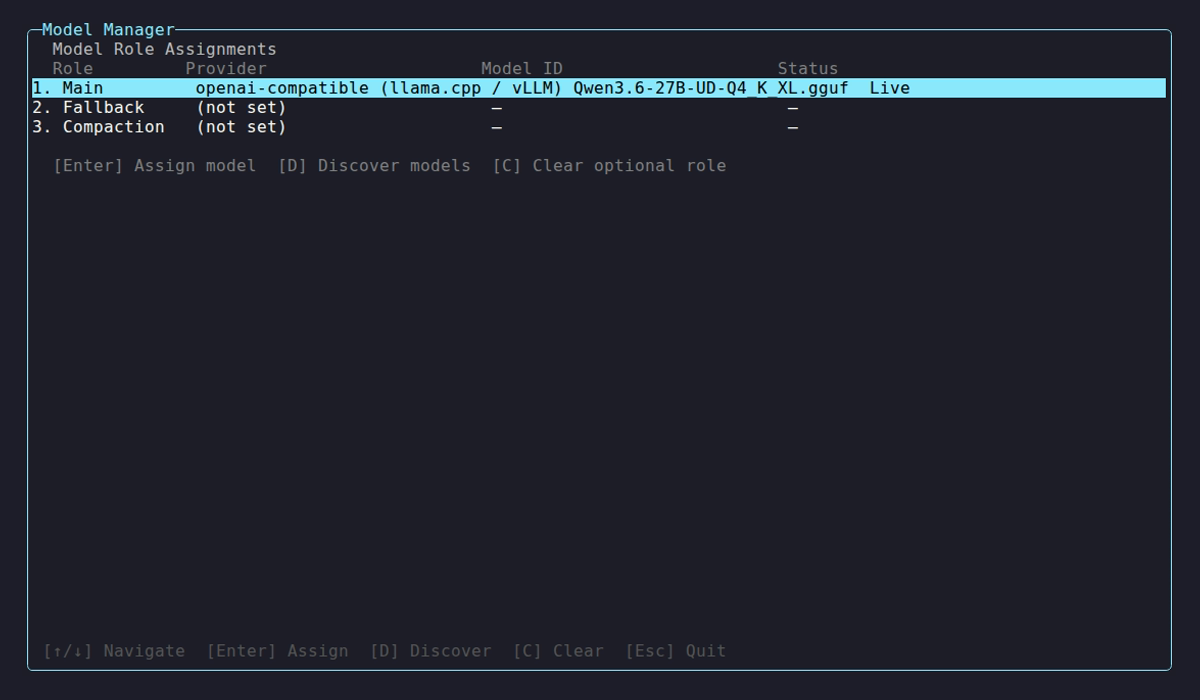
Select a role to reassign it, or use the hotkeys:
| Key | Action |
|---|---|
↑ / ↓ | Navigate roles |
Enter | Assign model to selected role |
D | Discover available models from a provider |
C | Clear optional role (Fallback or Compaction) |
Esc | Back / Quit (from role overview) |
Ctrl+Q | Quit from any screen |
Enter opens the assignment flow: pick a provider, discover its models, confirm. Discovery times out after 45 seconds and shows up to 30 results. If yours isn’t listed, pick “Enter model ID manually…” and type it in (e.g., qwen3:30b, llama3.2:latest).
Subcommands
Section titled “Subcommands”model list
Section titled “model list”netclaw model listRole Provider Model ID Context WindowMain remote-gpu qwen3:30b 32,768 tokensFallback remote-gpu qwen3:8b (default)Compaction (not set)Context window shows (default) unless you’ve set an explicit --context-window value. The table resolves roles to their provider and model — it doesn’t show definition names or modality overrides. Read the config file for those.
This reads from config, not from the running daemon. With no models configured, it prompts you to run model set or open the TUI.
If a role points at a definition that doesn’t exist, list names the bad reference and stops:
Error: Models:Roles:Main references unknown definition 'does-not-exist'.Fix the Models section in netclaw.json, then rerun `netclaw model list`.Open the config, compare Roles against Definitions, and make the names agree — this usually happens after renaming a definition and forgetting a role. netclaw doctor flags the same thing (it won’t auto-fix it), and the daemon refuses to start on it, so fix it before restarting.
model set
Section titled “model set”netclaw model set <role> <provider> <model-id> [options]| Flag | Description | Default |
|---|---|---|
--context-window <tokens> | Override context window size (positive integer) | Provider-detected |
--clear-context-window | Drop the override and go back to detection | — |
--input-modalities <list> | Comma-separated Text, Image, Audio, Video | Detected |
--output-modalities <list> | Same values, for output | Detected |
--clear-modalities | Drop both modality overrides | — |
Use --context-window when a local model doesn’t report its window (discovery shows -), or to cap usage below the model’s actual maximum. Use the modality flags when detection gets a model’s capabilities wrong — an Ollama vision model reported as text-only, say.
netclaw model set main remote-gpu qwen3-vl:32b \ --context-window 65536 \ --input-modalities "Text, Image" \ --output-modalities "Text"--context-window and --clear-context-window are mutually exclusive:
Error: --context-window and --clear-context-window cannot be combined.Modality names are case-insensitive and are stored canonicalized — text,image lands on disk as "Text, Image". Only the four names are accepted; anything else, including a raw integer, is rejected:
Error: invalid modalities '1'. Use a comma-separated list of: Text, Image, Audio, Video (or --clear-modalities to remove the override).What set and clear actually touch
Section titled “What set and clear actually touch”set and the --clear-* flags edit the model definition — the stored facts about a given provider/model pair. Assigning a role only repoints a reference at a definition. That distinction is the whole point: switch a role away from a model and back, and its overrides are still there.
netclaw model set main remote-gpu qwen3:30b --context-window 65536netclaw model set main remote-gpu qwen3:8b # 30b's definition is untouchednetclaw model set main remote-gpu qwen3:30b # still 65536Clearing removes the property outright rather than writing a sentinel, so a cleared value reads as “detect this at runtime”.
The provider must already exist in your config. If it doesn’t, the error lists your configured providers:
Error: Provider 'my-cloud' not found in configuration.Configured providers: remote-gpu, my-anthropicShrinking Main’s context window prints a warning because existing sessions with longer histories may fail until compacted.
Restart the daemon for changes to take effect: netclaw daemon stop && netclaw daemon start.
model discover
Section titled “model discover”netclaw model discover <provider>Discovery hits the provider’s API live, so it has to be reachable:
Model ID                                 Context Window        Cost (in/out per 1M)claude-opus-4-1                          200,000               $15.00 / $75.00claude-sonnet-4                          200,000               $3.00 / $15.00gpt-4-turbo                              128,000               $10.00 / $30.00gpt-4o                                   128,000               $5.00 / $15.00
4 model(s) found.
Cost and context window columns show - when the provider doesn’t report them (common with Ollama and OpenAI-compatible endpoints).
model clear
Section titled “model clear”netclaw model clear <role>Clears Fallback or Compaction. Cannot clear Main:
Error: Cannot clear the main model role. Use `netclaw model set main` to change it instead.The role assignment goes away; the definition stays. Re-assign that model later and its overrides are still there.
Examples
Section titled “Examples”# Set main model on a remote Ollama servernetclaw model set main remote-gpu qwen3:30b --context-window 32768
# Add a smaller fallback model on the same providernetclaw model set fallback remote-gpu qwen3:8b
# Use a cloud model for compactionnetclaw model set compaction my-anthropic claude-sonnet-4
# Tell netclaw a local model can see images when detection says otherwisenetclaw model set main remote-gpu qwen3-vl:32b --input-modalities "Text, Image"
# Undo that override and let detection decide againnetclaw model set main remote-gpu qwen3-vl:32b --clear-modalities
# Drop a context-window cap you no longer neednetclaw model set main remote-gpu qwen3:30b --clear-context-window
# See what models an Ollama server has availablenetclaw model discover my-ollama
# Remove the fallback assignmentnetclaw model clear fallbackConfiguration
Section titled “Configuration”Assignments live in ~/.netclaw/config/netclaw.json under the Models key. Definitions hold the model facts; roles point at them by name:
{ "Models": { "Definitions": { "remote-gpu-qwen3-30b": { "Provider": "remote-gpu", "ModelId": "qwen3:30b", "Provenance": "Manual", "ContextWindow": 65536, "InputModalities": "Text, Image", "OutputModalities": "Text" }, "remote-gpu-qwen3-8b": { "Provider": "remote-gpu", "ModelId": "qwen3:8b", "Provenance": "Manual" } }, "Roles": { "Main": "remote-gpu-qwen3-30b", "Fallback": "remote-gpu-qwen3-8b" } }}model set names new definitions after the provider and model (remote-gpu-qwen3-30b), but the names are yours — hand-edit them to anything readable and point the roles at the new name. Definitions stick around after you switch a role away, which is what keeps their overrides intact.
Models configuration covers the fields in full. Older configs use an inline shape that netclaw still reads — see Migrating model configuration.
Restart the daemon afterward.
Exit codes
Section titled “Exit codes”0 on success, 1 on invalid arguments, unknown provider, or validation failure.
What’s next
Section titled “What’s next”After setting your models, run netclaw status to confirm the daemon picked them up.
Related commands
Section titled “Related commands”netclaw provider— add providers before assigning models- Models configuration — the
Modelsshape these commands write - Migrating model configuration — converting an older inline
Modelssection netclaw status— see which model the daemon is actually usingnetclaw doctor— checks model config validitynetclaw init— initial model setup during onboarding
Resources
Section titled “Resources”- Ollama context length FAQ — Ollama serves at its own
num_ctxand truncates past it regardless of--context-window; set both - Ollama model library — browse models for local inference
- Anthropic models — Claude specs, pricing, context windows
- OpenRouter catalog — compare across providers
- OpenAI models — GPT specs, pricing, context windows
 Built by Petabridge