
netclaw skill
Manage skills from the CLI — list what’s installed, validate new ones, wire up external sources. None of these commands need a running daemon.
Skills are markdown files following the AgentSkills.io format: a SKILL.md with YAML frontmatter describing what the skill does, what tools it needs, and how to invoke it. At runtime, the agent sees a compressed skill index on every session and reads full skill content on demand — skills inject procedural knowledge into context without bloating the base prompt.
netclaw skill [subcommand] [options]Running netclaw skill with no subcommand defaults to list.
Subcommands
Section titled “Subcommands”| Subcommand | Description |
|---|---|
list | List all discovered skills (default) |
show <name> | Show skill details and full content |
validate <path> | Validate a SKILL.md file’s frontmatter |
remove <name> | Remove a native skill |
issues | Show only scanner issues |
search <query> | Search skills by name or description |
source list | List configured external sources |
source add <name> --path <dir> | Add a custom external source |
source add <name> --well-known <alias> | Add a well-known source |
source remove <name> | Remove an external source |
source enable <name> | Enable an external source |
source disable <name> | Disable an external source |
Skill classifications
Section titled “Skill classifications”Three categories:
| Source | Location | Mutable? |
|---|---|---|
system | ~/.netclaw/skills/.system/ | No — managed by the daemon |
native | ~/.netclaw/skills/ | Yes — user-created |
external | Configured source directories | Manage at source |
For a deeper look at how skills fit into netclaw’s architecture, see Skills Overview.
Listing skills
Section titled “Listing skills”netclaw skill listNAME SOURCE VERSION STATUScommit native 1.0.0 okreview-pr native 1.2.0 okakka-net-best-practices external - okmodern-csharp-standards external - oksession-context system - okmy-broken-skill ? - MissingDescription
5 skill(s), 1 issue(s)Skills with problems show their issue kind in the STATUS column. netclaw skill issues gives you the full details.
Showing skill details
Section titled “Showing skill details”netclaw skill show commitName: commitDisplay: Commit ChangesSource: nativeVersion: 1.0.0Category: gitLicense: MITPath: /home/user/.netclaw/skills/commit/SKILL.mdFlat file: FalseTools: bash gitDescription: Create well-structured git commits with conventional commit messages.
--- content ---(full SKILL.md content follows)Validating a skill file
Section titled “Validating a skill file”Catch frontmatter problems before deploying:
netclaw skill validate ./my-skill/SKILL.md[OK] Valid skill file. Name: my-skill Description: Does something useful. Version: 1.0.0 License: MITOnce validated, drop the skill into ~/.netclaw/skills/ (directory-based or flat file) and it’ll appear on the next netclaw skill list.
A failing file tells you exactly what’s wrong:
netclaw skill validate ./broken-skill.md[FAIL] MissingDescription: Skill file missing required 'description' field.Searching skills
Section titled “Searching skills”netclaw skill search "testing"NAME SOURCE VERSION DESCRIPTIONsnapshot-testing external - Verify test output using snapshot...integration-tests external - Testcontainers patterns for .NET...
2 match(es)Removing a skill
Section titled “Removing a skill”netclaw skill remove my-old-skillOnly native skills can be removed — system and external skills are read-only here.
Managing external sources
Section titled “Managing external sources”Point netclaw at skill directories from other tools (Claude Code, Open Code) or shared team paths.
Note: Skill feeds are a separate concept — server-based skill repositories synced by the daemon. This section covers local directory sources only.
List sources
Section titled “List sources”netclaw skill source listNAME ENABLED TYPE PATH / WELL-KNOWNclaude-skills yes well-known claude-codeteam-shared yes path /opt/skills/teamWhen no sources are configured, netclaw checks for well-known directories and nudges you:
No external skill sources configured.
Detected well-known skill directories on disk:  claude-code      /home/user/.claude/skillsAdd one with: netclaw skill source add <name> --well-known <alias>
Add a well-known source
Section titled “Add a well-known source”netclaw skill source add my-claude --well-known claude-codeThe aliases map to these paths:
| Alias | Scans |
|---|---|
claude-code | ~/.claude/skills/, ~/.claude/commands/, plus installed plugin marketplaces |
open-code | ~/.open-code/skills/ |
During netclaw init, you’re prompted to configure external skill sources:
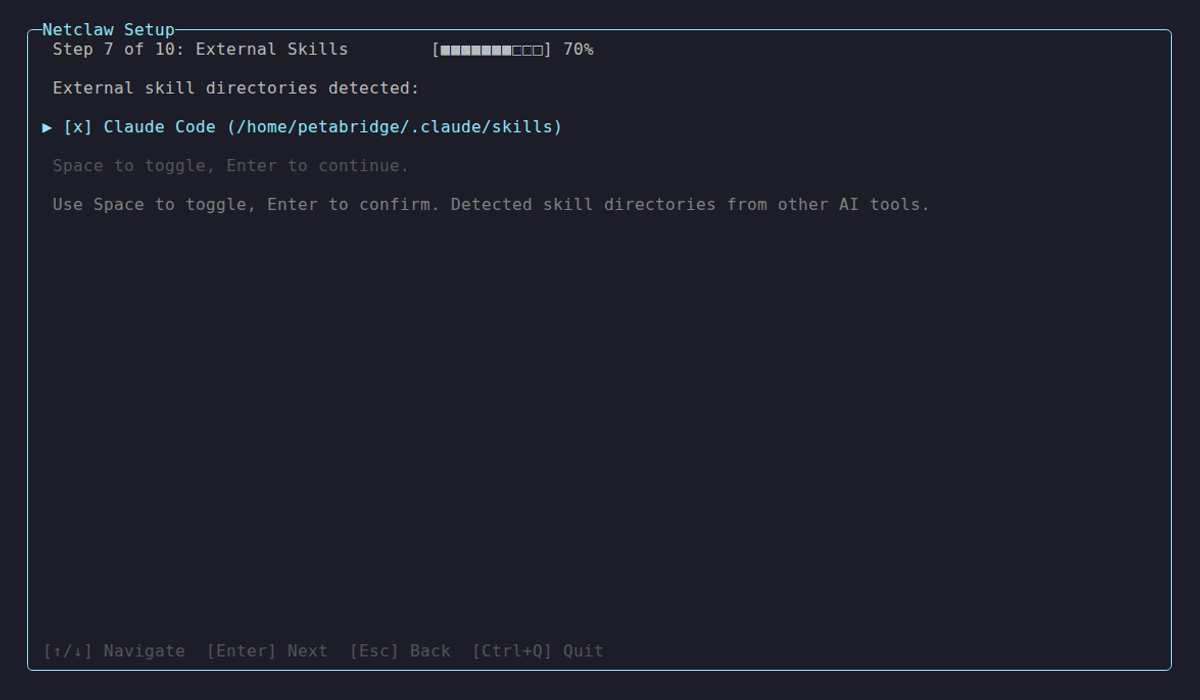
The init wizard detects well-known directories automatically.
Add a custom path source
Section titled “Add a custom path source”netclaw skill source add team-skills --path /opt/company/skillsThe directory must exist. Netclaw scans for both directory-based skills (skill-name/SKILL.md) and flat files (skill-name.md).
Enable / disable a source
Section titled “Enable / disable a source”netclaw skill source disable team-skillsnetclaw skill source enable team-skillsDisabled sources stay in config but won’t be scanned.
Remove a source
Section titled “Remove a source”netclaw skill source remove team-skillsRemoves the config entry only — skill files in the directory are untouched.
Skill file format
Section titled “Skill file format”Two layouts work:
Directory-based:
my-skill/ SKILL.md scripts/ helper.sh references/ api-docs.md assets/ diagram.pngFlat file:
my-skill.mdThe SKILL.md frontmatter:
---name: my-skilldescription: One-line description of what this skill does.metadata:  version: 1.0.0license: MITcompatibility: ["netclaw", "claude-code"]allowed-tools: "bash git"disable-model-invocation: falseuser-invocable: trueargument-hint: "<branch-name>"---
# My Skill
Skill instructions go here...
The display name is derived from the first # heading in the markdown body, falling back to title-casing the skill name.
| Field | Required | Description |
|---|---|---|
name | Yes | Identifier (must match directory/file name) |
description | Yes | One-line summary |
metadata.version | No | Semver version (nested under metadata:) |
license | No | SPDX license identifier |
compatibility | No | Which agents can use this skill |
allowed-tools | No | Space-delimited list of tools the skill needs |
disable-model-invocation | No | When true, prevents the model from auto-invoking this skill |
user-invocable | No | When true, users can invoke the skill directly (e.g. /commit) |
argument-hint | No | Hint text shown in command completion |
Related commands
Section titled “Related commands”netclaw init— configures external skill sources during onboardingnetclaw mcp— manage tool servers that skills reference inallowed-toolsnetclaw status— shows loaded skill count at runtime
Resources
Section titled “Resources”- AgentSkills.io — the SKILL.md format specification
- Cloudflare Agent Skills Discovery RFC — discovery protocol for skill feeds
- netclaw skill-server — self-hosted skill registry for organizations
- Skills Overview — how skills work at runtime
- Skill Feeds — server-synced skill repositories
 Built by Petabridge