
MCP Servers
Netclaw connects to Model Context Protocol servers to give the LLM tools: browsing the web, querying Notion, storing memories, whatever the MCP server exposes. Server definitions live in the McpServers section of ~/.netclaw/config/netclaw.json, with credentials split into secrets.json.
At startup, the daemon loads all enabled servers, discovers their tools, and enforces per-audience permissions on which tools each session can call.
The CLI writes this JSON for you (netclaw mcp add, netclaw mcp permissions), but direct editing works fine too. For the full CLI reference, see netclaw mcp.
Configuration schema
Section titled “Configuration schema”Each entry under McpServers is keyed by server name:
| Field | Type | Default | Description |
|---|---|---|---|
Transport | string | "stdio" | "stdio", "sse", or "http" |
Command | string? | null | Executable for stdio transport |
Arguments | string[]? | null | Args passed to the stdio command |
Url | string? | null | Endpoint URL for sse/http transport |
EnvironmentVariables | object? | null | Env overlay for the stdio process |
Headers | object? | null | Additional HTTP headers for http/sse transport |
Enabled | bool | true | Whether the server is loaded at startup |
GrantCategory | string? | null | ACL grant category; defaults to mcp:{serverName}. Set this to group multiple servers under a single permission grant — e.g., both browser_playwright and browser_chrome_devtools share browser_automation so they can be toggled together. |
OAuthClientId | string? | null | Static OAuth client ID (servers without dynamic registration) |
OAuthScope | string? | null | OAuth scope override (space-separated) |
Sensitive values (EnvironmentVariables entries, Headers with tokens) belong in secrets.json, not netclaw.json. The CLI handles this split for you when you use netclaw mcp add --env or --header.
Transports
Section titled “Transports”Launches a local process. The daemon starts it on startup and kills it on shutdown.
{ "McpServers": { "memorizer": { "Transport": "stdio", "Command": "uvx", "Arguments": ["memorizer-mcp"] } }}uvx is the runner from the uv Python package manager — it downloads and executes MCP servers published as Python packages. Command must be on the daemon’s PATH.
Connects to a remote MCP server over HTTP with streamable transport.
{ "McpServers": { "notion": { "Transport": "http", "Url": "https://mcp.notion.com", "OAuthClientId": "abc123", "OAuthScope": "read write" } }}If the server needs OAuth, run netclaw mcp auth <name> after adding it.
Server-Sent Events transport — use this for MCP servers that expose an SSE endpoint instead of streamable HTTP. Some older or self-hosted servers only support SSE.
{ "McpServers": { "my-server": { "Transport": "sse", "Url": "https://mcp.example.com/sse", "Headers": { "Authorization": "Bearer your-api-token-here" } } }}The Authorization header above is a placeholder. Put actual tokens in secrets.json instead of netclaw.json, or use netclaw mcp add --header which does the split for you.
Minimal config
Section titled “Minimal config”One stdio server with all defaults:
{ "McpServers": { "memorizer": { "Command": "uvx", "Arguments": ["memorizer-mcp"] } }}Transport defaults to "stdio", Enabled defaults to true, and GrantCategory defaults to mcp:memorizer.
Production config
Section titled “Production config”~/.netclaw/config/netclaw.json:
{ "McpServers": { "browser_playwright": { "Transport": "stdio", "Command": "npx", "Arguments": [ "-y", "@playwright/mcp@latest", "--isolated", "--headless", "--image-responses", "omit", "--snapshot-mode", "none", "--browser", "chromium" ], "GrantCategory": "browser_automation" }, "memorizer": { "Transport": "stdio", "Command": "uvx", "Arguments": ["memorizer-mcp"] }, "notion": { "Transport": "http", "Url": "https://mcp.notion.com", "OAuthClientId": "abc123", "OAuthScope": "read write" } }}The --browser chromium value is set by netclaw init based on which browsers are installed. netclaw init may also set EnvironmentVariables for the browser profiles depending on your environment.
Enabled: true is omitted throughout — it’s the default.
~/.netclaw/config/secrets.json (encrypted at rest):
{ "McpServers": { "memorizer": { "EnvironmentVariables": { "API_KEY": "ENC:CfDJ8N2x...encrypted..." } } }}Built-in browser automation profiles
Section titled “Built-in browser automation profiles”netclaw init offers two browser automation backends. Both use stdio transport and share the browser_automation grant category:
| Profile | Package | Runtime Requirement |
|---|---|---|
browser_playwright | @playwright/mcp@latest | Node.js + Playwright browser |
browser_chrome_devtools | chrome-devtools-mcp@latest | Node.js + local Chrome |
Both are regular MCP server entries. Edit them in netclaw.json like any other server.
OAuth flow
Section titled “OAuth flow”HTTP and SSE servers can authenticate via OAuth:
- Run
netclaw mcp auth <name>— attempts to open your browser to the authorization page - Complete the flow in the browser (or copy the printed URL in headless environments)
- The CLI polls for completion, timing out after 5 minutes
Set OAuthClientId and OAuthScope for servers that don’t support dynamic client registration. stdio servers cannot use OAuth.
Per-audience access control
Section titled “Per-audience access control”Netclaw gates MCP server access per audience (Personal, Team, Public) in the Tools.AudienceProfiles section of netclaw.json:
| Audience | Default McpServersMode | Default behavior |
|---|---|---|
| Personal | "All" | All servers allowed |
| Team | "Allowlist" | Must list servers in AllowedMcpServers |
| Public | "Allowlist" | Must list servers in AllowedMcpServers |
Each audience profile controls three things: which servers are visible, which of those servers’ tools can be invoked, and whether each tool runs on autopilot, needs confirmation, or is hard-blocked.
{ "Tools": { "AudienceProfiles": { "Personal": { "McpServersMode": "All", "McpServerToolGrants": { "memorizer": ["search_memories", "store_memory"] }, "ApprovalPolicy": { "DefaultMode": "Auto", "McpServerDefaults": { "memorizer": "Approval" }, "ToolOverrides": { "memorizer/delete_memory": "Deny" } } }, "Team": { "McpServersMode": "Allowlist", "AllowedMcpServers": ["memorizer"], "McpServerToolGrants": { "memorizer": ["search_memories"] }, "ApprovalPolicy": { "DefaultMode": "Approval" } } } }}Omitting McpServerToolGrants for a server passes all of that server’s tools through (if server-level access is allowed). To grant everything quickly from the CLI, use netclaw mcp add --grant-all.
New servers are fail-closed (blocked by default): all tools blocked for every audience until you grant them. Use netclaw mcp permissions to manage grants interactively — the daemon must be running first.
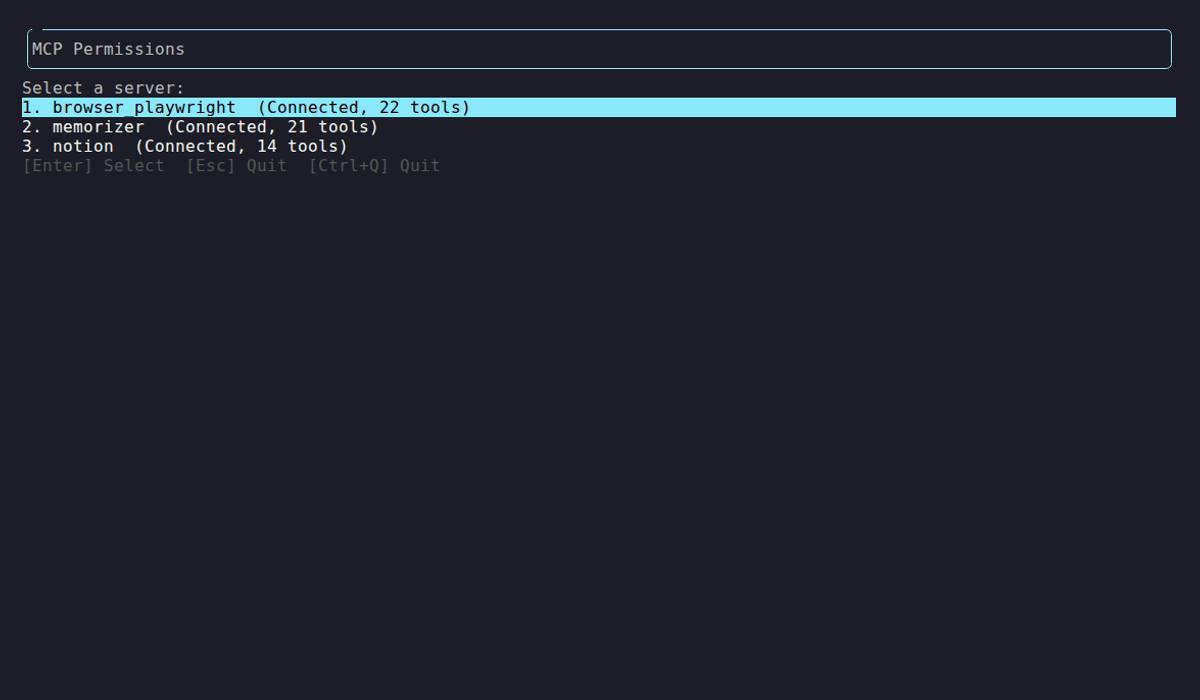
Each server shows its connection status and discovered tool count. Select one to configure per-audience grants and approval policies.
Daemon status codes
Section titled “Daemon status codes”After the daemon loads your MCP config, netclaw mcp list shows live status:
| Status | Meaning | Action |
|---|---|---|
connected (N tools) | Server up, N tools discovered | None |
awaiting auth | OAuth required | Run netclaw mcp auth <name> |
auth failed | OAuth rejected or credentials invalid | Re-run netclaw mcp auth <name> |
unreachable | Process crashed or network error | Run netclaw doctor |
disabled | Toggled off | Run netclaw mcp enable <name> when ready |
Environment variable overrides
Section titled “Environment variable overrides”Override any server field with NETCLAW_ environment variables. Double underscores separate path segments per the .NET configuration convention:
export NETCLAW_McpServers__notion__Enabled="true"export NETCLAW_McpServers__notion__Url="https://mcp.notion.com"export NETCLAW_McpServers__notion__Transport="http"These take highest priority, overriding anything in netclaw.json. On Linux, variable names are case-sensitive.
Validation errors
Section titled “Validation errors”netclaw doctor validates MCP server config at startup:
| Condition | Result |
|---|---|
Transport not stdio, sse, or http | Config error |
stdio transport with empty Command | Config error |
sse/http transport with empty Url | Config error |
Server unreachable at runtime | Warning (partial) or Error (all servers down) |
| OAuth auth failed | Error — re-run netclaw mcp auth <name> |
Invalid config prevents that server from loading, but the rest still start fine.
Applying changes
Section titled “Applying changes”Config changes take effect after a daemon restart:
netclaw daemon restartnetclaw mcp list # shows config + live statusnetclaw status # shows MCP connector healthSetup sequence
Section titled “Setup sequence”- Add a server:
netclaw mcp add <name> <command-or-url> - Restart the daemon:
netclaw daemon restart - Grant tool permissions:
netclaw mcp permissions(requires a running daemon) - Authenticate (if HTTP/SSE with OAuth):
netclaw mcp auth <name> - Verify:
netclaw mcp list
Related pages
Section titled “Related pages”netclaw mcp— CLI reference for all MCP subcommands (add, list, remove, permissions, auth)netclaw init— adds browser automation MCP servers during onboarding- Secrets Management — how credentials in
secrets.jsonare encrypted - Models — configure which LLMs use these tools
- Security Model — audience definitions and trust levels
Resources
Section titled “Resources”- Model Context Protocol specification — the protocol netclaw implements
- MCP server registry — community-maintained list of MCP servers
- uv documentation — the Python package manager behind
uvx - .NET environment variable configuration — the double-underscore nesting convention
- OAuth 2.0 Dynamic Client Registration (RFC 7591) — for servers that support automatic client registration
 Built by Petabridge