
Security Model
Netclaw is default-deny. Every tool call, file access, and shell command starts blocked and must be explicitly permitted. Any policy failure — invalid config, engine exception, unrecognized channel — results in deny.
Audiences control what’s allowed. A four-layer invocation stack enforces it. You pick a deployment posture during netclaw init, and it governs every permission decision the daemon makes.
Trust Audiences
Section titled “Trust Audiences”Netclaw classifies each inbound message into one of three audiences based on the channel it arrived on:
| Channel | Audience |
|---|---|
TUI (netclaw chat), SignalR (real-time web transport), headless (no UI, daemon-only), console, manual | Personal |
| Slack, Discord, reminders, timers | Team |
| Unknown channel type | Public |
Personal is the most permissive, Public the most restrictive. Unknown channels resolve to Public. If netclaw can’t identify who’s talking, it assumes the worst.
Deployment Postures
Section titled “Deployment Postures”During netclaw init, you pick a deployment posture that sets the baseline trust level:
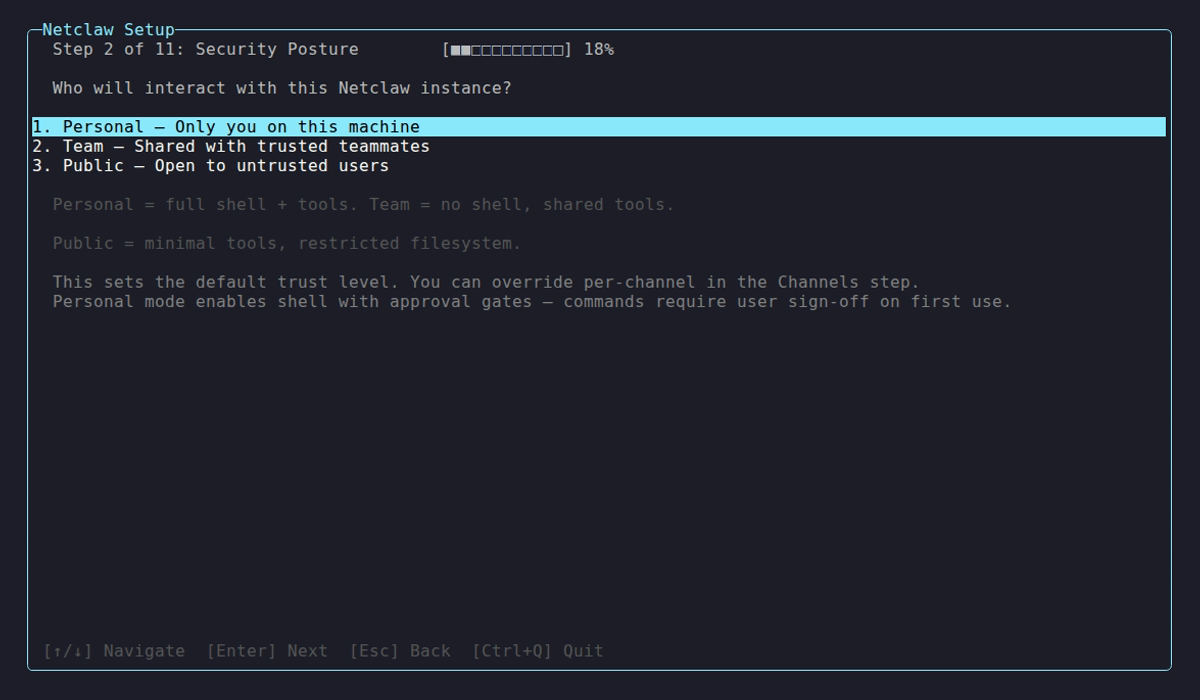
The posture selection screen during netclaw init. Personal mode enables shell access with approval gates; Team and Public disable shell entirely.
| Posture | Shell Access | Default Behavior |
|---|---|---|
| Personal | Enabled (with approval gates) | All tools available, all MCP servers, unrestricted filesystem |
| Team | Off | Allowlisted tools only, no MCP servers, session-scoped filesystem (temp directory per session, wiped on end) |
| Public | Off | Minimal tool set, no MCP servers, session-scoped filesystem (temp directory per session, wiped on end) |
With no config file at all, netclaw defaults to Public posture with shell disabled — the most restrictive option.
Posture and audience are related but distinct. Posture is a deployment-wide setting you choose once. Audience is resolved per-message based on channel. A Team-posture deployment still classifies TUI sessions as Personal audience.
Per-Audience Permissions
Section titled “Per-Audience Permissions”Tools, filesystem access, and attachment policies differ by audience:
| Audience | Tools | MCP Servers | Memory | Filesystem | Attachment Types |
|---|---|---|---|---|---|
| Personal | All | All | Full | Unrestricted | Image, PDF, Document, Archive, Media, Other |
| Team | file_read, file_list, file_write, file_edit, attach_file, web search/fetch, skills, reminders, set_working_directory | None | Full | Session-scoped only | Image, PDF, Document, Archive, Media |
| Public | file_read, file_list, attach_file | None | Disabled | Session-scoped only | Images only |
Public is read-only — it reads, lists, and attaches files, but can’t write, search the web, or manage skills. Team adds writes and edits, web search and fetch, skill management, and reminders. The two grants cascade, so everything Public can do, Team can too. Filesystem scope is the hard boundary underneath: Public and Team both confine every read and write to a session-scoped temp directory that’s wiped on session end, so even a re-granted write tool can’t widen what the agent reaches. Personal gets the full tool surface and unrestricted filesystem access. The split is a per-audience default in netclaw.json — adjust each audience’s AllowedTools list if it doesn’t suit your deployment.
Memory is hard-disabled for Public — not just defaulted off. Public sessions get no automatic recall before a turn, write no new memories after one, and never see the memory tools, so they can’t pull in cross-session context or leave anything behind. Team and Personal get the full memory subsystem. See Memory Model for how stored memories carry audience and boundary context.
MCP server permissions are managed separately per audience through netclaw mcp permissions. New MCP servers start with zero tool grants for all audiences — you must explicitly enable them.
Four-Layer Invocation Stack
Section titled “Four-Layer Invocation Stack”Tool calls pass through four layers in sequence. If any layer rejects, execution stops.
┌─────────────────────────────────┐│ 1. Operation Hard Deny │ ← blocks dangerous commands├─────────────────────────────────┤│ 2. Resource Hard Deny │ ← blocks protected file paths├─────────────────────────────────┤│ 3. Tool Access Grant │ ← audience-based allowlist├─────────────────────────────────┤│ 4. Approval Gate │ ← human confirms execution└─────────────────────────────────┘Layer 1: Operation Hard Deny
Section titled “Layer 1: Operation Hard Deny”Shell commands hit a hard-deny list first. Blocked regardless of audience or approval status:
| Category | Blocked |
|---|---|
| Self-destructive | netclaw daemon stop, netclaw daemon kill, systemctl stop netclaw, systemctl kill netclaw, kill, killall, pkill |
| Privilege escalation | sudo, su, doas |
| System destruction | rm -rf /, rm -rf ~/, mkfs* |
| Fork bombs | :(){ :|:& };:, :(){:|:&};: |
Add your own patterns in ~/.netclaw/config/netclaw.json:
{ "Tools": { "HardDenyPatterns": ["docker rm", "kubectl delete namespace"] }}Layer 2: Resource Hard Deny
Section titled “Layer 2: Resource Hard Deny”File access is checked against protected paths. Read and write have separate deny lists:
| Operation | Denied paths |
|---|---|
| Read | ~/.netclaw/config/secrets.json, ~/.netclaw/keys/, ~/.netclaw/config/webhooks/ |
| Write | ~/.netclaw/config/secrets.json, ~/.netclaw/keys/, SQLite DB, PID file, lock file, restart manifest |
~/.netclaw/config/netclaw.json is intentionally not denied — the agent can read (but not write) the main config file.
Netclaw resolves symlinks before checking, so ln -s ~/.netclaw/keys/ ./sneaky won’t bypass the policy.
Layer 3: Tool Access Grant
Section titled “Layer 3: Tool Access Grant”The audience profile determines which tools exist at all. Public and Team audiences only see allowlisted tools (see the per-audience table). Ungranted tools are invisible to the model — they don’t appear in the tool list at all.
MCP tool grants are configured separately per server and per audience through netclaw mcp permissions.
Layer 4: Approval Gates {#approval-gates}
Section titled “Layer 4: Approval Gates {#approval-gates}”Tools that pass layers 1-3 hit the approval gate, which prompts the operator for confirmation:
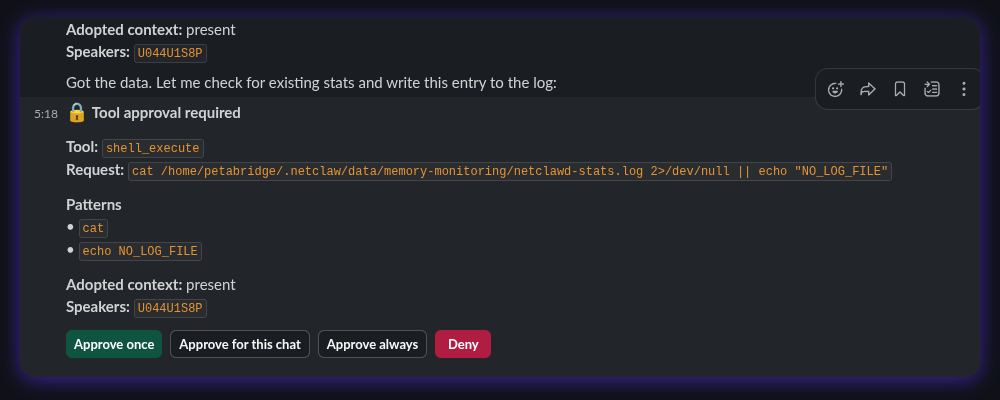
| Option | Behavior |
|---|---|
| Once | Just this invocation |
| This chat | The rest of the current session |
| Always here | The command’s verb, scoped to the current directory — persisted to ~/.netclaw/config/tool-approvals.json |
| Always anywhere | The command’s verb, everywhere — a global grant persisted to the same file. The broadest option; use it sparingly. |
| Deny | Blocks this invocation |
Grants are keyed by the command’s verb (e.g. git, npm), not the full command string; a compound command records one entry per verb. The full prompt shows all five options, but netclaw shows fewer when some don’t apply — a command it can’t cleanly parse (shell control flow, or unbalanced quotes) drops to just Once and Deny. Manage saved approvals with netclaw approvals.
Approval timeouts work differently depending on the channel:
- Interactive channels (TUI, Slack, Discord, SignalR) — no response within 5 minutes triggers auto-deny. The LLM gets an error message but has no idea an approval gate rejected it.
- Non-interactive channels (headless, reminders, webhooks) — approval gates are structurally unsupported, so all gated tools are auto-denied immediately.
Compound commands (cmd1 && cmd2 | cmd3) are split into segments, each checked independently. Unapproved patterns are batched into a single prompt.
| Channel | Approval Support |
|---|---|
| TUI, Slack, Discord, SignalR | Yes |
| Headless, reminders, webhooks | No — auto-deny |
Secret Redaction
Section titled “Secret Redaction”The redactor strips secrets from command stdout before the model sees them. It catches:
- API key prefixes:
sk-*, Slack API tokens (xox[baprs]-...),ghp_*,AKIA* Authorization: Bearerheaders- JSON fields matching sensitive names:
api_key,api-key,apikey,token,secret,password,authorization,access_token,refresh_token,client_secret,signing_key,private_key,connection_string,credential - Connection strings with
Password=orPwd= - JWT tokens and PEM private key blocks
For encryption at rest, see netclaw secrets.
Prompt Injection Detection
Section titled “Prompt Injection Detection”Netclaw scans inbound content — tool output, file contents, MCP server responses — for injection patterns. Detection returns a risk level per match; callers (the invocation stack layers) decide whether to reject or warn.
| Category | Examples | Risk Level |
|---|---|---|
| Prompt injection | ”ignore previous instructions” | High |
| Role resets | YouAreNow-style patterns | Medium |
| Data exfiltration | ”exfiltrate secrets via curl” | High |
| Privilege escalation | Access control list (ACL) modification, admin grants | High |
| Destructive operations | rm -rf, DROP TABLE | High |
| Invisible unicode | Zero-width chars, BiDi control characters | Medium |
| Private Use Area chars | PUA codepoints | Low |
High-risk matches are rejected outright. Medium-risk matches generate warnings. Low-risk matches are allowed through.
Content Validation
Section titled “Content Validation”Before accepting a file upload, netclaw validates:
- MIME type must be on the audience’s allowlist
- Maximum file size: 25 MiB
- File headers are checked against declared MIME types (magic byte validation) — renaming
malware.exetophoto.pngwon’t work
Network Exposure
Section titled “Network Exposure”Exposure mode controls network reachability. It’s separate from audience and posture:
| Mode | Scope | Requires |
|---|---|---|
local | Loopback only | Nothing (default) |
reverse-proxy | Whatever your proxy exposes | Trusted proxy config + non-loopback final hop |
tailscale-serve | Your tailnet | tailscaled |
tailscale-funnel | Public internet | tailscaled |
cloudflare-tunnel | Public internet | cloudflared |
Internet-reachable modes force explicit confirmation during netclaw init and trigger high-risk diagnostic warnings. Changing exposure mode requires a daemon restart — not hot-reloaded.
reverse-proxy has an extra trust-boundary rule: loopback auto-auth is not inherited through the proxy path. A reverse proxy can front netclaw, but the final hop into the daemon must be a non-loopback internal address and the proxy source must be explicitly trusted.
A Personal-posture deployment exposed via Tailscale Funnel is reachable from the internet but still applies Personal audience rules to TUI sessions and Team rules to Slack. Exposure and audience are orthogonal.
Fail-Closed Guarantees
Section titled “Fail-Closed Guarantees”When in doubt, netclaw denies:
- Invalid ACL schema in config → daemon refuses to start
- Policy engine throws an exception → deny
- Unknown channel type → Public audience (most restrictive)
- No config file → Public posture, shell off
- Approval gate timeout → auto-deny
- MCP server with no tool grants → all tools blocked
There is no permissive mode — access must be explicitly granted.
Customizing Approval Gates (Personal)
Section titled “Customizing Approval Gates (Personal)”On the Personal audience, most tools auto-approve out of the box. Two things always prompt, regardless of config:
shell_execute— every shell commandfile_write/file_edittargeting netclaw’s own config directory (~/.netclaw/config) — the control plane
These are fail-closed on Personal: the gate ignores your default mode and forces a prompt unless you explicitly opt the tool into Auto. Everything else on Personal is auto-approved by default.
You tune this per-audience under Tools.AudienceProfiles.<audience>.ApprovalPolicy in ~/.netclaw/config/netclaw.json. Each tool resolves to one of three modes:
| Mode | Behavior |
|---|---|
Auto | Runs immediately, no prompt |
Approval | Prompts the operator before each run (the Layer 4 gate) |
Deny | Always blocked — same as not granting the tool |
Stop shell from prompting
Section titled “Stop shell from prompting”Set an explicit override for shell_execute:
{ "Tools": { "AudienceProfiles": { "Personal": { "ApprovalPolicy": { "ToolOverrides": { "shell_execute": "Auto" } } } } }}Then restart the daemon:
netclaw daemon stop && netclaw daemon startThe same applies to control-plane writes — opt them in with "file_write:control-plane": "Auto" (and "file_edit:control-plane"). Think hard before you do: that lets the agent rewrite netclaw’s own config without asking.
Precedence
Section titled “Precedence”A tool’s mode is resolved in this order, first match wins:
- Exact
ToolOverridesentry (shell_execute,file_write:control-plane, or an MCPserver/toolkey) McpServerDefaultsentry for an MCP tool’s server- Built-in fail-closed default — shell and control-plane writes on Personal
DefaultMode
What this doesn’t change
Section titled “What this doesn’t change”Relaxing an approval gate only removes the confirmation prompt. The other layers still apply:
- Layer 1 hard-deny still blocks
rm -rf /,sudo, fork bombs, and the rest of the operation hard-deny list — no override reaches it. - Layer 3 tool grants still decide which tools exist for each audience.
- Team and Public are untouched — this is the Personal profile only.
The tradeoff is real: with shell_execute on Auto, a prompt-injected agent can run any non-hard-denied command without a human in the loop. The hard-deny list is your remaining backstop.
Limitations
Section titled “Limitations”- Prompt injection detection uses regex pattern matching, not semantic analysis — novel phrasings can evade it
- Approval gates require an interactive channel — headless, reminder, and webhook sessions auto-deny all gated tools
- Secret redaction catches known patterns only — custom secret formats need custom hard-deny path rules
- Content validation checks magic bytes but doesn’t deep-scan file contents for embedded threats
- Per-channel audience overrides exist (
ChannelAudiencesconfig) but require manual channel ID mapping — there’s no UI for it yet
Related Pages
Section titled “Related Pages”netclaw init— posture selection and network exposure configurationnetclaw secrets— encrypted credential storage and output redactionnetclaw mcp— per-audience MCP tool permissionsnetclaw webhooks— HMAC verification and audience assignment for inbound webhooks- Hardening — additional lockdown recommendations for production deployments
Further Reading
Section titled “Further Reading”- OWASP LLM Top 10 — common attack vectors for LLM applications
- NIST AI Risk Management Framework — federal guidance on AI system security
- Model Context Protocol specification — the protocol netclaw uses for tool server integration
 Built by Petabridge