
netclaw provider
Manage the LLM providers that netclaw talks to. Run netclaw provider for an interactive TUI, or use subcommands to script provider setup.
If you haven’t run netclaw init yet, start there — it configures your first provider.
netclaw provider # launch TUInetclaw provider <subcommand> [options] # CLI modeProvider Manager TUI
Section titled “Provider Manager TUI”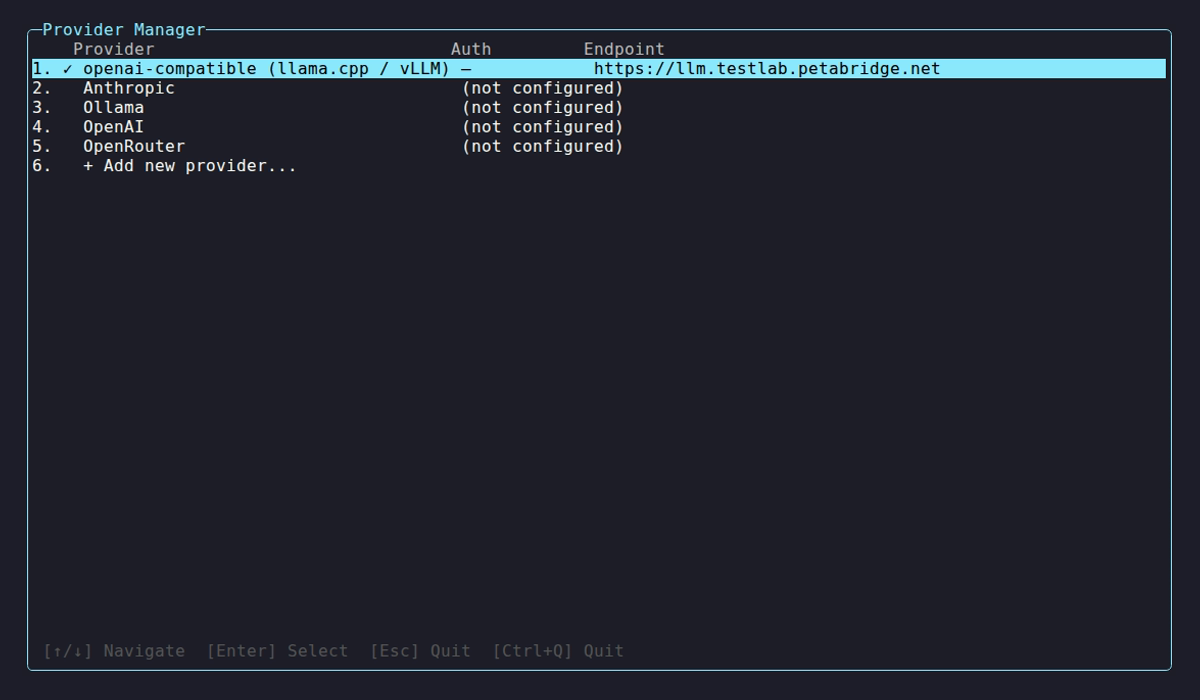
On launch, the TUI probes every configured provider and shows health status:
| Indicator | Meaning |
|---|---|
✓ | Healthy, models discovered |
⚠ | Unreachable or auth failure |
… | Probe in progress |
Select a provider to view details (type, auth, endpoint, model count) or take action:
| Key | Action |
|---|---|
↑ / ↓ | Navigate |
Enter | Select / open details |
K | Update API key (details view) |
R | Remove provider (details view) |
V | Re-validate connection (details view) |
Esc | Back / quit |
The sentinel row + Add new provider... starts an interactive add flow. Netclaw validates connectivity with a 20-second timeout and reports how many models it found.
OpenAI OAuth is only available through this TUI flow — select Add, choose OpenAI, then pick “ChatGPT Subscription” to authenticate with your existing account.
Subcommands
Section titled “Subcommands”provider list
Section titled “provider list”netclaw provider listName Provider Auth Endpointmy-anthropic Anthropic ApiKey https://api.anthropic.commy-ollama Ollama None http://localhost:11434This shows static config only — no live health probing. Open the TUI to see real-time provider health.
provider add
Section titled “provider add”netclaw provider add <name> <type> [--api-key <key>] [--endpoint <url>]| Flag | Description | Default |
|---|---|---|
--api-key <key> | API key for the provider | Prompted if required |
--endpoint <url> | Custom endpoint URL | Provider default |
--auth <method> | Auth method: api-key or oauth-device | Inferred from provider |
--github-host <url> | GitHub Enterprise auth host (github-copilot only) | https://github.com |
--github-api-base <url> | GitHub Enterprise API base (github-copilot only) | https://api.github.com |
Provider type and endpoint are stored in ~/.netclaw/config/netclaw.json. Credentials are encrypted in secrets.json. Restart the daemon after adding a provider so it picks up the new config.
provider remove
Section titled “provider remove”netclaw provider remove <name>Netclaw blocks removal if any model role (Main, Fallback, or Compaction) references the provider:
Error: Cannot remove provider 'my-anthropic' — referenced by model role(s): Main, FallbackRun `netclaw model set` to reassign these roles first, or `netclaw model clear` for optional roles.Reassign models first with netclaw model, then remove.
Provider types
Section titled “Provider types”Pick Anthropic or OpenAI for hosted models, Ollama for fully local inference, or OpenRouter for access to models from multiple vendors through a single key.
| Type | Display Name | Default Endpoint | Auth |
|---|---|---|---|
ollama | Ollama | http://localhost:11434 | None |
openai-compatible | llama.cpp / vLLM / DwarfStar ds4 | http://localhost:11434 | None |
openai | OpenAI | https://api.openai.com | OAuth or API key |
anthropic | Anthropic | https://api.anthropic.com | API key |
openrouter | OpenRouter | https://openrouter.ai/api/v1 | API key |
github-copilot | GitHub Copilot | https://api.githubcopilot.com | OAuth (device) |
veniceai | Venice.ai | https://api.venice.ai/api/v1 | API key |
For hosted-provider setup details — including GitHub Copilot on GitHub Enterprise — see Managed Providers.
Examples
Section titled “Examples”# Local Ollama on a remote GPU servernetclaw provider add my-ollama ollama --endpoint http://my-gpu-server:11434
# Anthropic with an API keynetclaw provider add my-anthropic anthropic --api-key sk-ant-...
# OpenAI with an API keynetclaw provider add my-openai openai --api-key sk-proj-...
# OpenRouternetclaw provider add my-openrouter openrouter --api-key sk-or-...
# llama.cpp or vLLM behind an OpenAI-compatible endpointnetclaw provider add my-llama openai-compatible --endpoint http://localhost:8080
# GitHub Copilot on GitHub Enterprisenetclaw provider add copilot-ghe github-copilot --auth oauth-device \ --github-host https://github.example.com \ --github-api-base https://github.example.com/api/v3
# Remove a providernetclaw provider remove my-ollamaAfter adding a provider, assign it to a model role with netclaw model set.
Override API keys with environment variables
Section titled “Override API keys with environment variables”Skip config files entirely by setting an environment variable:
export NETCLAW_Providers__my-anthropic__ApiKey="sk-ant-..."Double underscores (__) separate config path segments. The NETCLAW_ prefix is required.
Related commands
Section titled “Related commands”netclaw init— set up your initial provider during first-runnetclaw model— assign providers to model rolesnetclaw doctor— validate provider connectivity and config healthnetclaw status— check the active provider and model at runtimenetclaw secrets— manage encrypted credentials insecrets.json
Resources
Section titled “Resources”- Anthropic API keys — create and manage Anthropic keys
- OpenAI API keys — create and manage OpenAI keys
- OpenRouter keys — create and manage OpenRouter keys
- OpenRouter model catalog — browse available models
- Ollama — install and run local models
- llama.cpp server docs — set up an OpenAI-compatible local server
 Built by Petabridge