
netclaw doctor
netclaw doctor runs 16 checks against your config files, secrets, crash logs, memory state, and connectivity. It catches things netclaw status won’t: broken JSON schemas, unencrypted secrets, misconfigured webhooks, stale crash logs. Doesn’t need a running daemon.
netclaw doctor [options]Options
Section titled “Options”| Flag | Description | Default |
|---|---|---|
--fix | Apply safe automatic fixes | Off |
--dry-run | Show planned fixes without writing (implies --fix) | Off |
--yes, -y | Skip confirmation prompt when applying fixes | Off |
--format <text|json> | Output format | text |
Output
Section titled “Output”netclaw doctor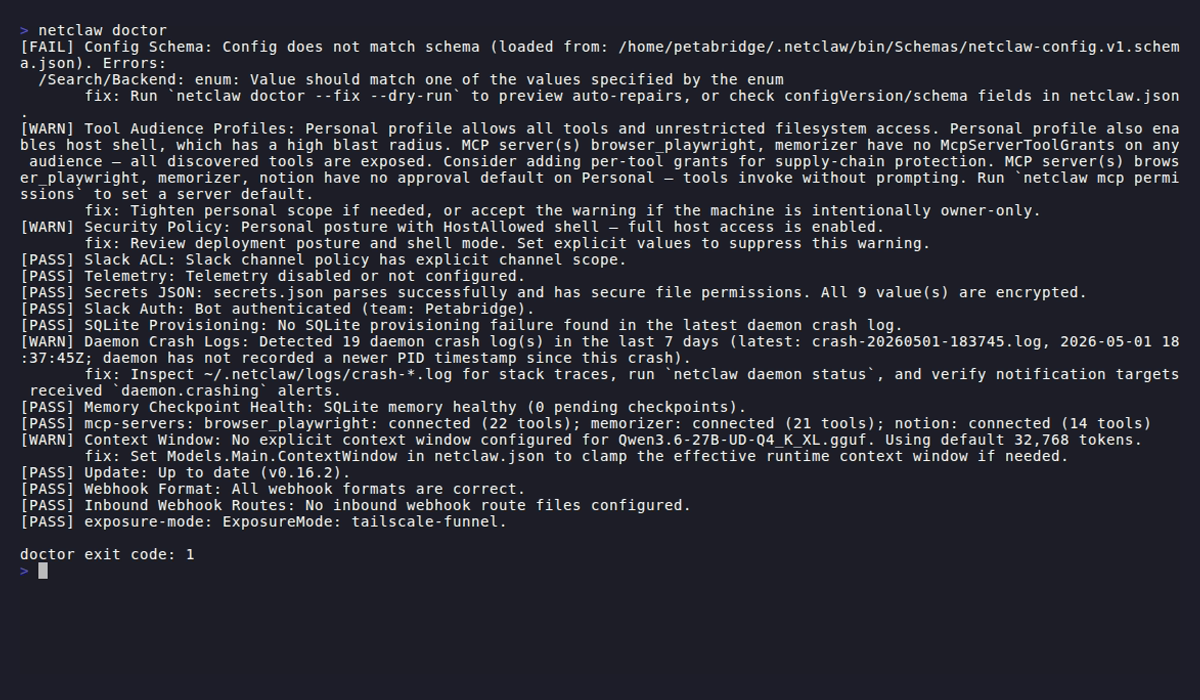
Checks print as PASS, WARN, or FAIL:
[PASS] Config Schema: Config matches schema v1.[WARN] Telemetry: Telemetry is enabled without Telemetry:Otlp:Endpoint; default endpoint will be used. fix: Set 'Telemetry:Otlp:Endpoint' (e.g. http://127.0.0.1:4317).[WARN] Secrets JSON: secrets.json has 2 unencrypted value(s) (3 encrypted). fix: Re-set secrets via 'netclaw secrets set <key> <value>' to encrypt them.Failures and warnings include a fix: line telling you what to do. Pass --fix to let doctor handle the ones it can repair automatically.
Exit codes
Section titled “Exit codes”| Code | Meaning |
|---|---|
0 | All checks passed |
1 | One or more checks failed |
2 | Warnings only, no failures |
Note: the CLI overview documents exit code 2 as “usage/argument error” for most commands. doctor is an exception — it uses 2 specifically for warnings-only results.
Skipped checks (Slack checks when Slack is disabled, etc.) don’t affect the exit code.
Wire it into a script:
netclaw doctor > /dev/null 2>&1rc=$?case $rc in 0) echo "clean" ;; 2) echo "warnings — review with 'netclaw doctor'" ;; *) echo "failures — run 'netclaw doctor --fix'" ;;esacChecks
Section titled “Checks”Doctor runs these in order. Checks that don’t apply to your config get skipped.
Config files live under ~/.netclaw/config/: netclaw.json for settings, secrets.json for credentials.
| Check | What it validates |
|---|---|
| Config Schema | netclaw.json parses, has valid configVersion, matches JSON schema |
| Tool Audience Profiles | Public/team/personal audience profiles don’t grant excessive tool access |
| Security Policy | DeploymentPosture is set; errors if null with StrictDefaults disabled |
| Slack ACL | Warns if no channel allow-list and no default channel are configured; warns if DMs enabled with no AllowedUserIds |
| Telemetry | Warns if OTLP endpoint is absent; errors if present but not a valid absolute URI (skipped if telemetry disabled) |
| Secrets JSON | File exists, valid JSON, correct Unix permissions (600), values are encrypted |
| Slack Auth | Live API call to verify bot token works |
| SQLite Provisioning | Inspects the most recent crash log for SQLite-related failures |
| Daemon Crash Logs | Checks for crash files in the last 7 days (in ~/.netclaw/logs/) |
| Memory Checkpoint Health | Opens memory DB, checks pending checkpoint backlog |
| mcp-servers | Validates MCP server config and live status |
| Context Window | Models.Main.ContextWindow is set and valid; warns if absent (defaults to 32,768 tokens) |
| Update | Checks for a newer netclaw version (5s network timeout) |
| Webhook Format | Flags Slack webhooks using Generic format instead of Slack format |
| Inbound Webhook Routes | Validates route JSON files in ~/.netclaw/config/webhooks/ |
| exposure-mode | Validates exposure mode matches running services (tailscaled, cloudflared, etc.) |
The mcp-servers check hits the daemon API for live MCP status but falls back to offline config probes if the daemon isn’t running. Slack Auth requires network access and will fail in air-gapped environments.
Auto-fix
Section titled “Auto-fix”--fix handles these issues in ~/.netclaw/config/netclaw.json:
- Missing
configVersion(inserts1) - Slack enabled with no channel allow-list and no default channel (inserts empty
AllowedChannelIds) - Telemetry enabled with no OTLP endpoint (inserts
http://127.0.0.1:4317) - Slack webhooks using Generic format (corrects to
"Slack") - Schema mismatches: enum int-to-string conversion, removing disallowed properties, inserting missing required properties with schema defaults
Unencrypted secrets, invalid bot tokens, and missing external services need manual work. The fix: lines in doctor’s output tell you what to do.
Before writing anything, --fix shows a diff:
--- before +++ after - "configVersion": null, + "configVersion": 1,Then prompts Apply these fixes? [y/N]:.
Preview without writing
Section titled “Preview without writing”netclaw doctor --dry-runSame diff output, nothing written. Good for CI.
JSON output
Section titled “JSON output”netclaw doctor --format json{ "exitCode": 0, "checks": [ { "name": "Config Schema", "severity": "pass", "message": "Config matches schema v1.", "remediation": null } ], "fix": { "requested": false, "dryRun": false, "changedFiles": 0, "files": [] }}Severity values are lowercase: "pass", "warning", "error". Parse with jq:
# List all failuresnetclaw doctor --format json | jq '[.checks[] | select(.severity == "error")]'
# Count warningsnetclaw doctor --format json | jq '[.checks[] | select(.severity == "warning")] | length'
Common workflows
Section titled “Common workflows”Post-init verification
Section titled “Post-init verification”After running netclaw init, run doctor right away:
netclaw doctorDoctor checks things that init’s built-in health check skips: crash logs, memory state, webhook routes.
Crash triage
Section titled “Crash triage”When the daemon crashes or behaves unexpectedly:
netclaw doctorDaemon Crash Logs and SQLite Provisioning scan for recent crash files and storage-related failures. Start there before digging through raw logs.
CI health gate
Section titled “CI health gate”netclaw doctor --format json --dry-run | jq -e '.exitCode == 0'--dry-run ensures no files are written — safe for read-only CI runners. Exit code still reflects real check results, so unfixed issues cause a non-zero exit.
Related commands
Section titled “Related commands”netclaw status— live runtime health (requires the daemon; doctor doesn’t)netclaw init— first-run wizard. Run doctor right afternetclaw mcp-tools— manage the MCP tool servers doctor validatesnetclaw secrets— manage the secrets doctor checks for encryption
Resources
Section titled “Resources”- jq manual — filter and transform
--format jsonoutput - jq download — install jq if you don’t have it
- OpenTelemetry collector docs — if the Telemetry check flags your OTLP endpoint
- Slack bot token types — if the Slack Auth check fails
 Built by Petabridge