
Exposure Modes
Exposure mode controls how the daemon is reachable over the network. Most setups use local mode. You only need a non-local mode when something external (GitHub webhooks, CI, a second machine, or a reverse proxy) needs to reach the daemon.
Before you begin
Section titled “Before you begin”- Netclaw installed (see Installation if needed). Exposure mode is configured after install via
netclaw config, not duringnetclaw init. - For reverse proxy: a working proxy already configured, a non-loopback internal IP for the daemon, and the proxy source IP or CIDR ready for
TrustedProxies. - For Tailscale modes:
tailscaledinstalled and running. - For Cloudflare Tunnel:
cloudflaredinstalled and configured.
| Mode | Config value | Required process | Reachability | Risk |
|---|---|---|---|---|
| Local | local | None | Loopback only | Lowest |
| Reverse Proxy | reverse-proxy | Your reverse proxy | Whatever the proxy exposes | Medium |
| Tailscale Serve | tailscale-serve | tailscaled | Your Tailscale network (called a tailnet), HTTPS | Low |
| Tailscale Funnel | tailscale-funnel | tailscaled | Public internet via Tailscale | High |
| Cloudflare Tunnel | cloudflare-tunnel | cloudflared | Public internet via Cloudflare | High |
Configure the exposure mode via netclaw config — navigate to Security & Access → Exposure Mode — or set Daemon.ExposureMode directly in netclaw.json.
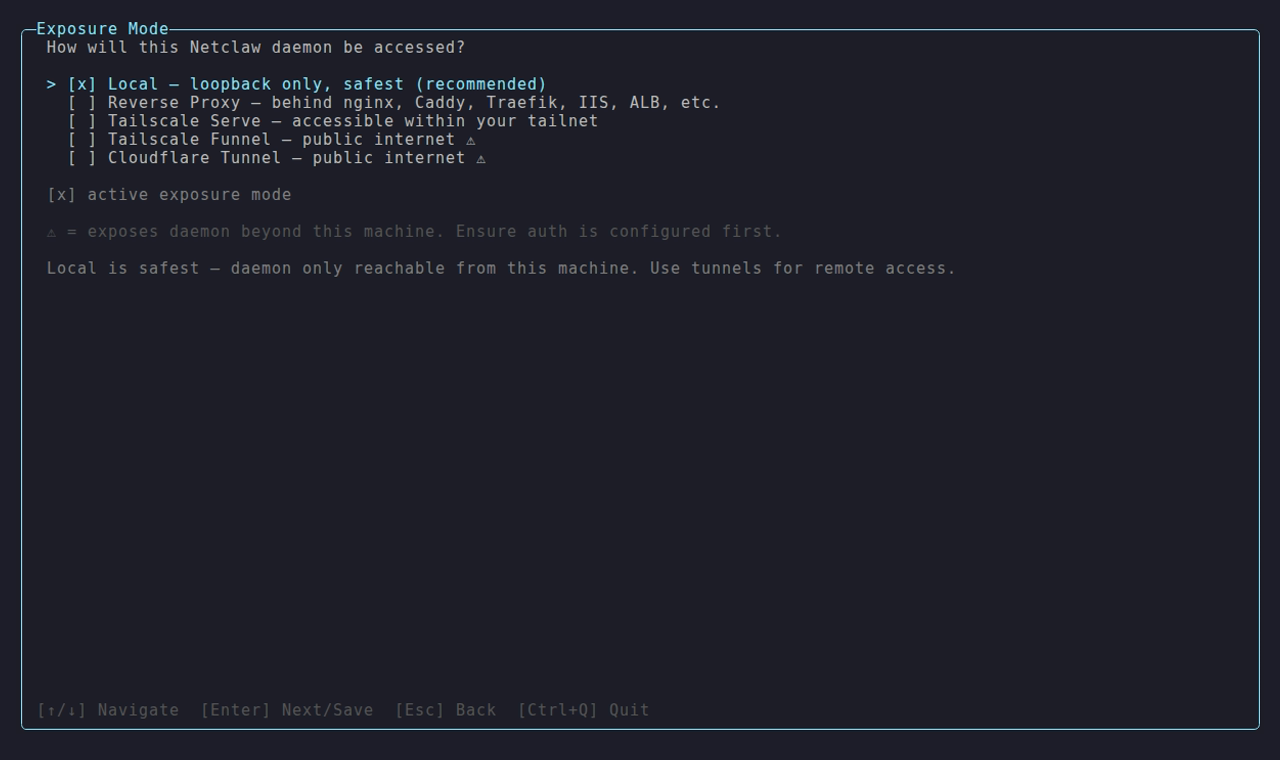
The Exposure Mode picker in netclaw config → Security & Access — Local, Reverse Proxy, Tailscale Serve/Funnel, or Cloudflare Tunnel.
Options marked with a warning triangle expose the daemon to the public internet. Tailscale Serve is the recommended remote mode: tailnet-only access, no public exposure.
Reverse Proxy
Section titled “Reverse Proxy”{ "Daemon": { "Host": "10.0.0.5", "ExposureMode": "reverse-proxy", "TrustedProxies": ["10.0.0.10"] }}Use this when nginx, Caddy, Traefik, HAProxy, or another reverse proxy is the public edge.
In this mode:
Daemon.Hostmust be a non-loopback internal address.127.0.0.1,::1, andlocalhostare rejected inreverse-proxymode.TrustedProxiesmust list the proxy’s source IP or CIDR. Forwarded headers are only honored from those peers.
If the proxy runs on the same machine, the final hop into netclaw still needs to target a non-loopback internal IP. A same-host reverse proxy is fine, but the final hop into netclaw still cannot use loopback.
Configuration
Section titled “Configuration”Set the mode via netclaw config → Security & Access → Exposure Mode, or directly edit the Daemon section of ~/.netclaw/config/netclaw.json.
Local (default)
Section titled “Local (default)”No Daemon section needed. The daemon binds to 127.0.0.1:5199 and is only reachable from the same machine.
{}Tailscale Serve
Section titled “Tailscale Serve”{ "Daemon": { "ExposureMode": "tailscale-serve" }}Tailscale Serve creates an HTTPS endpoint on your tailnet that proxies to the daemon’s local port. Only devices on your tailnet can reach it. Then run tailscale serve to proxy your tailnet hostname to 127.0.0.1:5199.
Tailscale Funnel
Section titled “Tailscale Funnel”{ "Daemon": { "ExposureMode": "tailscale-funnel" }}Funnel extends Serve to the public internet. Anyone with the URL can reach the daemon, though netclaw’s device authentication still applies. Configure it with tailscale funnel. Only use Funnel when you need public internet access — Tailscale Serve covers everything else.
Cloudflare Tunnel
Section titled “Cloudflare Tunnel”{ "Daemon": { "ExposureMode": "cloudflare-tunnel" }}Routes traffic through Cloudflare’s network to the daemon. Set up cloudflared with a Cloudflare Tunnel pointed at 127.0.0.1:5199, and pair it with a Cloudflare Access policy to restrict who can connect.
If cloudflared runs outside the daemon’s process namespace, set Daemon.SkipTunnelProcessCheck to true so startup validation skips the local process probe without skipping the rest of the auth checks.
Full Daemon section
Section titled “Full Daemon section”| Field | Type | Default | Notes |
|---|---|---|---|
Host | string | 127.0.0.1 | IP address the daemon binds to |
Port | int | 5199 | TCP port |
ExposureMode | string | local | local, reverse-proxy, tailscale-serve, tailscale-funnel, or cloudflare-tunnel |
TrustedProxies | string[] | [] | Required in reverse-proxy; literal IPs or CIDRs only |
SkipTunnelProcessCheck | bool | false | Skip local tunnel process detection for sidecar or host-managed tunnel topologies |
{ "Daemon": { "Host": "127.0.0.1", "Port": 5199, "ExposureMode": "tailscale-serve" }}Case-insensitive — reverse-proxy, ReverseProxy, and REVERSE-PROXY all work, same as the tunnel modes.
Docker users: if you switch to a tunnel mode, update your container’s port binding to match the Host and Port values here. See Docker Deployment for details.
Environment variables
Section titled “Environment variables”Override any field with NETCLAW_Daemon__ prefixed env vars:
NETCLAW_Daemon__ExposureMode=reverse-proxyNETCLAW_Daemon__Host=10.0.0.5NETCLAW_Daemon__Port=5199NETCLAW_Daemon__TrustedProxies__0=10.0.0.10Double underscores separate path segments, following the .NET configuration convention.
Restart required
Section titled “Restart required”Host, Port, and ExposureMode require a daemon restart — they aren’t hot-reloaded. Other config changes trigger an automatic restart; the daemon drains active sessions and restarts itself.
# systemdsystemctl --user restart netclaw
# Dockerdocker restart netclaw
Inbound webhooks
Section titled “Inbound webhooks”Tunnel modes make inbound webhooks possible. External services like GitHub or CI systems can trigger autonomous runs via HTTP POST.
They do nothing in local mode.
Device pairing
Section titled “Device pairing”Non-local modes require at least one paired device or an alternative remote authentication scheme. Without one, the daemon refuses to start because remote clients have no way to authenticate.
On fresh setup-owned installs, netclaw automatically creates a one-time bootstrap path for the first non-local start. Before the first successful non-local daemon start, it seeds one local paired device and matching local client token when no paired devices already exist. That covers the init wizard, first Docker boot, and manual setups that still use the daemon’s local state directory.
After the first successful non-local start, that auto-seeding stops. Normal CLI use is paired-device auth from that point on.
If the daemon is already running and you need to add another device, pair from the daemon host:
netclaw daemon pairStartup validation
Section titled “Startup validation”If the mode requires tailscaled or cloudflared and that process isn’t running, you’ll see this in the daemon logs (~/.netclaw/logs/daemon.log or journalctl --user -u netclaw for systemd):
Daemon startup aborted: Tunnel prerequisite not met: ExposureMode='tailscale-serve' requires 'tailscaled' to be running unless Daemon.SkipTunnelProcessCheck=true is explicitly set for a sidecar or host-managed tunnel topology. Remediation: Start 'tailscaled' locally, or set Daemon.SkipTunnelProcessCheck=true only when the tunnel is intentionally managed outside the Netclaw process namespace.If no paired devices exist and no alternative auth scheme is configured:
Daemon startup aborted: No remote authentication available: ExposureMode='tailscale-serve' requires either at least one paired device or an alternative remote auth scheme. Remediation: Run 'netclaw daemon pair' to pair a device, or check your auth configuration before exposing the daemon remotely.Both are fatal. The daemon won’t start until you fix the underlying issue.
In reverse-proxy mode, startup also fails if the daemon is still bound to loopback or if TrustedProxies is empty or malformed.
Troubleshooting
Section titled “Troubleshooting”Start here: netclaw doctor
Section titled “Start here: netclaw doctor”Run netclaw doctor first — it has a dedicated exposure-mode check.
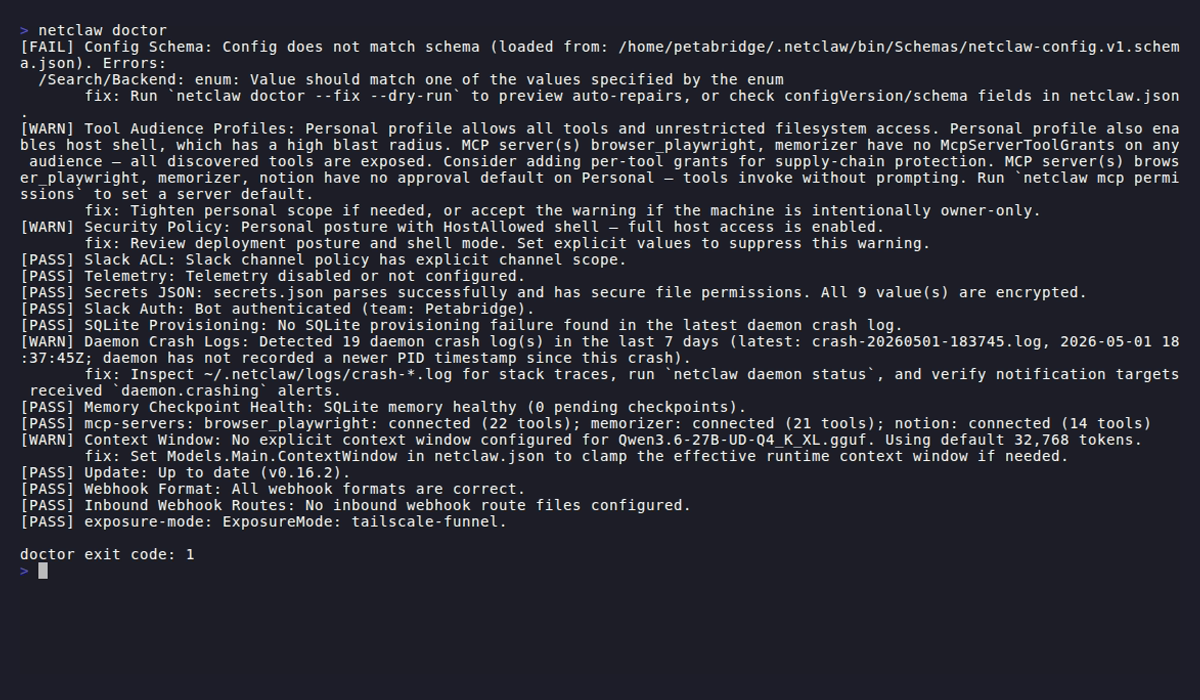
Tunnel process not running
Section titled “Tunnel process not running”Startup aborted with “required tunnel process is not running.”
Start the required process first:
# Tailscale modessudo systemctl start tailscaled
# Cloudflare Tunnelsudo systemctl start cloudflared
Or switch to local mode if you don’t need remote access:
{ "Daemon": { "ExposureMode": "local" }}No paired devices
Section titled “No paired devices”Startup aborted with “no paired devices exist and no alternative remote authentication scheme is configured.”
If this is a brand-new non-local install, check whether the daemon actually completed its first successful start. The one-shot bootstrap only happens before that first successful non-local startup.
If the daemon is already running, pair from the daemon host:
netclaw daemon pairIf the device store was lost after the first successful non-local start and the daemon will not start anymore, temporarily switch Daemon.ExposureMode to local or restore devices.json and secrets.json from backup. Then start the daemon, run netclaw daemon pair, and switch back.
You can also run netclaw init on an existing install — it shows an action menu with options to open the configuration editor, redo identity, or start over.
Reverse proxy bound to loopback
Section titled “Reverse proxy bound to loopback”Startup aborted because Daemon.ExposureMode is reverse-proxy but Daemon.Host is 127.0.0.1, ::1, or localhost.
Bind netclaw to a non-loopback internal IP and point the proxy at that address instead of loopback:
{ "Daemon": { "Host": "10.0.0.5", "ExposureMode": "reverse-proxy", "TrustedProxies": ["10.0.0.10"] }}Non-loopback bind in local mode
Section titled “Non-loopback bind in local mode”netclaw doctor reports a warning: “ExposureMode is ‘local’ but bind address is not loopback.”
The daemon is reachable beyond localhost without tunnel protection. Either bind to loopback:
{ "Daemon": { "Host": "127.0.0.1" }}Or switch to the exposure mode that reflects how the daemon is actually reachable:
{ "Daemon": { "Host": "127.0.0.1", "ExposureMode": "tailscale-serve" }}Related pages
Section titled “Related pages”- Docker Deployment — containerized daemon with loopback port binding
- systemd Service — bare-metal Linux service management
- Webhooks — inbound webhook route configuration
- Models — model slot configuration
netclaw doctor— built-in health check diagnostics
Resources
Section titled “Resources”- Tailscale Serve documentation — set up HTTPS endpoints on your tailnet
- Tailscale Funnel documentation — expose tailnet services to the public internet
- Cloudflare Tunnel documentation — route traffic through Cloudflare to your origin
- Cloudflare Access documentation — identity-aware access policies for tunneled services
- nginx reverse proxy guide — baseline reverse-proxy behavior and forwarding model
- Cloudflare Tunnel service docs — service startup and lifecycle details for cloudflared
- Tailscale download — install Tailscale on your platform
 Built by Petabridge