
Channel Troubleshooting
Netclaw not responding in Slack, Discord, or Mattermost? Two commands will tell you what’s wrong most of the time:
netclaw status # live connector health (requires running daemon)netclaw doctor # offline config and credential checksDaemon logs live at ~/.netclaw/logs/, or journalctl -u netclaw if you’re running it as a systemd service.
Symptom Triage
Section titled “Symptom Triage”| What you’re seeing | Jump to |
|---|---|
Bot shows “disconnected” in netclaw status | Authentication Errors |
| Bot connected but never replies | ACL and Permissions |
| Bot replies to some messages but not others | Bot Not Responding to Messages (MentionOnly) |
| Bot was working, then stopped | Connectivity |
| Bot processes messages but replies never appear | Message Delivery |
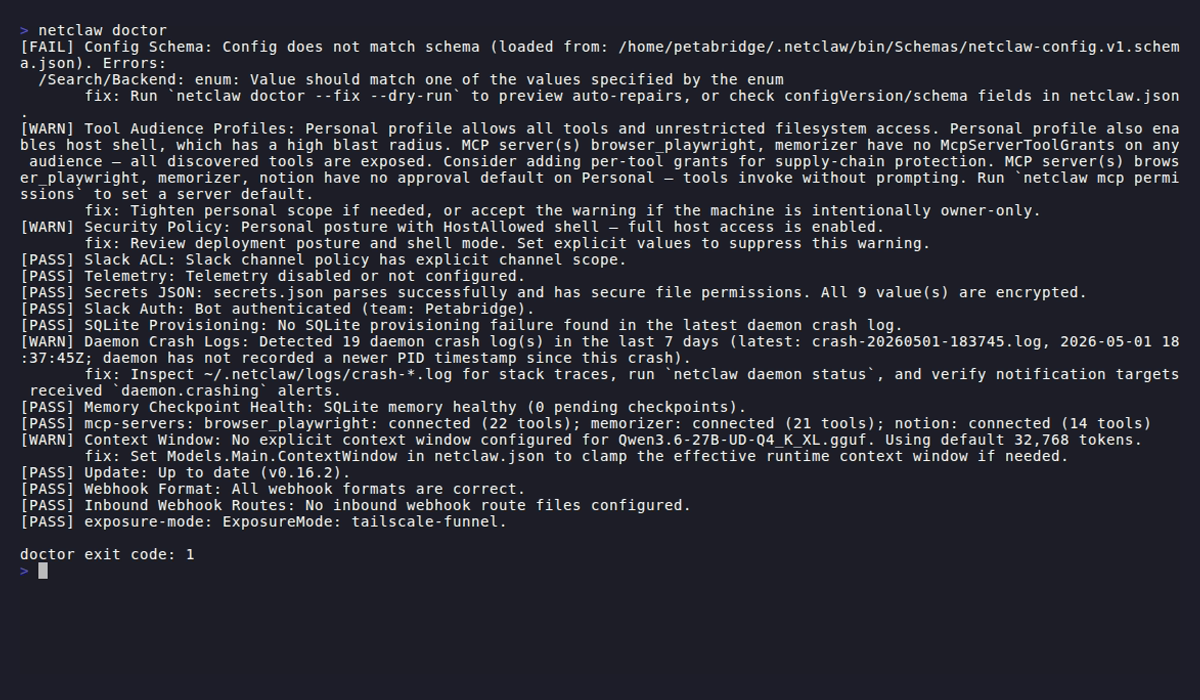
Doctor only checks Slack right now (Auth and ACL). For Discord and Mattermost, use netclaw status for connector health and the daemon logs for details.
Authentication Errors
Section titled “Authentication Errors”Slack: Invalid or Expired Bot Token
Section titled “Slack: Invalid or Expired Bot Token”netclaw status shows Slack as disconnected. Doctor’s Slack Auth check fails with one of these:
| Error | Meaning |
|---|---|
invalid_auth | Bot token is invalid. Check your Slack app’s Bot User OAuth Token. |
token_revoked | Token has been revoked. Generate a new one. |
token_expired | Token has expired. Generate a new one. |
account_inactive | Bot account is deactivated. |
not_authed | No authentication token provided. |
missing_scope | Bot token lacks channels:read scope. |
If you’re not sure which token is bad, regenerate both from the Slack App Management page:
netclaw secrets set Slack.BotToken xoxb-your-new-tokennetclaw secrets set Slack.AppToken xapp-your-new-tokennetclaw daemon stop && netclaw daemon startSlack: No Bot Token Found
Section titled “Slack: No Bot Token Found”Doctor reports “Slack is enabled but no bot token found.”
Run netclaw config → Channels → Slack, or set the token directly:
netclaw secrets set Slack.BotToken xoxb-your-tokenDiscord: Invalid Bot Token
Section titled “Discord: Invalid Bot Token”netclaw status shows Discord as disconnected. Daemon logs show an authentication error at startup.
| HTTP Code | Meaning |
|---|---|
| 401 | Bot token is invalid. Check your Discord application’s bot token. |
| 403 (code 50001) | Bot lacks access. Ensure it has been invited to the server. |
| 403 | Access denied. Check bot permissions. |
| 404 | Resource not found. Check the ID is correct. |
Discord uses a single bot token (not a xoxb-/xapp- pair like Slack). Regenerate it from the Discord Developer Portal:
netclaw secrets set Discord.BotToken your-new-tokennetclaw daemon stop && netclaw daemon startDiscord: Connection Timeout at Startup
Section titled “Discord: Connection Timeout at Startup”Daemon start hangs, then Discord shows disconnected. Logs show a 30-second timeout waiting for the gateway READY event.
The bot token may be valid but the bot hasn’t been invited to any server, so Discord has nothing to initialize. Verify the bot has been added to your server. Use Discord’s URL Generator to create an invite link with the bot scope.
Mattermost: Invalid Bot Token
Section titled “Mattermost: Invalid Bot Token”netclaw status shows Mattermost as disconnected. The daemon logs show Mattermost rejected the bot token (HTTP 401) with more detail.
The bot’s personal access token is wrong or was revoked. Re-issue it from the System Console (Integrations > Bot Accounts) and update the secret:
netclaw secrets set Mattermost.BotToken your-new-tokennetclaw daemon stop && netclaw daemon startIf startup logs say Mattermost is enabled but Mattermost:ServerUrl is not configured or ...no bot token is configured, the corresponding field is missing from netclaw.json/secrets.json. See the Mattermost setup guide.
ACL and Permissions
Section titled “ACL and Permissions”All Channel Traffic Denied
Section titled “All Channel Traffic Denied”Netclaw receives messages but never responds. netclaw status counters show recv > 0, dropped > 0, routed = 0. Logs show channel_not_allowed.
This is the number one gotcha. When AllowedChannelIds is empty and no DefaultChannelId/DefaultChannelName is set, netclaw denies all channel traffic.
Set a default channel or list specific channels in ~/.netclaw/config/netclaw.json:
{ "Slack": { "DefaultChannelId": "C0123456789" }}Or allow specific channels:
{ "Slack": { "AllowedChannelIds": ["C0123456789", "C9876543210"] }}After editing config, restart the daemon: netclaw daemon stop && netclaw daemon start
To find Slack channel IDs, right-click the channel name, select “View channel details,” and scroll to the bottom. For Discord, enable Developer Mode in Settings > App Settings > Advanced, then right-click any channel and select “Copy Channel ID.” See Slack: Finding IDs and Discord: Finding IDs.
netclaw doctor catches this one automatically.
User Not Allowed
Section titled “User Not Allowed”Specific users get no response. Logs show user_not_allowed.
Add the user’s ID to AllowedUserIds, or clear the list to allow all users:
{ "Slack": { "AllowedUserIds": ["U0123456789", "U9876543210"] }}DMs Not Working
Section titled “DMs Not Working”Direct messages to the bot get no response, but channel messages work fine. Logs show event_filtered ... reason=routing_policy_ignore ignoreReason=DmNotAllowed.
AllowDirectMessages defaults to false. Turn it on:
{ "Slack": { "AllowDirectMessages": true }}Doctor warns if you enable DMs with an empty AllowedUserIds list, since any workspace member can then DM the bot.
Channel Messages Silently Dropped After Upgrading from Pre-0.24.0
Section titled “Channel Messages Silently Dropped After Upgrading from Pre-0.24.0”Bot is connected and the channel is in AllowedChannelIds, but every message is dropped. Logs show channel_not_allowed. Started after upgrading to 0.24.0 or later.
Cause: Before 0.24.0, AllowedChannelIds accepted display names (e.g. "general") or manually entered values that were never resolved to canonical IDs. As of 0.24.0, incoming message channel IDs are matched against stored IDs only — display names no longer match.
Fix: Re-enter the channels via netclaw config → Channels so they resolve to canonical IDs and are saved correctly. This is the easiest path — the config UI does the resolution automatically.
If you prefer to fix it manually in ~/.netclaw/config/netclaw.json, replace any display names in AllowedChannelIds with the canonical channel ID for each platform:
- Slack: right-click a channel name → “View channel details” → scroll to the bottom for the
C...ID. See Slack: Finding IDs. - Discord: enable Developer Mode in Settings > App Settings > Advanced, then right-click any channel → “Copy Channel ID.”
- Mattermost: find IDs in the System Console or via the REST API.
After editing, restart the daemon: netclaw daemon stop && netclaw daemon start
Bot Not Responding to Messages (MentionOnly)
Section titled “Bot Not Responding to Messages (MentionOnly)”Bot is connected and healthy but only responds to some messages. Logs show event_filtered ... reason=routing_policy_ignore ignoreReason=ChannelMentionRequired.
MentionOnly defaults to true, so the bot ignores messages that don’t @-mention it. Either @-mention the bot every time, or turn it off:
Slack:
{ "Slack": { "MentionOnly": false }}Discord:
{ "Discord": { "MentionOnly": false, "MentionRequiredInDm": false }}MentionRequiredInDm controls whether DMs also need a mention (defaults to false).
Connectivity
Section titled “Connectivity”Slack Socket Mode Disconnected
Section titled “Slack Socket Mode Disconnected”netclaw status shows Slack as disconnected. Was working, then stopped.
Restart the daemon:
netclaw daemon stop && netclaw daemon startIf it keeps disconnecting, check the Slack Status page and your network. Make sure the App Token (xapp-...) is still valid; Socket Mode requires it.
Only Socket Mode is supported. Setting SocketMode: false leaves Slack unable to connect, so it shows as degraded in netclaw status and the daemon logs a connection error.
Discord Gateway Disconnected
Section titled “Discord Gateway Disconnected”netclaw status shows Discord as disconnected.
Restart the daemon: netclaw daemon stop && netclaw daemon start. If it keeps dropping, check the Discord Status page and verify the bot token.
Rate Limiting
Section titled “Rate Limiting”Replies are delayed or fail intermittently. Logs show rate_limited (Slack) or HTTP 429 (Discord).
Netclaw retries on its own. If rate limiting is sustained, check whether another integration shares the same bot token’s rate limit budget.
Message Delivery
Section titled “Message Delivery”Slack: Reply Not Posted
Section titled “Slack: Reply Not Posted”Bot processes the message (logs show session activity) but the reply never appears in Slack.
| Error | Meaning |
|---|---|
not_in_channel | Bot hasn’t been invited to the channel. Invite it with /invite @botname. |
channel_not_found | Channel ID is wrong or the channel was deleted. |
missing_scope | Bot token lacks the required OAuth scope for posting. |
no_permission | Bot doesn’t have permission to post in this channel. |
msg_too_long | Response exceeded Slack’s message size limit. |
invalid_blocks | Malformed Block Kit payload. Usually a formatting edge case in the response. |
too_many_attachments | Response has too many attachments. |
For permission errors: add the bot to the channel and make sure it has chat:write scope. Check your app’s OAuth scopes in the Slack API dashboard.
Discord: Reply Not Posted
Section titled “Discord: Reply Not Posted”Bot processes the message but no reply appears in Discord.
Check daemon logs for HTTP error codes. Usually the bot is missing Send Messages permission in the target channel. Fix it in your Discord server’s channel permission settings.
Bot Reply Loop
Section titled “Bot Reply Loop”Bot responds to its own messages, creating an infinite loop. High events.filtered{reason="bot_message"} counter alongside high events.received.
Netclaw filters its own messages to prevent loops, so this is rare. Restart the daemon. If the loop comes back, bot user ID detection probably failed at startup. Look for errors around the slack.Auth.Test() call in the logs.
Debug Logging
Section titled “Debug Logging”Still stuck? Turn on debug logging in ~/.netclaw/config/netclaw.json:
{ "Logging": { "LogLevel": { "Default": "Debug" }, "Console": { "Enabled": true } }}Restart the daemon, trigger the failing interaction, and look for these patterns:
Healthy message flow (Slack):
Routing Slack event {id} to conversation {channelId}— [SlackGatewayActor, Debug]turn_routed event={EventId} hasFiles=... textChars=...— [SlackConversationActor]turn_received textChars=... fileCount=...— [SlackThreadBindingActor]turn_enqueued contentItems=...— [SlackThreadBindingActor]Posted Slack reply message— [SlackThreadBindingActor]
If step 1 never appears, the message was dropped before routing — check ACL config (channel_not_allowed, user_not_allowed). If step 1 appears but step 2 does not, the routing policy filtered it (look for event_filtered reason=routing_policy_ignore). If step 4 appears but step 5 does not, the reply couldn’t be posted — check the error tables above.
Quick triage commands:
# Daemon process statusnetclaw daemon status
# Recent crash logsls -lt ~/.netclaw/logs/crash-*.log
# Recent session activity (SQLite)sqlite3 ~/.netclaw/netclaw.db \  "SELECT persistence_id, MAX(created), MAX(sequence_number) \   FROM journal GROUP BY persistence_id \   ORDER BY MAX(created) DESC LIMIT 10;"
OTLP Diagnostic Patterns
Section titled “OTLP Diagnostic Patterns”If OpenTelemetry is enabled, channel metrics tell the story faster than logs:
| Pattern | Metrics | Likely Cause |
|---|---|---|
| Messages received, none routed | events.received > 0, events.routed = 0 | ACL blocking all traffic |
| Messages routed, no replies | messages.enqueued > 0, replies.posted = 0 | Outbound delivery failure |
| High drop rate | events.dropped spiking with reason=channel_not_allowed | Channel not in allow list |
| Suspected loop | High events.filtered{reason="bot_message"} + high events.received | Bot message filter working, but volume suggests upstream issue |
Channel metrics use the namespace netclaw.channel.slack.*, netclaw.channel.discord.*, and netclaw.channel.mattermost.*.
Related Pages
Section titled “Related Pages”netclaw doctor— offline diagnosticsnetclaw status— live connector health and message countersnetclaw secrets— manage encrypted tokensnetclaw config— Channels- OpenTelemetry — OTLP metrics reference
External Resources
Section titled “External Resources”- Slack API: Bot tokens and permissions — token types and required scopes
- Slack API: Socket Mode — how Socket Mode connections work
- Slack: Finding Channel and User IDs — locate IDs for ACL config
- Discord Developer Docs: Getting Started — bot setup and permissions
- Discord: Finding IDs — enable Developer Mode to copy IDs
- Slack Status — check for Slack API outages
- Discord Status — check for Discord API outages
 Built by Petabridge