
CLI Overview
The netclaw CLI controls your agent — configuration, diagnostics, chat, daemon lifecycle.
netclaw <command> [options]The Daemon column in each table indicates whether the netclaw daemon (the background process that manages sessions, connectors, and model routing) must be running for that command to work.
Commands
Section titled “Commands”Chat & Sessions
Section titled “Chat & Sessions”| Command | Description | Daemon | TUI |
|---|---|---|---|
chat | Interactive terminal UI chat | Required | Yes |
chat -p <text> | Headless single-prompt mode (supports --resume / -r, --json) | Required | No |
sessions | Browse and resume recent sessions | Required | Yes |
sessions --once | List sessions without the terminal UI | Required | No |
sessions --json | JSON output (implies --once) | Required | No |
First Run & Diagnostics
Section titled “First Run & Diagnostics”| Command | Description | Daemon | TUI |
|---|---|---|---|
init | First-run setup wizard (starts the daemon for you) | Not required | Yes |
doctor | Config and connectivity diagnostics; --fix for auto-repair | Optional | No |
status | Daemon runtime health, connector status, model info | Required | No |
stats | Token usage, session counts, memory stats; --tui for dashboard | Required | No |
Daemon Management
Section titled “Daemon Management”| Command | Description |
|---|---|
daemon start | Start daemon as a background process |
daemon stop | Stop daemon gracefully |
daemon status | Show daemon process status |
daemon install | Install systemd user service (Linux) |
daemon uninstall | Remove systemd user service (Linux) |
daemon pair | Generate a pairing code (run on the host machine) |
daemon devices | List paired devices |
daemon devices revoke <name> | Revoke a paired device by name |
pair <endpoint> | Pair this device with a remote daemon using a pairing code (run on the remote device) |
daemon install writes a systemd --user unit, so the daemon runs under your own user account at the same privilege you have at the shell. No root, no dedicated service identity. See systemd Service for the security model and operational walkthrough.
See the Pairing Remote Devices guide for the full walkthrough.
Configuration
Section titled “Configuration”| Command | Description | Daemon | TUI |
|---|---|---|---|
config | Post-init setup: channels, search, network exposure, browser automation, telemetry, skill sources | No | Yes |
provider | Manage LLM providers | No | Yes (bare invocation) |
model | Manage model role assignments | No | Yes (bare invocation) |
mcp | Manage MCP (Model Context Protocol) server profiles and tool permissions | Optional | Partial |
webhooks | Manage inbound webhook routes | No | No |
secrets | Store encrypted secrets via secrets set <key> <value>. See Secrets. | No | No |
reminder | Manage scheduled reminders | Required | Yes (ui or tui subcommand) |
skill | Manage skills and external skill sources. See Skills. | No | No |
If you just ran netclaw init, netclaw config is your next stop — channels (Slack, Discord, Mattermost), search, and network exposure all live there.
See Configuration for field references and config file details.
Housekeeping
Section titled “Housekeeping”| Command | Description |
|---|---|
update | Check for and install CLI updates; --check to check only, --channel <stable|beta> to switch release channel |
version / --version / -V | Print version, commit hash, and build timestamp |
First Run
Section titled “First Run”# First-time setup (starts the daemon automatically)netclaw init
# Connect channels, enable search, set exposure modenetclaw config
# Check everything is wired upnetclaw doctor
# Verify the daemon is healthynetclaw statusnetclaw init is intentionally minimal — it doesn’t set up Slack, Discord, web search, or network exposure. Run netclaw config immediately after to configure those. If status shows errors, run netclaw doctor --fix to auto-repair common issues.
# Start chattingnetclaw chatOnce you’re up and running, head to First Conversation for a walkthrough of your first chat session.
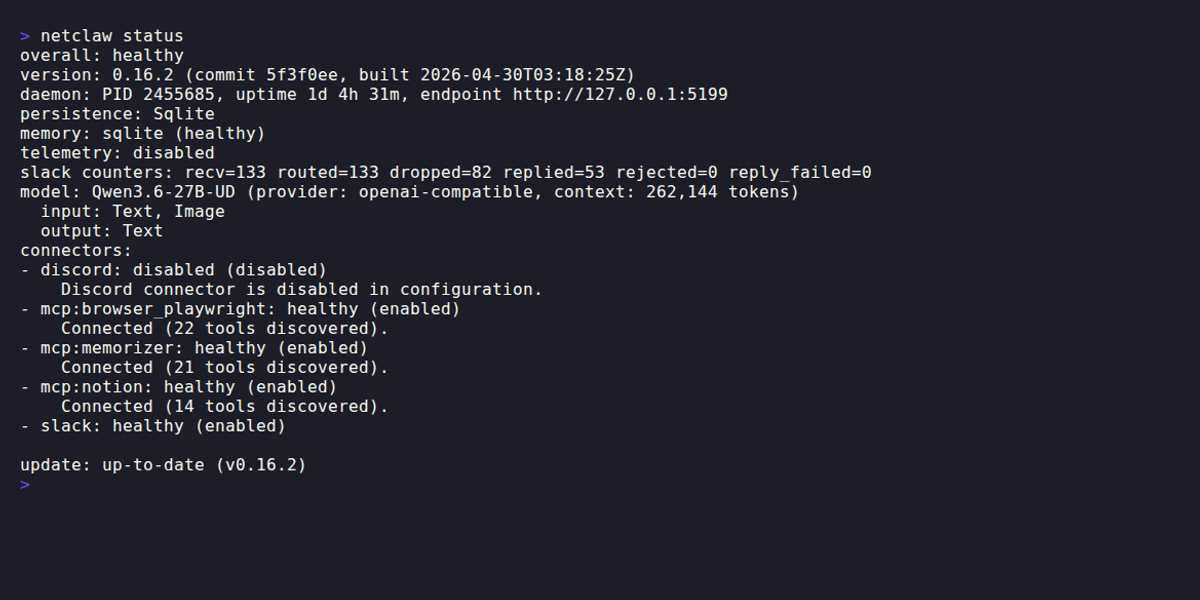
netclaw status shows the daemon’s health, active model, and connector states.
Config Files
Section titled “Config Files”| File | Purpose |
|---|---|
~/.netclaw/config/netclaw.json | Main configuration |
~/.netclaw/config/secrets.json | Encrypted credentials overlay |
NETCLAW_* env vars | Highest-priority overrides |
See Configuration for field references.
Exit Codes
Section titled “Exit Codes”| Code | Meaning |
|---|---|
0 | Success |
1 | Validation, policy, or runtime failure |
2 | Usage or argument error |
Background Update Check
Section titled “Background Update Check”Non-TUI commands silently check for updates on startup. TUI commands skip this — run netclaw update --check to check manually.
Version Output
Section titled “Version Output”netclaw 0.22.1 (commit bc2170d, built 2026-06-01T12:38:11Z)Related
Section titled “Related”- Quickstart — Get netclaw running from scratch
- Installation — Platform-specific install instructions
- First Conversation — Walk through your first chat session
- systemd deployment — Run the daemon as a system service
- Docker deployment — Containerized daemon setup
- .NET CLI tools documentation — Background on .NET global tools, which is how netclaw is distributed
- systemd user services — Reference for
daemon install/daemon uninstallon Linux - Model Context Protocol spec — MCP specification
 Built by Petabridge