
Skills Overview
Skills are markdown files that teach the agent how to do things. Rather than hard-coding every behavior into the daemon, you write procedural knowledge as plain text and the agent loads it on demand.
Think of them as cheat sheets. A commit skill encodes your team’s commit conventions; a review-pr skill walks through your code review checklist. The agent sees a one-line-per-skill index on every turn (just names and descriptions), then reads the full content only when it needs it. A large skill library costs almost nothing in context.
All skills follow the AgentSkills.io format: a SKILL.md file with YAML frontmatter. The format is shared across multiple agent platforms, so skills you write for netclaw can work in Claude Code too.
How skills reach the agent
Section titled “How skills reach the agent”The lifecycle has four phases:
-
Sync - at startup, the daemon pulls netclaw’s built-in skills from netclaw’s own feed and (optionally) syncs skills from private skill servers. These land in read-only directories under
~/.netclaw/skills/. -
Scan — the daemon walks all skill directories (native, server feeds, external), validates frontmatter, and merges results. Native skills take precedence over server feeds, which take precedence over external sources. Netclaw logs name collisions from lower-precedence sources as issues and skips the duplicates. Run
netclaw skill issuesto see them. -
Index — the daemon compresses the merged list into a one-line-per-skill summary and injects it into the agent’s system prompt. The agent sees skill names and descriptions but not the full instructions.
-
Load — when the agent needs a skill, it calls the
skill_loadbuilt-in tool to read the fullSKILL.mdbody and get a listing of resource files (scripts, references, assets). Users can also invoke skills directly via/skill-nameslash commands.
Changes to skill files trigger a rescan automatically. A file watcher monitors native and external source directories with a 500ms debounce, so edits take effect without a restart. Server feed directories are not watched — they update on the configured sync interval.
Skill file format
Section titled “Skill file format”Two layouts work:
Directory-based — for skills with supporting resources:
commit/ SKILL.md # Required — instructions + frontmatter scripts/ # Optional — helper scripts references/ # Optional — reference material assets/ # Optional — images, templatesFlat file — for self-contained skills:
commit.mdThe file name (or directory name) must match the name field in the frontmatter for native skills. External sources are more relaxed — the frontmatter name is treated as canonical.
---name: commitdescription: Create well-structured git commits with conventional commit messages.metadata:  version: 1.0.0license: MITallowed-tools: "bash git"---
# Commit Changes
Instructions for the agent go here...
Frontmatter fields
Section titled “Frontmatter fields”| Field | Required | Description |
|---|---|---|
name | Yes | Lowercase identifier (must match directory/file name for native skills) |
description | Yes | One-line summary (max 1024 chars per the AgentSkills.io spec) |
metadata.version | No | Semver version string |
license | No | SPDX license identifier |
compatibility | No | Which agent platforms can use this skill |
allowed-tools | No | Space-delimited list of tools the skill needs (informational — does not grant access) |
disable-model-invocation | No | When true, excluded from the LLM index (still invocable via /name) |
invocable | No | Default true; when false, hidden from slash commands |
argument-hint | No | Hint text shown after the slash command in completions |
metadata.subagent | No | Routes execution to a named subagent instead of returning skill content |
The display name shown in netclaw skill list comes from the first # heading in the markdown body, falling back to title-casing the skill name.
Quick setup
Section titled “Quick setup”To add an external skill directory or connect a skill server, run netclaw config → Skill Sources. The TUI opens an interactive picker — no manual JSON editing required.
netclaw configSelect Skill Sources to add a local folder (e.g., ~/.claude/skills/) or subscribe to a private skill server. Changes take effect on the next scan without a restart.
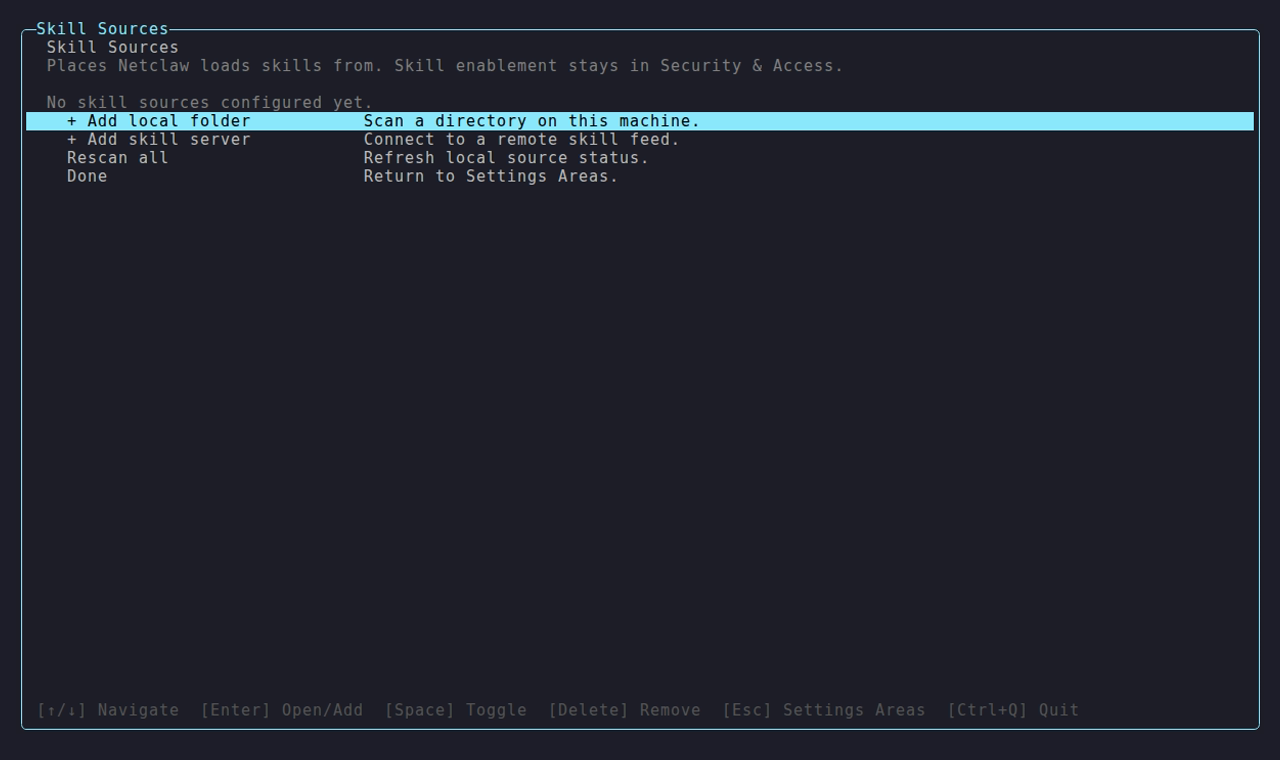
Manual configuration (e.g., for scripted or Docker installs) is covered in External Skills and Skill Feeds.
Where skills come from
Section titled “Where skills come from”Four source types, each with different trust and management:
| Source | Location | Managed by | Mutable? |
|---|---|---|---|
| system | ~/.netclaw/skills/.system/ | Daemon (netclaw’s feed) | No |
| native | ~/.netclaw/skills/ | You | Yes |
| server feeds | ~/.netclaw/skills/.server-feeds/ | Private skill servers | No |
| external | Configured directories | Source tool (Claude Code, etc.) | At source |
Drop a SKILL.md into ~/.netclaw/skills/ and it appears on the next scan - that’s a native skill. You can also ask netclaw’s agent to write one for you - it has a skill_manage tool for creating and editing skills. Inspect or remove skills with netclaw skill, and run netclaw skill validate to check a skill’s frontmatter before using it.
System skills ship from netclaw’s own feed and are read-only. Built-in skills like netclaw-memory and netclaw-operations land here on first run. For a fully offline setup, set SkillSync.DisableSystemSkillSync: true in your netclaw.json (see Configuration for file location).
External skills let netclaw read skill directories from other AI tools. Add a local folder via netclaw config → Skill Sources or wire up a well-known alias via the CLI.
Well-known aliases expand to standard paths:
| Alias | Scans |
|---|---|
claude-code | ~/.claude/skills/, ~/.claude/commands/, ~/.claude/plugins/marketplaces/*/skills/ |
open-code | ~/.open-code/skills/ |
Server feed skills sync from private skill servers that implement the Cloudflare Agent Skills Discovery RFC. These are self-hosted registries that distribute skills across your organization. Configure them in netclaw config → Skill Sources or add them later via netclaw skill source add. See the netclaw skill-server reference implementation for setting up your own.
Precedence
Section titled “Precedence”When multiple sources define a skill with the same name, the highest-precedence source wins:
native > server feeds > externalA native skill named commit shadows any commit from a server feed or external source. You can always override shared skills with your own version.
Security
Section titled “Security”Skills are just text, but text that lands in an agent’s instructions can carry prompt injection - hidden text that tries to hijack the agent’s instructions. Netclaw runs a content scanner on both write operations (create, edit, sync) and at load time (every skill_load call scans before returning content):
| Verdict | Risk | Action |
|---|---|---|
| Allowed | None or low risk detected | Skill proceeds normally |
| Warning | Medium | Skill loads, but the event is logged |
| Rejected | High (prompt injection detected) | Skill is blocked; netclaw skill issues surfaces the rejection |
Additional guardrails:
- Symlinks are blocked by default in native and system directories. External sources can opt in via
AllowSymlinks: truein config. - Sessions with a public trust audience cannot load skills.
skill_loadalso returns an error whenSkillSync.Enabledisfalse. - Skills run through the same tool access policies as everything else. The
allowed-toolsfrontmatter field is informational — actual tool grants are controlled by the security policy.
Subagent routing
Section titled “Subagent routing”Instead of returning instructions, a skill can hand off to a subagent. Add metadata.subagent to the frontmatter:
---name: researchdescription: Deep research on a topic using multiple sources.metadata: subagent: research-assistant---When skill_load hits this skill, it spawns the named subagent with the skill’s body as a system prompt overlay. The caller passes a task parameter to the spawned subagent. The target subagent must be registered and user-facing — internal-only subagents cannot be routed to.
Configuration
Section titled “Configuration”Run netclaw config to manage skill sources interactively. Two keys in netclaw.json also control skill loading directly:
| Key | Default | Description |
|---|---|---|
SkillSync.Enabled | true | Blocks the agent from loading skills via skill_load when false |
SkillSync.DisableSystemSkillSync | false | Skip CDN sync for system skills |
External sources and skill feeds have their own config sections. See External Skills and Skill Feeds for details.
Tracking skill usage
Section titled “Tracking skill usage”Run netclaw stats skills to see which skills the agent loads most often. Good for spotting which skills pull their weight and which to cut.
Limitations
Section titled “Limitations”- No built-in skill marketplace or discovery beyond what your configured sources provide.
- Skill content scanning uses regex-based heuristics. It catches common prompt injection patterns but is not a comprehensive security boundary.
- The
allowed-toolsfrontmatter field is informational. It does not grant tool access — that is controlled entirely by the security policy. - Skills are text-only. They cannot register tools, modify daemon behavior, or execute code directly.
- No versioning or rollback for native skills. If you overwrite a skill, the old version is gone.
What to read next
Section titled “What to read next”netclaw skill— CLI reference for managing skills (list, show, validate, search, source management)- External Skills — configuring external skill directories
- Skill Feeds — subscribing to server-synced skill repositories
- Skill Server — running a private skill registry for your org
Resources
Section titled “Resources”- AgentSkills.io — the SKILL.md format specification
- Cloudflare Agent Skills Discovery RFC — the protocol behind skill feeds and server-based distribution
- netclaw skill-server — reference implementation of a self-hosted skill registry
 Built by Petabridge