
Hardening
The security model covers what netclaw enforces by default: default-deny, audience scoping, a four-layer invocation stack. This page covers what you should do on top of that, especially if you’re running it for a team, exposing it to the internet, or leaving it unattended.
Sections are independent. Work through the ones that apply to your deployment.
All configuration lives in ~/.netclaw/config/netclaw.json unless noted otherwise. Values merge with built-in defaults, so you only need to specify what you’re changing.
File Permissions
Section titled “File Permissions”Netclaw stores credentials and webhook secrets in plaintext JSON files. Lock them down:
# Encrypted secrets — only the daemon user should read thischmod 600 ~/.netclaw/config/secrets.json
# Webhook route files contain HMAC secretschmod 700 ~/.netclaw/config/webhooks/
# Encryption keys for secrets at restchmod 700 ~/.netclaw/keys/
netclaw doctor checks secrets.json permissions and flags unencrypted values. Run it after any manual config edits.
Shell Access
Section titled “Shell Access”Shell access is the biggest risk surface you can control. Two working modes in ~/.netclaw/config/netclaw.json:
| Mode | Behavior |
|---|---|
Off | Shell completely disabled. No shell_execute tool available. |
HostAllowed | Shell runs directly on the host. Approval gates are your only guardrail. |
A third value, SandboxOnly, is accepted but has no backend yet — setting it denies shell entirely, and shell_execute fails with shell_requires_sandbox_backend. If you see that error, this is why; use Off for the same effect.
Set the mode explicitly:
{ "Security": { "ShellExecutionMode": "Off" }}For Team and Public postures, shell is off by default. Only Personal posture enables it, and only with approval gates on shell_execute. If you’re running Personal posture but don’t need shell, turn it off.
Custom Hard-Deny Patterns
Section titled “Custom Hard-Deny Patterns”The built-in hard-deny list blocks sudo, rm -rf ~/, kill, fork bombs, and commands that would stop the daemon. Add your own patterns for anything dangerous in your environment:
{ "Tools": { "HardDenyPatterns": [ "docker rm", "kubectl delete namespace", "terraform destroy" ] }}Custom patterns augment the defaults, they don’t replace them. Netclaw tokenizes compound commands (&&, ||, ;, |) and checks each segment independently, so echo hello && docker rm foo still triggers the deny.
MCP Tool Permissions
Section titled “MCP Tool Permissions”New MCP servers start with zero tool grants for all audiences, safe by default. The risk comes from granting too much.
Audit your grants per audience:
netclaw mcp permissions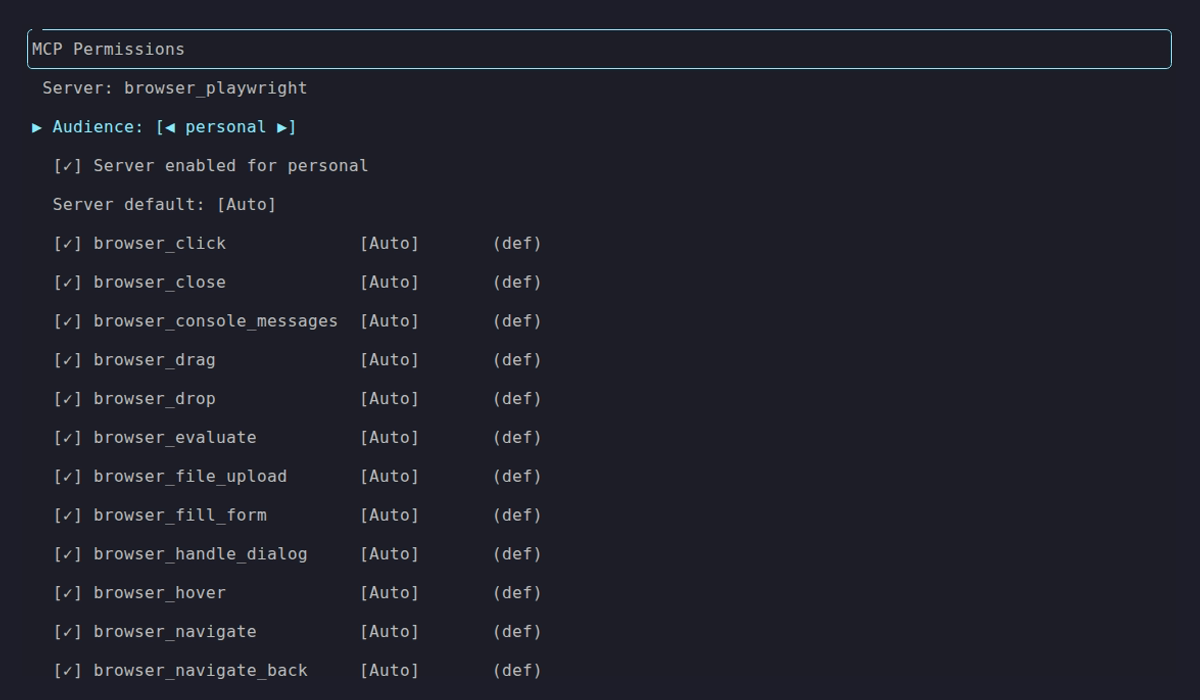
Personal audience with all tools granted. Compare against the locked-down Team and Public defaults:
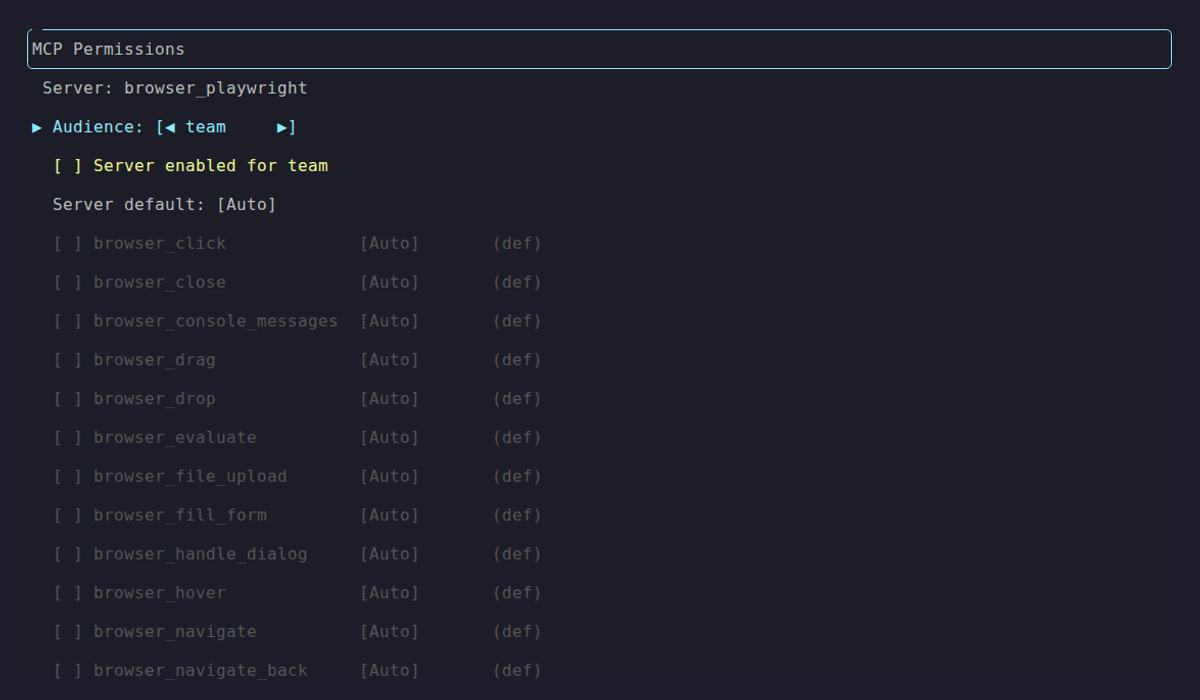
Team audience: server disabled, no tools granted.
Grant the minimum tools each audience actually needs. Don’t enable everything for Team because it’s faster to configure. For destructive MCP tools (delete, drop, write), set approval mode to Approval or Deny. Per-tool overrides let you keep the server default on Auto while gating the dangerous ones:
{ "Tools": { "AudienceProfiles": { "Personal": { "ApprovalPolicy": { "DefaultMode": "Auto", "ToolOverrides": { "shell_execute": "Approval", "notion/notion-delete-page": "Approval" } } } } }}Tool override keys use the format {serverName}/{toolName}.
Review ~/.netclaw/config/tool-approvals.json periodically and prune stale “approve always” decisions.
See netclaw mcp for full details on the permissions TUI and CLI.
Network Exposure
Section titled “Network Exposure”The daemon binds to 127.0.0.1:5199 by default. Keep it that way unless you have a reason not to.
| Mode | Scope | Risk |
|---|---|---|
local | Loopback only | Minimal — only local processes can connect |
reverse-proxy | Whatever your proxy exposes | Medium to high — depends on final hop and trusted-proxy config |
tailscale-serve | Your tailnet | Low — Tailscale identity gates access |
tailscale-funnel | Public internet | High — anyone on the internet can reach it via Tailscale Funnel |
cloudflare-tunnel | Public internet | High — requires a Cloudflare Access policy |
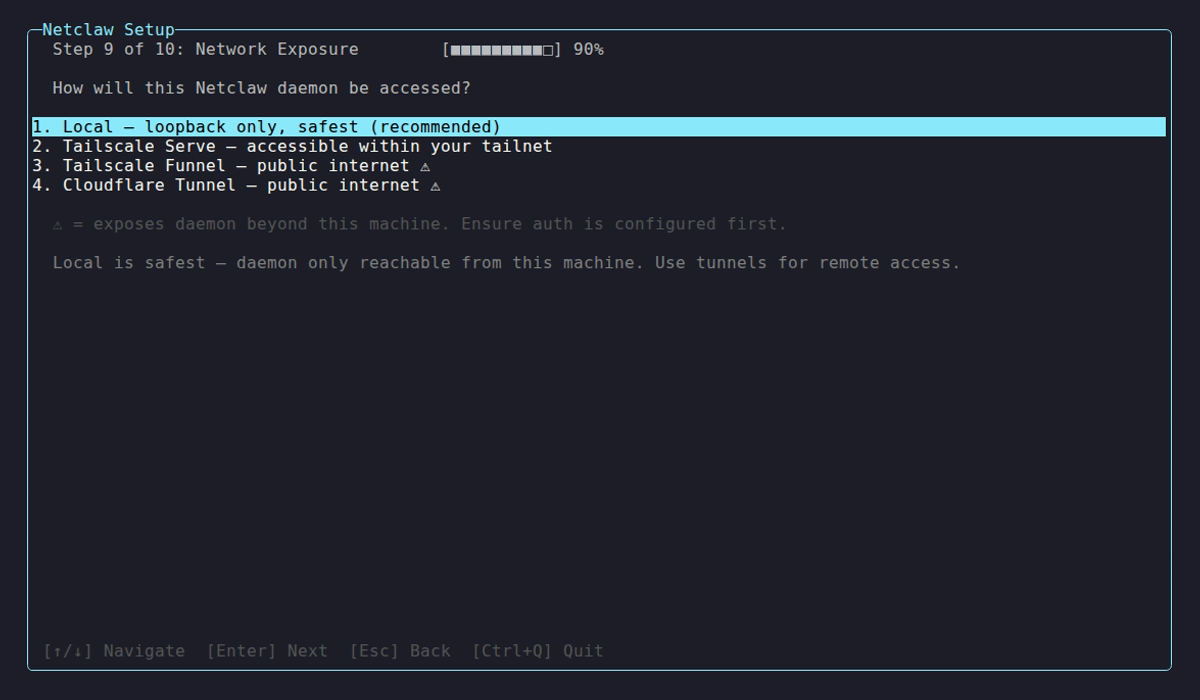
The exposure selection during netclaw init. Internet-facing modes force explicit confirmation.
If you need remote access, prefer tailscale-serve. It limits access to your tailnet. Funnel exposes you to the public internet — a completely different threat model.
If you need a conventional reverse proxy, bind netclaw to a non-loopback internal IP and explicitly set Daemon.TrustedProxies. reverse-proxy mode rejects loopback final-hop proxying on purpose.
For Docker deployments, bind to loopback explicitly:
docker run -p 127.0.0.1:5199:5199 ...Omitting 127.0.0.1 binds to all interfaces. Any machine on your network can reach the daemon.
Changing exposure mode requires a daemon restart. It’s excluded from hot-reload on purpose.
netclaw daemon stop && netclaw daemon startIn reverse-proxy mode, daemon-host CLI access is no longer “loopback means trusted.” Local control-plane requests may still work, but they do so through explicit paired-device auth when the exposure mode requires it.
Channel Access Restrictions
Section titled “Channel Access Restrictions”Every chat channel gates who can reach netclaw through the same four controls:
- Channel allowlist — which channels netclaw answers in. No allowlist and no default channel denies all channel traffic.
- User allowlist — which users get a response. Empty accepts everyone in the allowed channels.
- Direct messages — off by default. Enable them only alongside a user allowlist.
- Per-channel audiences — override the trust audience for a single channel, or for DMs.
Defaults are restrictive everywhere: MentionOnly: true, AllowDirectMessages: false, and empty allowlists. The config keys are identical across channels — only the ID format and where you copy IDs from differ. Each channel page documents its own setup:
| Channel | Access control reference |
|---|---|
| Slack | Slack access control |
| Discord | Discord access control |
Webhooks are the exception — they have no channel or user allowlist. Inbound webhooks authenticate with HMAC signatures instead. See netclaw webhooks.
netclaw doctor runs a Slack ACL check that flags Slack enabled with no channel allowlist and no default channel, or DMs enabled without a user allowlist.
Approval Gates
Section titled “Approval Gates”The last layer before a tool actually runs. Configure per audience:
{ "Tools": { "AudienceProfiles": { "Personal": { "ApprovalPolicy": { "DefaultMode": "Auto", "ToolOverrides": { "shell_execute": "Approval" } } }, "Team": { "ApprovalPolicy": { "DefaultMode": "Approval" } }, "Public": { "ApprovalPolicy": { "DefaultMode": "Deny" } } } }}- Headless sessions (reminders, webhooks,
netclaw chat -p "prompt") auto-deny all gated tools. There’s no human to ask. - No response within 5 minutes means deny.
- The “Always here” and “Always anywhere” options persist to
~/.netclaw/config/tool-approvals.json— manage them withnetclaw approvals.
If nobody is watching the approval prompts in production, set DefaultMode: "Deny" for Team and Public. Auto-deny is safer than a 5-minute timeout nobody sees.
Webhook Security
Section titled “Webhook Security”Each webhook route has its own HMAC secret, audience, body size limit, and rate limit:
{ "Verification": { "Kind": "Hmac", "HmacAlgorithm": "Sha256", "Secret": "whsec_...", "SignatureHeaderName": "X-Hub-Signature-256", "SignaturePrefix": "sha256=" }, "Audience": "Public", "MaxBodyBytes": 1048576, "RateLimitPerMinute": 10}Set the audience to the minimum the webhook actually needs. Most should run as Public (fewest tools, session-scoped filesystem, wiped on end). Only use Team or Personal if the webhook prompt genuinely requires those tools.
RateLimitPerMinute applies per webhook route, not globally across all routes. Lower it from the default 30 if the source won’t fire that often — GitHub sends roughly one webhook per event, so 10/min is plenty. Keep MaxBodyBytes at 1 MB or lower unless you know the payloads are larger.
Route files contain secrets in plaintext. Keep ~/.netclaw/config/webhooks/ at mode 700 (see File Permissions).
See netclaw webhooks for route setup and HMAC verification details.
Doctor Checks
Section titled “Doctor Checks”After making changes, validate everything:
netclaw doctor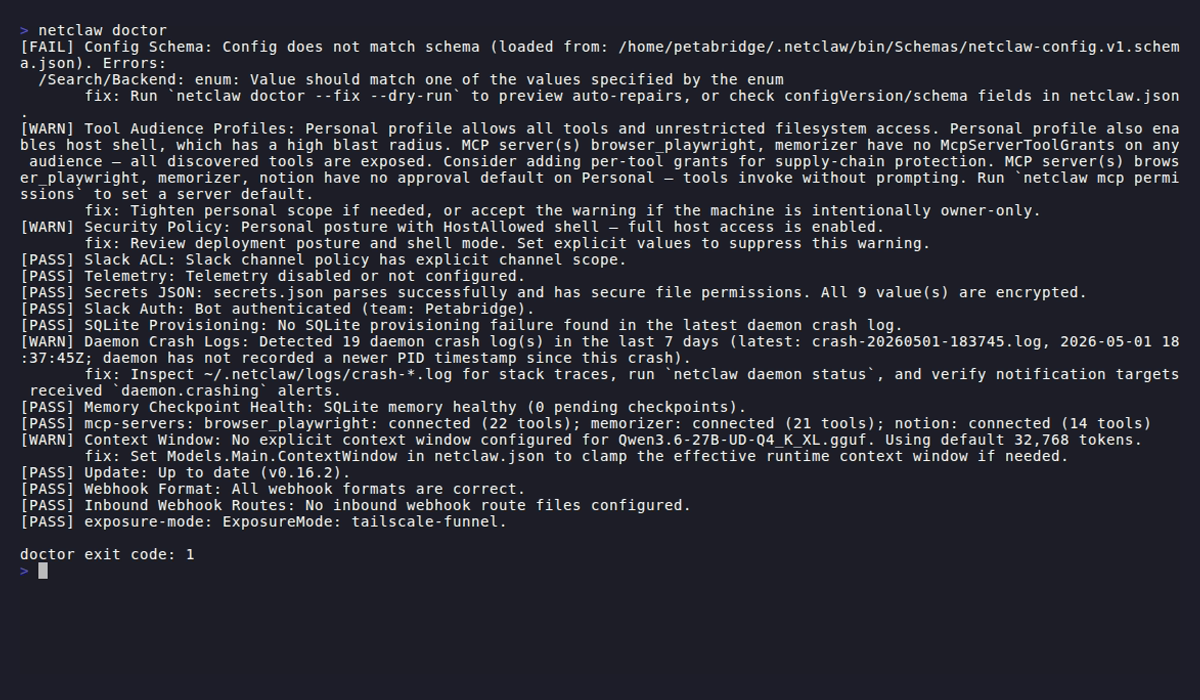
Security-relevant checks include:
| Check | What it catches |
|---|---|
| Security Policy | Missing DeploymentPosture |
| Secrets JSON | Wrong file permissions, unencrypted values |
| Slack ACL | No channel allowlist, DMs enabled without user allowlist |
| Tool Audience Profiles | Overly permissive tool grants |
| exposure-mode | Internet-reachable exposure without valid auth policy |
| Inbound Webhook Routes | Schema errors in route files |
Wire it into your deployment pipeline:
netclaw doctor --format json | jq -e '.exitCode == 0'Limitations
Section titled “Limitations”- Prompt injection detection is regex-based. It catches known patterns (role resets, exfiltration attempts, invisible Unicode) but novel phrasings, Base64 encoding, synonym substitution, and non-English attacks can evade it. Treat it as a tripwire, not a firewall.
- Tool grants are per-audience, not per-channel.
ChannelAudiencesoverrides which audience a channel maps to, but you can’t give one Slack channel different tools than another channel with the same audience. - Secret redaction catches
sk-*, Slack tokens (xox[baprs]-*),ghp_*, AWS access keys (AKIA*), JWTs, PEM blocks, and common JSON key names. Custom secret formats won’t be redacted. Use hard-deny path rules to block file access instead. - Approval gates only work on interactive channels. Headless mode, reminders, and webhooks auto-deny tools that would otherwise prompt for approval. Design automation workflows with that in mind.
Related Pages
Section titled “Related Pages”- Security Model — default-deny architecture, audiences, trust layers
netclaw init— posture and exposure selection wizardnetclaw mcp— MCP tool permissions TUInetclaw doctor— configuration diagnosticsnetclaw webhooks— webhook route management and HMAC verificationnetclaw secrets— encrypted credential storage
Further Reading
Section titled “Further Reading”- OWASP LLM Top 10 — prompt injection, insecure output handling, and other LLM attack vectors
- Tailscale ACLs — network-level access control for
tailscale-servedeployments - Cloudflare Access policies — IdP-based access control for
cloudflare-tunneldeployments - GitHub webhook security — best practices for HMAC verification and secret rotation
 Built by Petabridge