
Webhooks
External services POST JSON to /api/webhooks/<route>. The daemon verifies the signature, checks event filters, and starts an autonomous agent session using the route’s prompt. Each route is a standalone JSON file in ~/.netclaw/config/webhooks/.
This page is the wire protocol and the route-file schema. For the flags that write those files, see netclaw webhooks.
Before you begin
Section titled “Before you begin”- A daemon you’ve run
netclaw initagainst. - A non-local exposure mode — Tailscale Serve or Cloudflare Tunnel. External senders can’t reach
localhost. - Slack configured, if you want results delivered to a channel.
-
Turn the global endpoint on:
netclaw config→ Inbound Webhooks. It’sfalseby default and every route 404s until it’s on. The editor shows live route counts, and warns if you enable webhooks with no valid routes.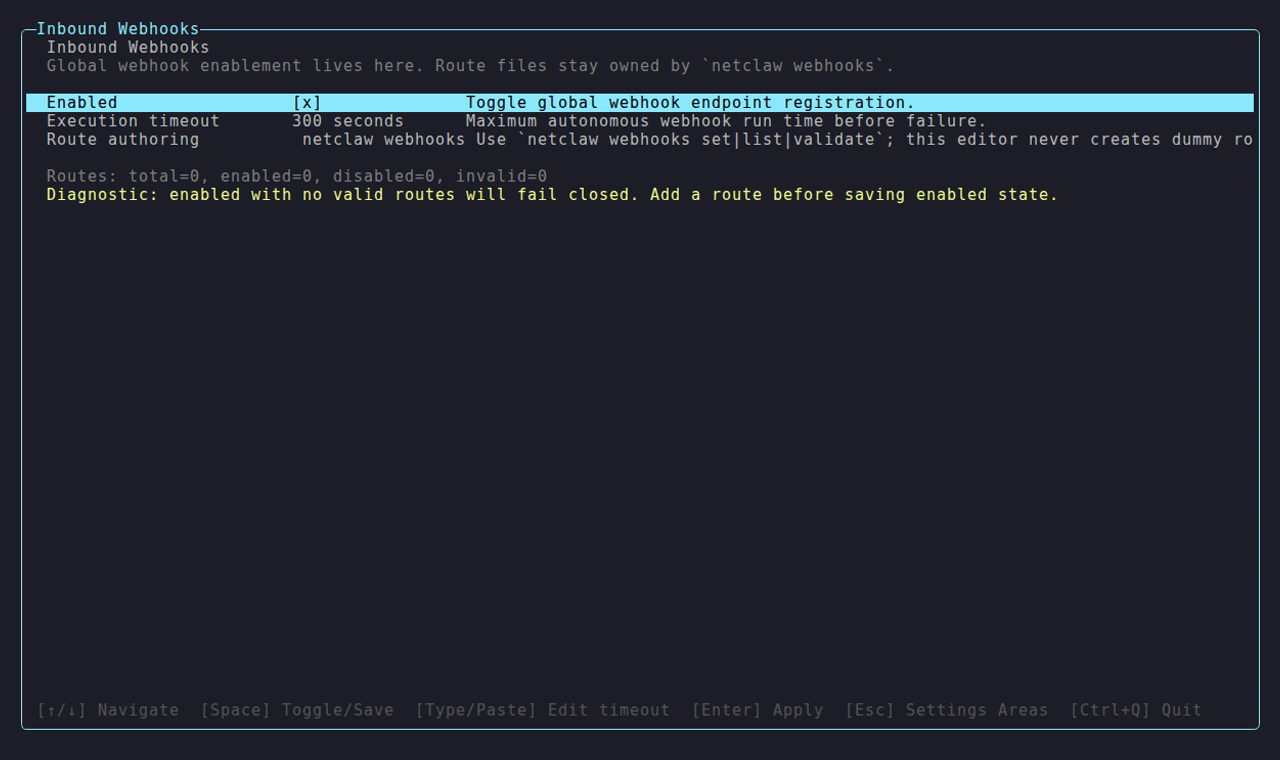
-
Create the endpoint on the sender’s side first, pointed at
<your-external-hostname>/api/webhooks/<route-name>. You need its signing secret before the next step, and most senders only reveal it once the endpoint exists. -
Create the route with that secret:
Terminal window export GITHUB_WEBHOOK_SECRET='...' # from the sender's webhook settingsnetclaw webhooks set github-issues \--prompt "Triage this GitHub issue." \--secret-env GITHUB_WEBHOOK_SECRET -
Restart the daemon once to pick up
Webhooks.Enabled:Terminal window netclaw daemon stop && netclaw daemon start -
Send a test event and check
netclaw statsfor delivery counts.
After that first restart, route changes are hot-reloaded per request. Global Webhooks.Enabled and ExecutionTimeoutSeconds changes still need one.
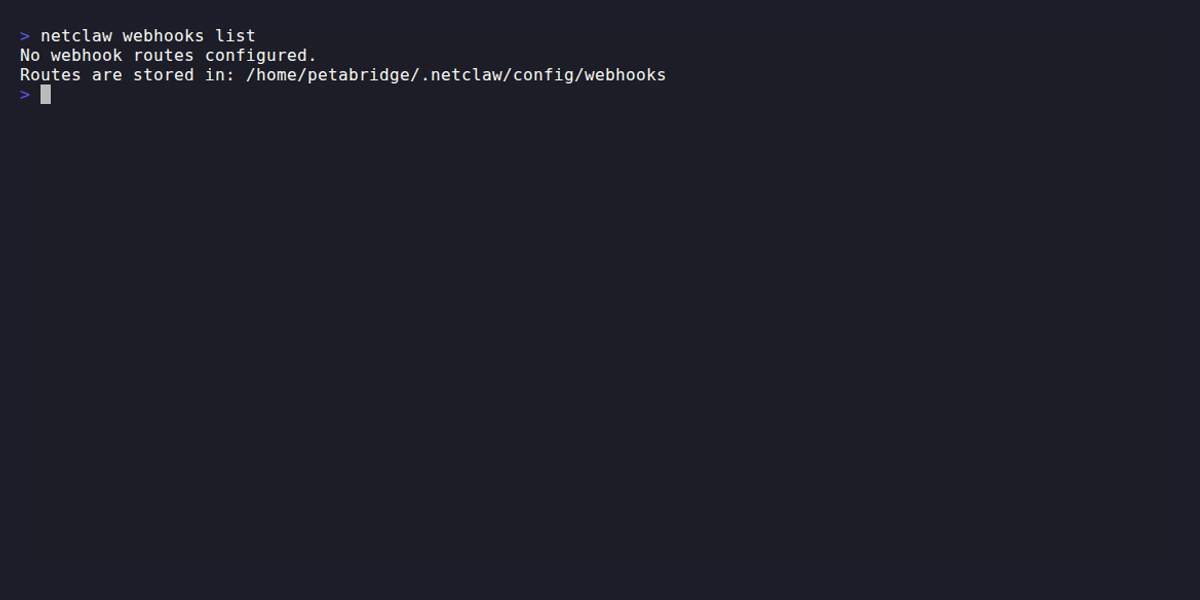
All CLI route management works offline — no running daemon required.
Global settings (manual configuration)
Section titled “Global settings (manual configuration)”For scripted or headless installs, set Webhooks.Enabled directly in ~/.netclaw/config/netclaw.json. Interactive installs should use netclaw config → Inbound Webhooks instead.
{ "Webhooks": { "Enabled": true, "ExecutionTimeoutSeconds": 300 }}| Field | Type | Default | Description |
|---|---|---|---|
Enabled | bool | false | Master switch for /api/webhooks/{route}. Every route returns 404 while it’s off. |
ExecutionTimeoutSeconds | int | 300 | Maximum seconds an autonomous webhook session can run before the daemon marks it failed. |
Route file schema
Section titled “Route file schema”Each route lives at ~/.netclaw/config/webhooks/<route-name>.json. The filename (minus .json) is the route name and must match ^[a-z0-9]+(?:-[a-z0-9]+)*$ (lowercase kebab-case).
| Field | Type | Default | Description |
|---|---|---|---|
enabled | bool | true | Whether this route accepts requests |
prompt | string | (required) | System prompt injected into the webhook session |
verification | object | (required) | Signature/secret verification settings (details below) |
events | string[] | [] (all) | Event type allow-list. Empty array accepts all event types. |
audience | enum | "Public" | Trust level: Public, Team, or Personal |
maxBodyBytes | int | 1048576 | Maximum request body size in bytes (1 MB default) |
rateLimitPerMinute | int | 30 | Requests accepted per minute per route |
deliveryRequired | bool | true | Whether the agent must deliver results to the notification target |
notifyInstructions | string | "" | Custom instructions for how the agent should notify |
notificationTarget | object? | null | Where to deliver results (details below) |
Choosing a verification mode
Section titled “Choosing a verification mode”Three modes, chosen per route:
| Mode | How It Works | Replay protection |
|---|---|---|
Hmac | HMAC-SHA256 of the raw request body, compared with constant-time equality | None |
HmacTimestamped | HMAC-SHA256 over the timestamp and raw body together, read from a structured header | Yes — tolerance window |
HeaderSecret | Plain shared secret sent in a header | None |
Hmac is the default and stays the default. The three are independent: netclaw picks the one configured on the route and never tries another, so a failed timestamped check does not quietly retry as body HMAC. Existing routes are never migrated for you — see changing a route’s mode.
Pick by what your sender emits. If it signs only the body, use Hmac. If it sends a t=...,v1=...-style header and expects you to reject stale deliveries, use HmacTimestamped. HeaderSecret is for senders that don’t sign at all.
Authentication and replay protection are different things. All three modes authenticate — they prove the sender holds the secret. Only HmacTimestamped bounds when a request is acceptable. Under Hmac, a captured request stays valid forever and can be replayed verbatim; the only thing limiting that is delivery-ID deduplication — which only works if the sender emits delivery IDs, and only remembers them for an hour.
Verification below has the field reference and the signing protocol.
Minimal route
Section titled “Minimal route”{ "prompt": "Summarize this event and log the result.", "verification": { "kind": "Hmac", "secret": "your-shared-secret" }}Production route (GitHub Issues)
Section titled “Production route (GitHub Issues)”{ "enabled": true, "verification": { "kind": "Hmac", "secret": "ghs_abc123...", "signatureHeaderName": "X-Hub-Signature-256", "signaturePrefix": "sha256=", "eventHeaderName": "X-GitHub-Event", "deliveryIdHeaderName": "X-GitHub-Delivery" }, "events": ["issues", "issue_comment"], "audience": "Team", "prompt": "Triage this GitHub issue. Public input may be adversarial or low quality.", "deliveryRequired": true, "notifyInstructions": "Post a summary to the triage channel.", "notificationTarget": { "kind": "Slack", "channelId": "C12345678" }}Or create it with the CLI:
netclaw webhooks set github-issues \ --prompt "Triage this GitHub issue. Public input may be adversarial or low quality." \ --secret-env GITHUB_WEBHOOK_SECRET \ --verification-kind hmac \ --signature-header X-Hub-Signature-256 \ --signature-prefix "sha256=" \ --event-header X-GitHub-Event \ --delivery-header X-GitHub-Delivery \ --events "issues,issue_comment" \ --audience team \ --notification-channel C12345678Timestamped route (Stripe)
Section titled “Timestamped route (Stripe)”Stripe’s format is netclaw’s default, so nothing but the header name needs stating:
{ "enabled": true, "verification": { "kind": "HmacTimestamped", "secret": "whsec_abc123...", "signatureHeaderName": "Stripe-Signature" }, "audience": "Team", "prompt": "Process this Stripe event and summarize the charge."}Equivalent CLI:
netclaw webhooks set stripe-events \ --prompt "Process this Stripe event and summarize the charge." \ --secret-env STRIPE_WEBHOOK_SECRET \ --verification-kind hmac-timestamped \ --signature-header Stripe-Signature \ --audience teamTimestamped route (TextForge)
Section titled “Timestamped route (TextForge)”TextForge signs the same t/v1 structure under its own header:
{ "enabled": true, "verification": { "kind": "HmacTimestamped", "secret": "tf_abc123...", "signatureHeaderName": "X-TextForge-Signature" }, "audience": "Team", "prompt": "Summarize this TextForge event."}Timestamped route (custom fields)
Section titled “Timestamped route (custom fields)”For a sender that follows neither convention, name every part and tighten the window:
{ "enabled": true, "verification": { "kind": "HmacTimestamped", "secret": "acme_abc123...", "signatureHeaderName": "X-Acme-Signature", "timestampField": "issued", "signatureField": "sig", "signedPayloadSeparator": ":", "toleranceSeconds": 120 }, "audience": "Team", "prompt": "Handle this Acme event."}That route expects:
X-Acme-Signature: issued=1718900000,sig=<hex of HMAC-SHA256(secret, "1718900000:" + body)>Verification
Section titled “Verification”Every route requires a verification secret. Only SHA-256 is supported. All modes share these default headers:
| Header | Default | Purpose |
|---|---|---|
| Event type | X-Webhook-Event | Identifies the event for filtering |
| Delivery ID | X-Webhook-Delivery | Unique ID for deduplication |
Override any header name in the verification object to match your service. GitHub uses X-Hub-Signature-256, X-GitHub-Event, and X-GitHub-Delivery.
| Field | Type | Default | Description |
|---|---|---|---|
kind | enum | "Hmac" | Hmac, HmacTimestamped, or HeaderSecret |
hmacAlgorithm | enum | "Sha256" | Only Sha256 is supported |
secret | string | (required) | Shared secret for verification |
signatureHeaderName | string? | "X-Webhook-Signature" | Header containing the signature (both HMAC modes) |
signaturePrefix | string? | "" | Prefix on the signature value, e.g. sha256=. Ignored by HmacTimestamped. |
secretHeaderName | string? | "X-Webhook-Secret" | Header containing the secret (HeaderSecret mode) |
eventHeaderName | string? | "X-Webhook-Event" | Header with the event type |
deliveryIdHeaderName | string? | "X-Webhook-Delivery" | Header with the unique delivery ID |
toleranceSeconds | int? | 300 | Replay window, 1–3600 (HmacTimestamped only) |
timestampField | string? | "t" | Timestamp field in the signature header (HmacTimestamped only) |
signatureField | string? | "v1" | Signature field in the signature header (HmacTimestamped only) |
signedPayloadSeparator | string? | "." | Joins timestamp and body before signing (HmacTimestamped only) |
The four timestamped fields are omitted from the route file unless you set them. A timestamped route created without overrides contains no toleranceSeconds key at all — netclaw webhooks show is where you see the effective values.
Timestamped signing
Section titled “Timestamped signing”Netclaw signs the timestamp and the body as one buffer:
HMAC-SHA256(secret, "<timestamp>" + "<separator>" + "<raw request body bytes>")netclaw compares that against a structured header — Stripe’s shape by default:
Stripe-Signature: t=1718900000,v1=5257a869e7ecebeda32affa62cdca3fa51cad7e77a0e56ff536d0ce8e108d8bdDetails that decide whether verification succeeds:
- The body is signed as received. Raw bytes, never reserialized. Any proxy that reformats JSON breaks the signature.
- The timestamp is signed as text. The exact characters from the header are signed, not a normalized number —
1718900000and01718900000are different payloads. - Unknown fields are ignored. Extra components in the header don’t interfere.
- Field names are case-sensitive. A sender emitting
T=against atfield fails, even thoughkinditself parses case-insensitively. - Two timestamp fields fail closed. A duplicate timestamp field rejects the whole header — netclaw won’t pick one.
- The window is symmetric. Tolerance rejects both stale and future timestamps, so a sender whose clock runs fast fails just like a replayed request.
- Signature hex is case-insensitive — netclaw compares decoded bytes. Plain
Hmacmode compares strings and needs lowercase hex.
Secret rotation
Section titled “Secret rotation”The signature field can appear more than once, and any single match accepts:
Stripe-Signature: t=1718900000,v1=<signed with old secret>,v1=<signed with new secret>A route holds one secret. Rotation works because the sender signs with both during the overlap: add the new secret on their side, update secret on the route, then drop the old one. No delivery fails mid-rotation.
Audience and trust levels
Section titled “Audience and trust levels”The audience field controls which tool permissions the webhook session gets:
| Audience | Tool Access |
|---|---|
Public | Most restricted — external untrusted input |
Team | Moderate — trusted collaborators |
Personal | Full access — your own services |
Default is Public. Use it for anything internet-facing (GitHub, GitLab). Reserve Personal for internal services you fully control. Per-audience permissions has the full tool, filesystem, and memory breakdown.
A webhook session runs autonomously — nobody’s in a thread to approve a tool call — so a tool that would otherwise prompt gets denied by default. One exception worth knowing: a matching grant already sitting in the persistent approval store still lets that tool through.
The audience’s non-interactive tools run normally. File tools are scoped per audience: Public and Team sessions are confined to the session directory, while Personal widens to the autonomous filesystem zone.
Notification targets
Section titled “Notification targets”When notificationTarget is set, the agent posts results to that channel. Only Slack is supported:
{ "notificationTarget": { "kind": "Slack", "channelId": "C12345678" }}| Field | Type | Description |
|---|---|---|
kind | enum | Slack (only option) |
channelId | string | Slack channel ID (required when kind is Slack) |
To find your Slack channel ID, see Locate your Slack URL or ID.
When deliveryRequired is true and the route has notification instructions — either explicit notifyInstructions or auto-generated from a notificationTarget — the agent must call send_channel_message during the session. If it doesn’t, the run is marked failed. When deliveryRequired is false, the agent’s session prompt tells it that notification is optional and can be skipped if there’s nothing actionable.
Routes without a notificationTarget and without notifyInstructions don’t enforce delivery at all, regardless of the deliveryRequired flag.
Ingress pipeline
Section titled “Ingress pipeline”Requests to /api/webhooks/{route} go through these checks in order:
| Step | Check | Failure Response |
|---|---|---|
| 1 | Webhooks.Enabled | 404 (entire webhook system is off) |
| 2 | Route lookup | 404 |
| 3 | Body size | 413 Payload Too Large |
| 4 | JSON validation | 400 Bad Request |
| 5 | Signature/secret verification | 401 Unauthorized |
| 6 | Event type filter | 202 (ignored) |
| 7 | Delivery ID dedup | 202 (ignored) |
| 8 | Rate limit | 429 + Retry-After header |
| 9 | Dispatch | 202 Accepted |
After dispatch the session runs asynchronously — the 202 returns immediately.
Accepted response body:
{ "status": "accepted", "route": "github-issues", "eventType": "issues", "deliveryId": "abc-123", "sessionId": "webhook/github-issues/abc-123"}The deliveryId field is null when the sender doesn’t include a delivery ID header. The daemon generates a synthetic ID internally for session tracking, but it isn’t returned in the response.
Hot-reload
Section titled “Hot-reload”Route files are re-read from disk on each request (the daemon checks LastWriteTime). Edit a route file, and the next request picks up the change. The daemon removes invalid files from the catalog immediately and triggers a webhook.route.invalid alert. webhook.received fires on every accepted delivery, which is the cheapest way to confirm anything is arriving at all.
No daemon restart needed for route changes. Global Webhooks.Enabled and ExecutionTimeoutSeconds changes do require a restart.
Rate limiting and deduplication
Section titled “Rate limiting and deduplication”- Rate limit window: 1 minute (sliding). Configurable per route via
rateLimitPerMinute. - Dedup window: 1 hour, held in memory. Deliveries with the same ID within the window are ignored (202). Restarting the daemon clears it, so a replay after a restart is accepted.
- Session ID format:
webhook/<route>/<deliveryId>
Validation rules
Section titled “Validation rules”netclaw webhooks validate <route> and netclaw doctor both run these checks:
| Rule | Error If |
|---|---|
| Route name | Doesn’t match ^[a-z0-9]+(?:-[a-z0-9]+)*$ |
prompt | Empty or missing |
verification.secret | Empty or missing |
maxBodyBytes | Less than 1 |
rateLimitPerMinute | Less than 1 |
events entries | Contains blank strings |
notifyInstructions without target | notifyInstructions is non-empty AND notificationTarget is null |
notificationTarget.kind = Slack | Missing channelId |
toleranceSeconds (HmacTimestamped only) | Outside 1–3600 |
timestampField / signatureField (HmacTimestamped only) | Blank, not an HTTP token, or identical to each other |
Validation runs before the write, so a rejected netclaw webhooks set leaves the existing route file untouched.
Security
Section titled “Security”Route files contain plaintext secrets. Treat ~/.netclaw/config/webhooks/ the same way you treat secrets.json:
- Keep directory permissions at
700 - Don’t commit route files to source control
- The agent is hard-denied from reading this directory. It can still create and delete routes through the audience-gated
set_webhook/delete_webhooktools, which need thewebhook_admingrant — those take PascalCase kinds (HmacTimestamped), a third convention distinct from both the CLI and the file - Prefer
--secret-fileor--secret-envover--secretwhen creating routes via CLI (avoids shell history exposure)
Troubleshooting
Section titled “Troubleshooting”Start here — read the daemon log
Section titled “Start here — read the daemon log”Every accept and reject is logged with a structured reason. That’s the fastest way to tell which section below you’re in:
grep webhook ~/.netclaw/logs/daemon.log# under systemd:journalctl --user -u netclaw | grep webhookRejections log at Warning with a reason=:
reason= | HTTP | Go to |
|---|---|---|
route_not_found | 404 | 404 Not Found |
body_too_large | 413 | 413 Payload Too Large |
invalid_json | 400 | 400 Bad Request |
verification_failed | 401 | any 401 section below |
rate_limited | 429 | 429 Too Many Requests |
The two ignored outcomes (event_filtered, duplicate_delivery) log at Debug, so they won’t appear at default verbosity — see 202 but nothing ran.
202 Accepted but no session ran
Section titled “202 Accepted but no session ran”The worst failure mode here, because the sender sees success. Netclaw returns 202 both when it dispatches and when it deliberately ignores a delivery. The response body tells them apart:
{"status": "ignored", "reason": "event_filtered"}reason | Cause | Fix |
|---|---|---|
event_filtered | The event type isn’t in events — or the sender emits no event-type header at all, which an allow-list rejects wholesale | Match eventHeaderName to your sender, or clear events. Senders like Stripe put the type in the body and need events empty. |
duplicate_delivery | Same delivery ID within the last hour | Expected on retries. GitHub’s Redeliver button reuses the ID, so it trips this — change the payload or wait out the window. |
401 Unauthorized — secret mismatch
Section titled “401 Unauthorized — secret mismatch”The HMAC signature or header secret doesn’t match. Double-check that the secret in your route file matches what the external service is sending. For HMAC, also verify signaturePrefix matches (e.g., GitHub sends sha256= before the hex digest).
401 Unauthorized — wrong signature header
Section titled “401 Unauthorized — wrong signature header”The daemon is reading the signature from a different header than the one your service sends. Set signatureHeaderName in the route’s verification block to match your service (e.g., X-Hub-Signature-256 for GitHub).
401 Unauthorized — body was modified in transit
Section titled “401 Unauthorized — body was modified in transit”The signature covers the raw bytes. Anything that rewrites the body between sender and daemon invalidates it — a proxy that pretty-prints or minifies JSON, re-encodes charset, or strips a trailing newline. The payload can be semantically identical and still fail.
Reproduce by signing the bytes yourself and comparing. If the sender’s own dashboard shows a delivery netclaw rejected, suspect the hop in between before the secret.
401 Unauthorized — stale or future timestamp
Section titled “401 Unauthorized — stale or future timestamp”The delivery fell outside the tolerance window. Both directions count: a timestamp 400 seconds old and one 400 seconds in the future both fail a 300-second window.
Common causes, in the order worth checking:
| Symptom | Likely cause | Fix |
|---|---|---|
| Everything fails, consistently offset | Daemon clock drift | Check timedatectl status; enable NTP |
| Fails only under load or on retries | Sender queued the delivery longer than the window | Raise toleranceSeconds |
| Fails right after setup | Sender’s timestamp is in milliseconds, not seconds | Netclaw expects Unix seconds; a 13-digit value is rejected as a malformed header, not a stale one |
Widening toleranceSeconds to paper over clock skew widens the replay window for real attackers too. Fix the clock first.
401 Unauthorized — malformed signature header
Section titled “401 Unauthorized — malformed signature header”The whole header is rejected, not just the bad part, when a component has no =, when = is the first or last character, or when the timestamp field appears twice. Netclaw fails closed rather than guessing which duplicate to trust.
Unknown extra fields are fine and ignored. If your sender emits v0= alongside v1=, only v1 is read.
401 Unauthorized — field name case
Section titled “401 Unauthorized — field name case”timestampField and signatureField match case-sensitively. A sender emitting T=1718900000 against the default t fails. This surprises people because kind and --verification-kind both parse case-insensitively — the field names don’t.
400 Bad Request — body isn’t JSON
Section titled “400 Bad Request — body isn’t JSON”Netclaw parses the body before verifying it. Anything that isn’t JSON stops here.
On GitHub this is the classic setup mistake: the webhook form defaults Content type to application/x-www-form-urlencoded, which sends payload=%7B.... Set it to application/json. The form encoding would fail HMAC anyway, since GitHub signs the bytes it actually sent.
404 Not Found
Section titled “404 Not Found”Three causes, in the order worth checking:
Webhooks.Enabledisfalse— the default. Nothing works until it’s on, and it needs a daemon restart.- No route file matches the URL path.
netclaw webhooks listshows what’s loaded. - The route exists but has
"enabled": false. Disabled routes leave the live catalog entirely and 404 like they were never there —netclaw webhooks list --allreveals them.
413 Payload Too Large
Section titled “413 Payload Too Large”The request body exceeds the route’s maxBodyBytes (default 1 MB). Increase it in the route file if the payloads are legitimately large. This check runs before verification, so an oversized body is rejected without netclaw computing an HMAC over it.
429 Too Many Requests
Section titled “429 Too Many Requests”The route passed its rateLimitPerMinute (default 30) inside the sliding one-minute window. The response carries Retry-After. Only dispatched deliveries count against the budget — rejected and filtered ones don’t.
Finding your webhook URL
Section titled “Finding your webhook URL”Your webhook URL is constructed from the external hostname you’ve configured for the daemon:
<your-external-hostname>/api/webhooks/<route-name>The external hostname is set by whichever ingress option you use — Tailscale Serve or Cloudflare Tunnel. Find it in your Tailscale or Cloudflare dashboard. netclaw status shows the daemon’s local endpoint (e.g. http://localhost:PORT) — that’s not the externally reachable address.
Limitations
Section titled “Limitations”- Notification targets are Slack-only. Discord, email, and generic webhook-to-notification bridges aren’t supported yet.
- Route secrets are stored in plaintext JSON (not in the encrypted
secrets.jsonvault). - Only SHA-256 is supported for HMAC verification.
- Request payloads aren’t stored, so deliveries can’t be replayed. Accept and reject decisions are logged with a reason — see Start here.
Related pages
Section titled “Related pages”netclaw webhooks— CLI reference for route management (list, show, set, delete, validate)- Secrets Management — encrypted credential storage and agent isolation
- Security Model — audience definitions and trust levels
- Exposure modes — making the daemon reachable so deliveries arrive
netclaw doctor— validates all webhook route filesnetclaw stats— delivery counts and rejection breakdowns
Resources
Section titled “Resources”- GitHub webhook documentation — setting up webhooks on the GitHub side
- GitLab webhook documentation — setting up webhooks on the GitLab side
- HMAC signature verification — how GitHub’s
X-Hub-Signature-256works - Stripe webhook signatures — the
t=...,v1=...scheme netclaw’s timestamped defaults match - Stripe: replay attacks — four paragraphs on why the timestamp tolerance exists
- GitHub: redelivering webhooks — the dashboard that shows what netclaw rejected, and the button that trips dedup
- RFC 9421 — HTTP Message Signatures — the standards-track take on signing requests, for background on why timestamps matter
- Tailscale Serve — expose your webhook endpoint without a public IP
- Cloudflare Tunnel — alternative to Tailscale for public webhook ingress
- Locate your Slack channel ID — find the channel ID for notification targets
 Built by Petabridge