
Managed Providers
Managed providers are cloud-hosted LLM services that netclaw connects to over HTTPS. Each authenticates with an API key or OAuth: OpenRouter, Anthropic, OpenAI, GitHub Copilot, Venice.ai, and DeepSeek.
Provider config lives in two files. Non-secret fields (type, endpoint, auth method) go in ~/.netclaw/config/netclaw.json. Credentials go in ~/.netclaw/config/secrets.json, which is encrypted at rest — write plaintext values and netclaw encrypts them on first read. Environment variables override both.
If you’re setting up netclaw for the first time, netclaw init handles provider selection interactively. This page covers manual configuration and the details behind each provider type.
For self-hosted inference (Ollama, llama.cpp, vLLM), see Self-Hosted Providers.
Provider Summary
Section titled “Provider Summary”| Type | Display Name | Default Endpoint | Auth | Key Source |
|---|---|---|---|---|
openrouter | OpenRouter | https://openrouter.ai/api/v1 | API key | openrouter.ai/keys |
anthropic | Anthropic | https://api.anthropic.com | API key | console.anthropic.com |
openai | OpenAI | https://api.openai.com | OAuth or API key | platform.openai.com |
github-copilot | GitHub Copilot | https://api.githubcopilot.com | OAuth (device) | GitHub Copilot subscription |
veniceai | Venice.ai | https://api.venice.ai/api/v1 | API key | venice.ai/settings/api |
deepseek | DeepSeek | https://api.deepseek.com/v1 | API key | platform.deepseek.com/api_keys |
Configuration Schema
Section titled “Configuration Schema”Each provider is a named entry under the Providers section. The key is a name you choose — you can have multiple entries of the same type (e.g., two Anthropic providers with different keys).
| Field | Type | Default | Description |
|---|---|---|---|
Type | string | "ollama" | Provider SDK: openrouter, anthropic, openai, github-copilot, veniceai, or deepseek for managed providers. Always set this explicitly. |
Endpoint | string | "" | Base URL. Leave empty to use the provider’s default |
ApiKey | string? | null | API key. Store in secrets.json, never netclaw.json |
AuthMethod | enum | None | None, ApiKey, OAuthDevice, or OAuthPkce |
Config File Examples
Section titled “Config File Examples”netclaw.json — non-secret fields
Section titled “netclaw.json — non-secret fields”{ "Providers": { "openrouter": { "Type": "openrouter", "Endpoint": "https://openrouter.ai/api/v1" }, "my-anthropic": { "Type": "anthropic" }, "my-openai": { "Type": "openai", "AuthMethod": "OAuthPkce" } }}secrets.json — encrypted credentials
Section titled “secrets.json — encrypted credentials”{ "Providers": { "openrouter": { "ApiKey": "sk-or-v1-..." }, "my-anthropic": { "ApiKey": "sk-ant-..." } }}OAuth providers (OpenAI via ChatGPT, GitHub Copilot) don’t need an ApiKey in secrets.json — netclaw manages the tokens automatically after you authenticate.
You can also manage credentials with netclaw secrets set instead of editing secrets.json directly.
After adding a provider, assign it to a model role — Main, Fallback, or Compaction — with netclaw model set.
OpenRouter
Section titled “OpenRouter”One API key, hundreds of models. OpenRouter proxies requests to Anthropic, OpenAI, Meta, Mistral, and others, so you don’t need a separate account with each vendor.
netclaw provider add openrouter openrouter --api-key sk-or-v1-...Or configure manually in netclaw.json:
{ "Providers": { "openrouter": { "Type": "openrouter" } }}The endpoint defaults to https://openrouter.ai/api/v1 — only override it if you’re using a proxy.
Get your key at openrouter.ai/keys. Browse available models in the OpenRouter model catalog.
Anthropic
Section titled “Anthropic”Connects directly to Claude models via the Anthropic API.
netclaw provider add my-anthropic anthropic --api-key sk-ant-...The endpoint defaults to https://api.anthropic.com. Netclaw sends the x-api-key header and anthropic-version: 2023-06-01 on probe requests.
Get your key at console.anthropic.com/settings/keys. See the Anthropic API docs for model versions and usage limits.
OpenAI
Section titled “OpenAI”OpenAI supports two auth methods: OAuth PKCE (Proof Key for Code Exchange, uses your ChatGPT subscription) and API key (uses platform.openai.com credits).
ChatGPT Subscription (OAuth)
Section titled “ChatGPT Subscription (OAuth)”If you already pay for ChatGPT Plus or Pro, this is the way to go — no API keys to manage. Setup happens inside the TUI, which opens a browser window for the OAuth flow:
netclaw provider # opens Provider ManagerSelect + Add new provider, choose OpenAI, then pick ChatGPT Subscription (recommended).
You can also start the OAuth device flow from the CLI without the TUI:
netclaw provider add my-openai openai --auth oauth-deviceOAuth requires a browser — if you’re on a headless server over SSH, use the API key method instead.
OAuth tokens expire periodically. When they do, open netclaw provider, select the unhealthy provider, and re-authenticate.
Since 0.22.1, netclaw discovers your ChatGPT models live — after you authenticate, it probes OpenAI’s Codex backend and reads each model’s context window and modalities from the response. New models show up as OpenAI ships them, without waiting for a netclaw release.
API Key
Section titled “API Key”netclaw provider add my-openai openai --api-key sk-proj-...Get your key at platform.openai.com/api-keys. With API key auth, netclaw discovers available models automatically via /v1/models.
GitHub Copilot
Section titled “GitHub Copilot”Run inference through your GitHub Copilot subscription. There’s no API key — auth is GitHub’s OAuth device flow:
netclaw provider add copilot github-copilot --auth oauth-devicenetclaw prints a one-time code and a verification URL; enter the code, approve, and you’re connected. It stores the GitHub OAuth token in secrets.json and exchanges it on demand for a short-lived Copilot token (cached in memory for ~30 minutes) — that short-lived token never touches disk. Models are whatever your subscription exposes (gpt-4o, gpt-5, claude-sonnet-4, and so on), discovered from Copilot’s API.
Requires an active GitHub Copilot subscription.
GitHub Enterprise
Section titled “GitHub Enterprise”By default the provider authenticates against github.com. To use Copilot on a GitHub Enterprise Server or GitHub Enterprise Cloud with data residency, point auth at your enterprise host with two vendor options:
| Vendor option | Default | Controls |
|---|---|---|
GitHubHost | https://github.com | The OAuth auth host — device-code, OAuth token, and token-refresh endpoints (<host>/login/device/code, <host>/login/oauth/access_token) |
GitHubApiBase | https://api.github.com | The API base for the Copilot token exchange (<api-base>/copilot_internal/v2/token) |
Set them from the CLI with --github-host and --github-api-base:
netclaw provider add copilot-ghe github-copilot --auth oauth-device \ --github-host https://github.example.com \ --github-api-base https://github.example.com/api/v3Pass --github-host alone and netclaw derives the API base for you: github.com → https://api.github.com, a *.ghe.com data-residency tenant → api.<host>, any other host (GitHub Enterprise Server) → <host>/api/v3. Both values must be HTTPS; GitHubHost must be a bare origin with no path.
In the TUI, + Add new provider → GitHub Copilot offers a GitHub.com / GitHub Enterprise auth-host choice; pick GitHub Enterprise and enter the host (the API base is prefilled from it).
The stored config looks like this:
{ "Providers": { "copilot-ghe": { "Type": "github-copilot", "AuthMethod": "OAuthDevice", "VendorOptions": { "GitHubHost": "https://github.example.com", "GitHubApiBase": "https://github.example.com/api/v3" } } }}Auth host vs. model endpoint
Section titled “Auth host vs. model endpoint”Two different hosts are in play, and they’re set separately:
- Auth plane —
GitHubHostandGitHubApiBase(above) decide where device OAuth, token refresh, and the Copilot token exchange happen. This is what GitHub Enterprise changes. - Model plane — the provider
Endpointdecides where chat and/modelstraffic goes. Leave it at the default (https://api.githubcopilot.com) and netclaw sends chat to the host the token exchange reports in itsendpoints.apifield — the tenant host that GHE data residency requires. Set an explicit--endpointonly to force traffic through a specific host (e.g. a corporate proxy); a deliberate override always wins.
So for a standard GHE setup you configure GitHubHost/GitHubApiBase and leave Endpoint alone — the correct model host is discovered at token-exchange time.
If you’re on a headless server, the ambient GitHub environment variables seed the host during --auth oauth-device setup: GitHubHost from the first of COPILOT_GH_HOST, GHE_HOST, GH_HOST, or GITHUB_SERVER_URL, and GitHubApiBase from GITHUB_API_URL. An explicit flag always wins over the environment.
Verify and troubleshoot
Section titled “Verify and troubleshoot”Run netclaw doctor or open netclaw provider after setup. The probe hits /models at the token’s real host, so a misconfigured enterprise host fails at setup instead of silently reporting healthy and breaking on the first chat.
| Symptom | Cause | Fix |
|---|---|---|
| Device flow never shows a code | Wrong GitHubHost — login/device/code is unreachable | Point --github-host at your enterprise host origin (HTTPS, no path) |
token exchange failed | Wrong GitHubApiBase, or the host doesn’t serve copilot_internal/v2/token | Set --github-api-base to the enterprise API base (<host>/api/v3 for GHES) |
authorization expired on a long run | OAuth token expired and refresh failed against the enterprise host | Re-authenticate: netclaw provider remove <name> then re-add with --auth oauth-device |
token exchange did not return an API host (endpoints.api) | Token isn’t scoped to a data-residency host | Re-authenticate, or set an explicit --endpoint to override the model host |
Venice.ai
Section titled “Venice.ai”Venice.ai is privacy-focused inference with an OpenAI-compatible API. Auth is an API key:
netclaw provider add venice veniceai --api-key vk-...The endpoint defaults to https://api.venice.ai/api/v1. Get a key at venice.ai/settings/api.
By default, netclaw tells Venice not to prepend its own system prompt (include_venice_system_prompt = false), so your identity grounding stays the first system message and the context-budget math stays correct. If you actually want Venice’s default prompt, opt in with a vendor option:
{ "Providers": { "venice": { "Type": "veniceai", "VendorOptions": { "IncludeVeniceSystemPrompt": true } } }}DeepSeek
Section titled “DeepSeek”DeepSeek is a hosted inference provider with a 1M-token context window, tool calls, JSON output, and optional thinking mode. Auth is an API key:
netclaw provider add deepseek deepseek --api-key sk-...The endpoint defaults to https://api.deepseek.com/v1. Get a key at platform.deepseek.com/api_keys.
Netclaw supports two hosted DeepSeek models: deepseek-v4-pro and deepseek-v4-flash. Both are text-only — no vision, no audio. The 1M context window and modality constraints are applied automatically since DeepSeek’s /models endpoint doesn’t report capabilities for the V4 family.
Provider Manager TUI
Section titled “Provider Manager TUI”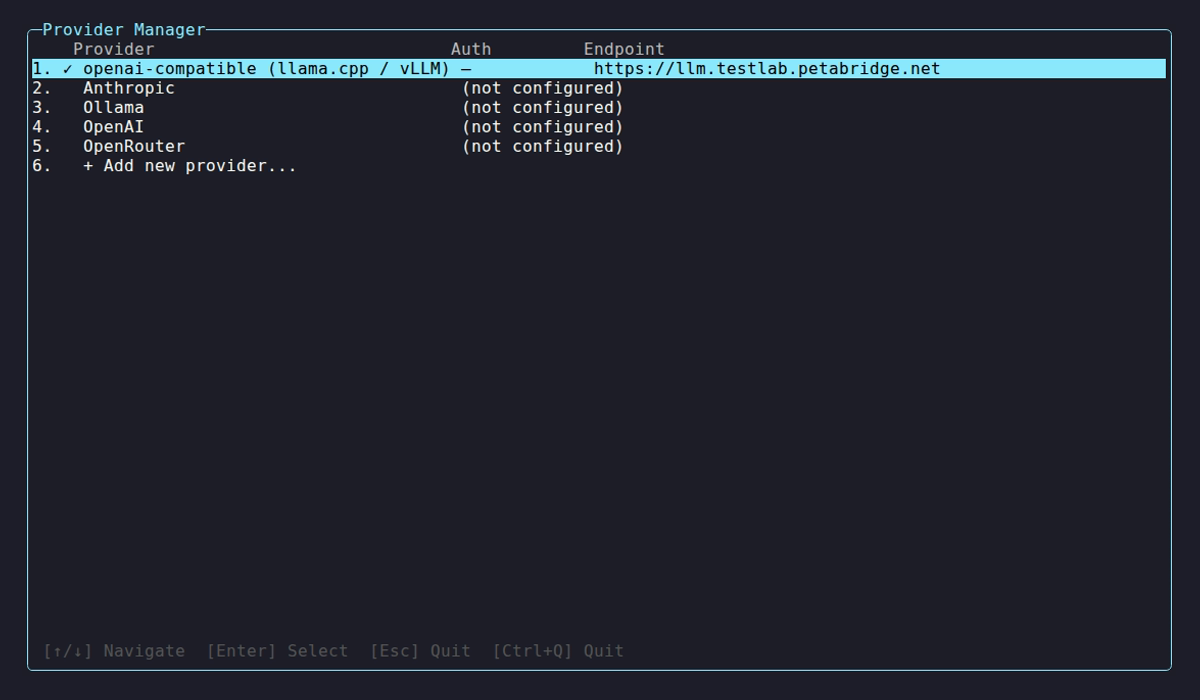
netclaw provider probes each configured provider on startup and shows whether it’s reachable and authenticated:
| Indicator | Meaning |
|---|---|
✓ | Healthy — models discovered |
⚠ | Unreachable or auth failure |
… | Probe in progress |
Select a provider to manage it:
| Key | Action |
|---|---|
K | Update API key |
R | Remove provider |
V | Re-validate connection |
Environment Variable Overrides
Section titled “Environment Variable Overrides”Skip config files entirely by setting environment variables with the NETCLAW_ prefix. Double underscores (__) separate path segments, following the .NET configuration convention:
# Override a provider's API keyexport NETCLAW_Providers__openrouter__ApiKey="sk-or-v1-..."
# Point a model role at a provider (named definition + role reference)export NETCLAW_Models__Definitions__claude__Provider="openrouter"export NETCLAW_Models__Definitions__claude__ModelId="anthropic/claude-sonnet-4"export NETCLAW_Models__Roles__Main="claude"
Environment variables take highest priority, overriding both netclaw.json and secrets.json. On Linux, variable names are case-sensitive — NETCLAW_Providers__openrouter__ApiKey won’t match NETCLAW_PROVIDERS__OPENROUTER__APIKEY.
Probe and Health Checks
Section titled “Probe and Health Checks”When the TUI or daemon starts, netclaw probes each provider by hitting its model-listing endpoint. Each probe has a 10-second HTTP timeout.
Common probe errors:
| HTTP Status | Message |
|---|---|
| 401 | Invalid credentials — double-check your provider key |
| 403 | Access denied — credentials may lack model-listing permissions |
| 404 | Models API not found — service may be down |
| 429 | Rate limited — wait a moment and try again |
| 5xx | Provider returned an error — may be experiencing issues |
| Connection failure | Network issue — check endpoint and connectivity |
To test your configuration right now, run netclaw doctor for a full config and connectivity diagnostic, or open netclaw provider to see live health status.
Caveats
Section titled “Caveats”- Changing providers requires a daemon restart.
- Missing credentials are a startup error, not a warning — the daemon won’t start if a configured provider has no API key and no
NETCLAW_Providers__<name>__ApiKeyenv var. - Each model role uses exactly one provider. There’s no automatic failover or per-channel provider selection. Change the active provider with
netclaw model set.
Related Pages
Section titled “Related Pages”netclaw provider— CLI reference for all provider commandsnetclaw model— assign providers to Main, Fallback, and Compaction roles- Secrets Management — how credentials are encrypted and stored
- Self-Hosted Providers — Ollama and openai-compatible setup
- Models — model role configuration
Resources
Section titled “Resources”- OpenRouter API docs — request format, rate limits, model routing
- Anthropic API docs — authentication, model versions, usage limits
- OpenAI API docs — endpoints, authentication, model capabilities
- GitHub Copilot — subscription details and supported models
- Venice.ai API docs — endpoints, models, and vendor parameters
- DeepSeek API docs — authentication, models, and rate limits
- .NET environment variable configuration — the double-underscore nesting convention
- RFC 7636 — OAuth PKCE — the code exchange flow OpenAI uses
 Built by Petabridge