
Design Philosophy
Netclaw exists because we disagreed with the direction every other open-source agent project was heading. OpenClaw (the most popular open-source personal AI assistant, 360K+ GitHub stars, dozens of platform integrations) and Hermes Agent (Nous Research’s autonomous agent with a self-improving skill system) proved the category and inspired this project. We respect the hell out of what they’ve built. But we think their philosophies are bad for their projects long-term, and that’s why we built something new.
Simplicity is a feature
Section titled “Simplicity is a feature”Petabridge has maintained Akka.NET since 2014. Over a decade of shepherding a large open-source framework through breaking changes, security patches, and community demands. The lesson: the biggest threat to any project is its own complexity.
Every feature you add is a feature you have to maintain, test, secure, and explain. The most productive thing a maintainer can do is say no. Most agent projects treat feature count and velocity as proof of progress — hundreds of PRs per release, thousands of community integrations, autonomous skill lifecycle management. We think that’s antithetical to how you should build software.
Netclaw’s codebase is deliberately small. So is the configuration footprint. When we’re tempted to add a feature, the first question is always: can this live in an MCP server someone else maintains instead?
What we don’t build
Section titled “What we don’t build”You’ll probably never see voice mode in netclaw. That’s a property of the model you’re using and something your operating system will handle natively. We don’t build web dashboards for daily interaction — your chat app already has auth, threading, mobile apps, notifications, and search. We don’t build an autonomous skill lifecycle that generates, archives, and self-improves skills without human oversight.
Every feature we don’t build is a feature that can’t break, can’t have a CVE, and can’t confuse your deployment.
Chat-first interaction
Section titled “Chat-first interaction”Your chat app is the interface. Slack, Discord, Mattermost — whatever your team already uses. Every thread you spin up with the agent is its own session: reentrant (pick up where you left off), persisted to disk, and recoverable across daemon restarts. The agent doesn’t need its own UI because it lives where your team already works.
At the session layer, the source of a message is irrelevant. Slack, a webhook, a scheduled timer, a CLI chat — they all produce the same kind of message routed to the same kind of actor. The architecture overview covers how this works mechanically, but the philosophy is simple: the agent shouldn’t care how you talk to it, and you shouldn’t have to learn a new interface to use it.
This means adding a new channel — Mattermost, Signal, a web UI for remote management — never touches session logic. The codebase stays small because the transport layer is someone else’s problem.
Default-deny security
Section titled “Default-deny security”Giving an LLM shell access and tool-calling ability is giving it the keys to your infrastructure. The question isn’t whether something will go wrong — it’s what happens when it does.
Most agent frameworks start permissive and add restrictions after security incidents. Netclaw works the other way around. During netclaw init, you choose an audience disposition — Personal, Team, or Public — and that choice sets the baseline for what the agent can do. Some common operations are allowed out of the box, but anything potentially destructive requires explicit approval. You can approve a tool call for the current session or persistently, and the agent makes the distinction clear with a structured approval prompt in the TUI.
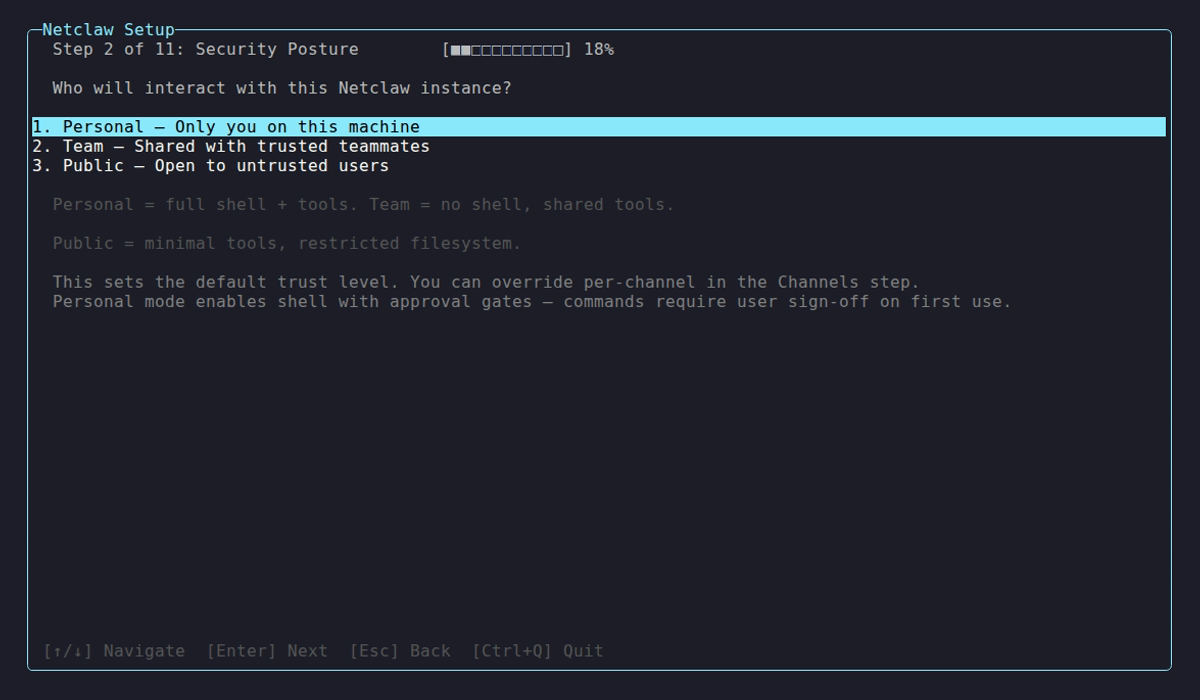
This is the principle of least privilege applied to an LLM agent.
When something fails or is misconfigured, it fails loudly. Fallbacks hide bugs, and on security-relevant paths they can silently escalate privileges. Inbound message checks run in the gateway boundary before messages ever reach the session layer. And the security model stacks four independent layers — hard denies, path restrictions, audience-scoped grants, and human approval gates — so no single check is the only thing between the agent and a destructive action. The security architecture covers the full stack.
Determinism boundaries
Section titled “Determinism boundaries”Traditional service architecture thinks in terms of service boundaries. Agent architecture needs to think in terms of determinism boundaries: where is it safe for an LLM to operate non-deterministically, and where isn’t it?
LLMs are inherently non-deterministic — same input, different output, every time. That’s fine for research, summarization, and conversation. It’s not fine for git push --force or deleting a database.
The operating principle is reversibility: if the agent is about to perform an action that can’t be undone, that action needs a deterministic gate — an approval prompt where a human confirms intent. If you want to turn those gates off, that’s your decision. You live with the consequences.
Lightweight access control without an identity provider
Section titled “Lightweight access control without an identity provider”The real-world use case that drove this: a bot in a team Slack channel that can answer questions about live service status for anyone, but only operators — the IT folks — can trigger high-privilege actions like exporting log dumps or restarting services.
Traditional role-based access control solves this, but it requires a fully managed identity provider — something most self-hosted deployments don’t have and shouldn’t need. To keep netclaw simple and self-hostable, we distilled two lightweight primitives that are adjacent to RBAC without the infrastructure dependency:
-
Audience dispositions classify trust by deployment topology and channel type. Personal (you at your machine), Team (your Slack workspace), or Public (untrusted sources). The disposition determines what tools are visible, what memory is accessible, and whether approval gates are active.
-
Listing owners are the specific user IDs in each channel who actually operate the bot. They get elevated trust within their audience tier.
| Audience | Trust | Typical source |
|---|---|---|
| Personal | Full access | Local TUI, operator at the machine |
| Team | Scoped access | Slack workspace, Discord server |
| Public | Minimal access | Unknown or untrusted channels |
During netclaw init, you assign each connected channel to an audience tier. The same Slack workspace can have DMs classified as Personal and a shared ops channel classified as Team:
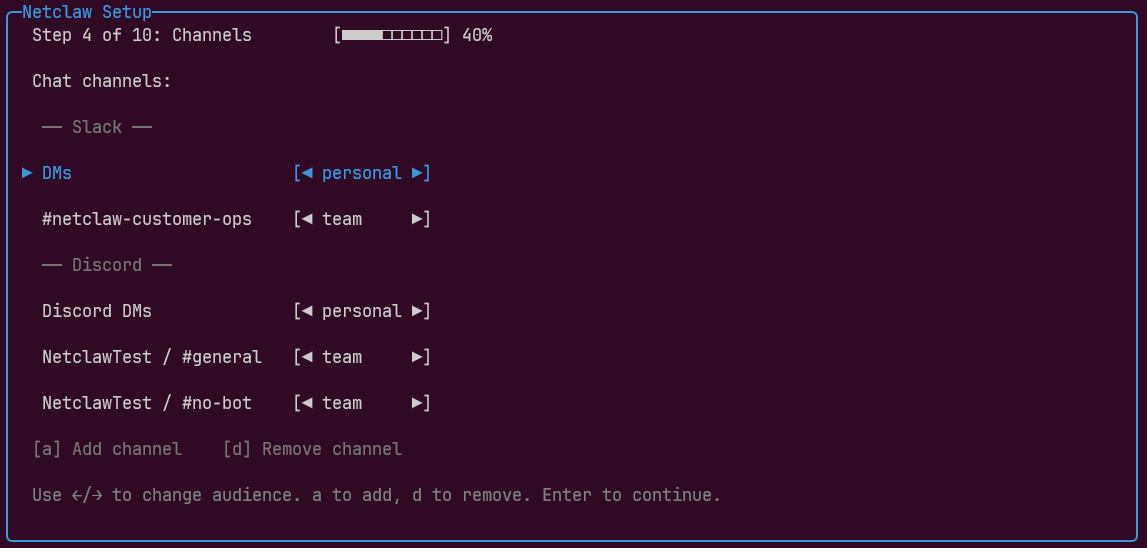
This isn’t a better idea than RBAC. It’s a pragmatic simplification that lets you deploy an agent with meaningful access control today, on your own hardware, without standing up Entra or Okta first. Every other security decision flows from the audience disposition. See audience scoping for how it works in practice.
MCP-first tooling
Section titled “MCP-first tooling”LLMs calling command-line tools is powerful and composable — especially when those tools are in the model’s training data or expose their own help documentation. But shell access is where all the security problems come from. Agents deleting production databases, sending unauthorized emails, running destructive commands — that’s shell territory.
For operators and developers, shell access makes sense. Netclaw supports it with strong approval gates that extract verb-chains from commands (so approving git push covers git push origin main) and make shell access as safe as possible.
But for everyone else in an organization? Shell access is a non-starter. The accounting team isn’t going to install the Google Cloud CLI on a sandboxed VM over SSH. That’s unrealistic.
MCP solves this. It lets you deploy agents that connect to remote tool servers with scoped permissions — read-only access to your CRM, delegated service accounts for cloud resources, controlled access to internal APIs. The agent gets purpose-built tools without shell exposure, and every tool call goes through the same approval gates as shell commands.
What makes MCP work at scale is progressive tool disclosure. The agent sees server-level summaries — “browser tools,” “memory tools,” “CRM tools” — and loads specific tools on demand. This keeps the prompt small and prevents the model from misfiring on similarly-named tools across servers.
If an MCP server definition changes and new tools appear, operators can set the default approval status for unknown tools: auto-deny, auto-approve, or require human confirmation. MCP provides a deterministic security boundary that shell calling fundamentally cannot.
The use cases that benefit most have nothing to do with coding: generating invoices, updating a CRM, triaging support tickets, syncing project management tools. MCP is how you give non-technical team members the benefits of an agent without the risks of shell access.
Small models are enough
Section titled “Small models are enough”Most agent platforms assume frontier models. OpenClaw’s documentation recommends using “the strongest latest-generation model available,” which in practice means 70B+ parameter models or paid API access to GPT-4, Claude, or similar. That means your data leaves your network.
We think that’s the wrong default. If your agent is working deals in a CRM, responding to GitHub webhooks, generating invoices, or triaging support tickets, you don’t need a frontier model at $10 per million input tokens.
Netclaw runs production workloads on Qwen 3.6 27B. We’ve tested with models as small as Qwen 3.5 9B and gotten reliable tool-calling results. The architecture is designed to make this work:
Progressive tool disclosure reduces the noise in the prompt — what the model has to sort through to pick the right tool — so smaller models can navigate tool graphs without misfiring. Compressed skill and tool indexes keep the system prompt lean, and server-first MCP discovery means the model picks “which server” before it ever sees individual tool definitions. Much simpler decision space.
There’s an economic argument here too. A $3,000 GPU with 64GB VRAM runs local inference indefinitely — bounded capital expenditure instead of unbounded API billing. Local inference also means your data never leaves your infrastructure, which matters when the agent handles contracts, financials, or internal communications.
For tasks that genuinely need frontier capabilities — complex agentic coding, multi-step research across large codebases — netclaw delegates to tools like Claude Code or OpenCode in headless mode via skills. Use your existing subscriptions for frontier work. Use local models for everything else.
Automatic memory formation
Section titled “Automatic memory formation”Agents that forget everything between conversations aren’t useful for real work. But agents that require users to manually save context don’t get used either.
Netclaw forms memories automatically. A per-session observation sidecar watches the conversation and, when the session goes idle, distills key facts, decisions, and project context into durable memory — without an extra LLM call during your turn. A background curation pipeline validates proposals, deduplicates against existing memories, blocks secret content, and persists what survives to SQLite.
On the next turn — in any session — relevant memories are recalled automatically via deterministic full-text search and injected into the system prompt. No vector database, no embeddings, no external service. The agent remembers that your project uses PostgreSQL, that you prefer Terraform over Pulumi, that the deploy target changed last Tuesday — because it observed those facts and stored them.
This is the kind of feature that belongs in core, not in a plugin. Memory touches the session lifecycle, the compaction pipeline, the security model (public sessions get no memory access), and the system prompt assembly. Pushing it to the edges would mean every integration reimplements it badly. The memory architecture covers the full system.
The philosophy of no
Section titled “The philosophy of no”Open-source maintainers tend to say yes too much. Every accepted contribution is a maintenance commitment. Every feature that lands in core is a feature that can’t be pushed to a plugin, an MCP server, or a skill that someone else maintains.
Netclaw takes the opposite approach: functionality belongs at the edges unless there’s a strong reason to centralize it. Want voice mode? That’s a model capability and an OS integration — not an agent framework feature. Want a custom skill marketplace? Run your own skill feed or skill server. Want a specialized tool for your workflow? Build an MCP server and connect it.
The core stays small, and so does the surface area for bugs, CVEs, and breaking changes. When your competitors’ complexity is the source of their security vulnerabilities, your simplicity is your security story.
Keep reading
Section titled “Keep reading”- Architecture Overview — how these principles become a running system
- Security Architecture — the four-layer security model in detail
- Quickstart — try it yourself
- MCP Tool Permissions — practical guide to scoping MCP access
- Self-Hosted Providers — setting up local model inference
Resources
Section titled “Resources”- Actor model — the concurrency model behind netclaw’s session architecture
- Akka.NET — the actor framework that implements it, maintained by Petabridge since 2014
- Model Context Protocol specification — the open standard for agent tool integration
- Principle of Least Privilege (NIST) — the access control philosophy behind default-deny
- OWASP LLM Top 10 — the attack taxonomy netclaw’s security model is designed against
 Built by Petabridge