
Search Providers
The web_search and web_fetch tools route through one configured search backend. Netclaw supports three: a self-hosted SearXNG instance, the managed Brave Search API, and DuckDuckGo as a last-resort scraper.
Quick Start
Section titled “Quick Start”Run netclaw config and select Search to pick a backend and enter credentials:
netclaw config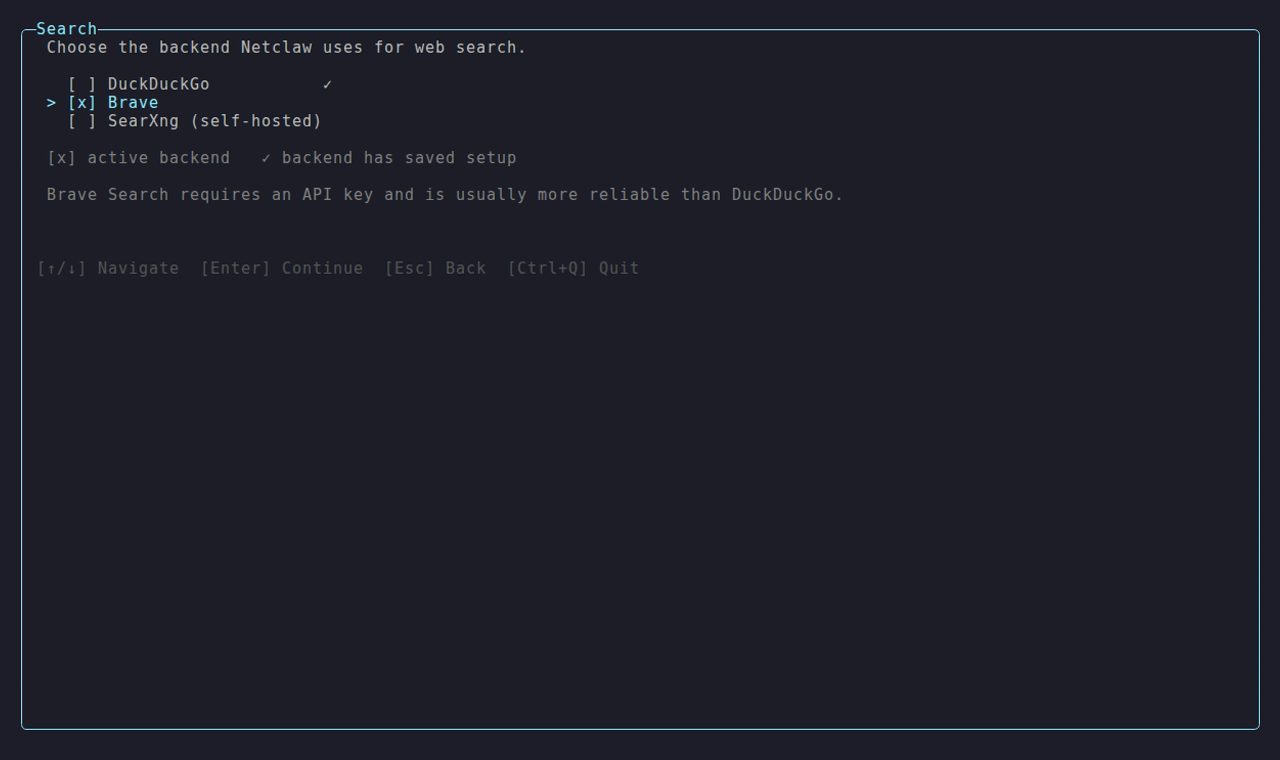
The wizard walks you through backend selection and credential entry. For SearXNG, the endpoint URL is validated by a reachability probe before saving — if the instance is unreachable, the editor raises a warning and offers a “Save anyway” override. For Brave, it prompts for your API key and stores it in secrets.json (encrypted at rest).
Once you save, restart the daemon to apply the change.
Provider Summary
Section titled “Provider Summary”| Backend | Shape | Required config | Notes |
|---|---|---|---|
searxng | Self-hosted | Search.SearXngEndpoint | Operator runs the instance. JSON output must be enabled. |
brave | Managed | Search.BraveApiKey (in secrets.json) | API key from api.search.brave.com. |
duckduckgo | Scraped | None | No config; least reliable; may hit bot detection. |
SearXNG
Section titled “SearXNG”SearXNG is a privacy-focused metasearch engine you self-host. It aggregates results from upstream search engines and returns them through a uniform API. Netclaw queries the /search endpoint and parses the JSON response.
Manual configuration
Section titled “Manual configuration”For scripted installs, Docker deployments, or any environment where netclaw config isn’t available, set Search.Backend and Search.SearXngEndpoint directly in netclaw.json:
{ "Search": { "Backend": "searxng", "SearXngEndpoint": "https://searxng.internal.example/" }}No credentials go in secrets.json for SearXNG today. Authenticated instances are tracked as a future feature; see Limitations below.
Required settings.yml
Section titled “Required settings.yml”Netclaw queries ?format=json and parses the response as JSON. Your SearXNG instance must have JSON in its enabled output formats:
search: formats: - html - jsonIf JSON is not enabled, SearXNG returns either HTTP 403 Forbidden or a HTML body on a 200 response, and Netclaw surfaces a terminal error pointing back at this section. There is no retry; the instance configuration is wrong, and retries won’t change the outcome.
Reverse-Proxy and Limiter Behavior
Section titled “Reverse-Proxy and Limiter Behavior”Most production SearXNG deployments sit behind a reverse proxy (nginx, Caddy, Cloudflare). Two requirements matter for Netclaw’s traffic.
First, allow a non-empty User-Agent. Netclaw sends Netclaw/{version} (+https://netclaw.dev; sha={shortSha}) on every request. Many reverse proxies bot-wall empty-UA traffic before it ever reaches SearXNG; non-empty UAs pass.
Second, use standard HTTP rate-limit semantics. When the upstream throttles, Netclaw expects HTTP 429 Too Many Requests, optionally with a Retry-After header. Both delta-seconds and HTTP-date forms are honored. Netclaw retries up to 3 times on 429 with exponential backoff (5s, 10s, 20s) when no Retry-After is present. Non-standard limiter responses (a redirect to a captcha page, a silent body swap to HTML) are treated as terminal errors.
SearXNG’s own bot-detection limiter is behavioral and IP-list based, backed by Valkey. If your instance runs the limiter and you want to whitelist Netclaw, the documented mechanism is the pass_ip allowlist in limiter.toml.
Connectivity
Section titled “Connectivity”Netclaw applies a 15-second per-request timeout when it constructs its own HttpClient. Across the 3-attempt retry loop the worst case is roughly 45 seconds plus any honored Retry-After delays before the user sees an error. If your SearXNG instance routinely takes longer than that to respond, the upstream search engines are likely the bottleneck. Look at the engines: configuration before tuning the client.
Limitations
Section titled “Limitations”Netclaw does not currently support authenticated SearXNG instances — no Bearer tokens, no HTTP Basic, no custom headers, no mTLS. If your instance is gated behind authentication, either expose it on a network the daemon can reach unauthenticated, or follow issue #912 for first-class auth support.
Netclaw also only parses JSON. HTML and RSS responses are not supported.
Brave Search
Section titled “Brave Search”The Brave Search API is a managed search backend. It requires an API key. netclaw config → Search prompts for the key and stores it encrypted — the recommended path for interactive installs.
Manual configuration
Section titled “Manual configuration”For scripted or headless installs, set Search.Backend in netclaw.json and store the key with netclaw secrets:
{ "Search": { "Backend": "brave" }}netclaw secrets set Search.BraveApiKey your-key-hereGet a key from api.search.brave.com. The free tier is sufficient for personal use; paid tiers raise the rate limit.
Behavior
Section titled “Behavior”Brave returns gzip-compressed JSON, which Netclaw decompresses transparently. On HTTP 401, Netclaw surfaces an authentication error pointing at Search.BraveApiKey. On HTTP 429, Netclaw retries up to 3 times honoring the API’s Retry-After. After max retries Netclaw returns a rate-limit error; from there your options are to wait or upgrade the plan.
DuckDuckGo
Section titled “DuckDuckGo”DuckDuckGo is the last-resort backend; it needs no configuration. It scrapes the lite HTML interface, which is fragile by design — DuckDuckGo’s bot detection regularly trips on automated traffic. Select it via netclaw config → Search, or set it directly in netclaw.json:
{ "Search": { "Backend": "duckduckgo" }}Use this only when neither a SearXNG instance nor a Brave API key is available. Expect periodic failures.
Diagnosing Search Errors
Section titled “Diagnosing Search Errors”When the LLM reports a search failure, the error message includes the actionable cause:
| Error fragment | Cause | Fix |
|---|---|---|
settings.yml / search.formats | SearXNG JSON output not enabled | Add json to search.formats in settings.yml, restart SearXNG |
rate limit exceeded (SearXNG) | Limiter or reverse proxy throttling | Reduce concurrency, whitelist Netclaw’s IP, or check limiter.toml |
endpoint unreachable | Network / DNS / wrong URL | Verify Search.SearXngEndpoint resolves and is reachable from the daemon host |
request timed out | Upstream search engines slow or unreachable | Check SearXNG’s engines: configuration |
Brave Search API authentication failed | Missing or invalid Brave API key | Update Search.BraveApiKey in secrets.json |
Brave Search API rate limit exceeded | Brave API throttling | Wait or upgrade your Brave plan |
Related Pages
Section titled “Related Pages”- Managed Providers — LLM provider config (where API keys for managed services live)
- Self-Hosted Providers — running inference on your own hardware
- Secrets Management — how
secrets.jsonencrypts credentials at rest
Resources
Section titled “Resources”- SearXNG documentation
- SearXNG limiter configuration
- Brave Search API — overview and pricing
- Brave Search API key dashboard — get a key
 Built by Petabridge