
Mattermost
Netclaw connects to Mattermost over a WebSocket for events and the REST API for replies. You run a bot account on your Mattermost server, give netclaw the bot’s access token, and it shows up as a bot user — same default-deny ACL model as Slack and Discord, against infrastructure you host yourself.
Prerequisites
Section titled “Prerequisites”- Netclaw installed and initialized (
netclaw init) - A self-hosted Mattermost server reachable from the daemon
- System Console access on that server (to enable bot accounts and create the bot)
Create a bot account
Section titled “Create a bot account”Mattermost bots authenticate with a personal access token, not OAuth. Two server settings have to be on before you can create one.
1. Enable bot accounts and access tokens
Section titled “1. Enable bot accounts and access tokens”In the System Console, under Integrations > Bot Accounts, set Enable Bot Account Creation to true. Then, under Integrations > Integration Management, turn on Enable Personal Access Tokens.
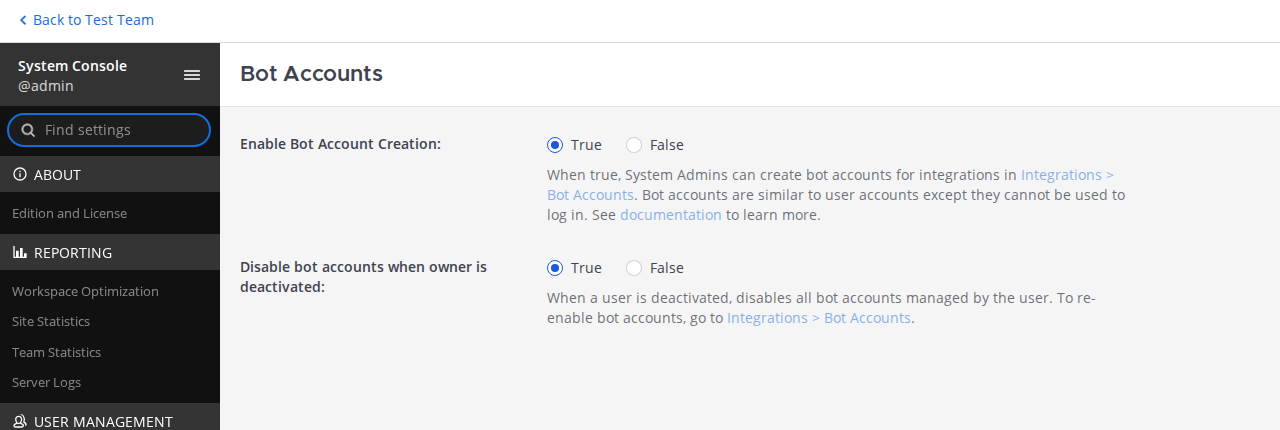
Both are off by default on a fresh Mattermost install — skipping either is the most common setup snag.
2. Create the bot and copy its token
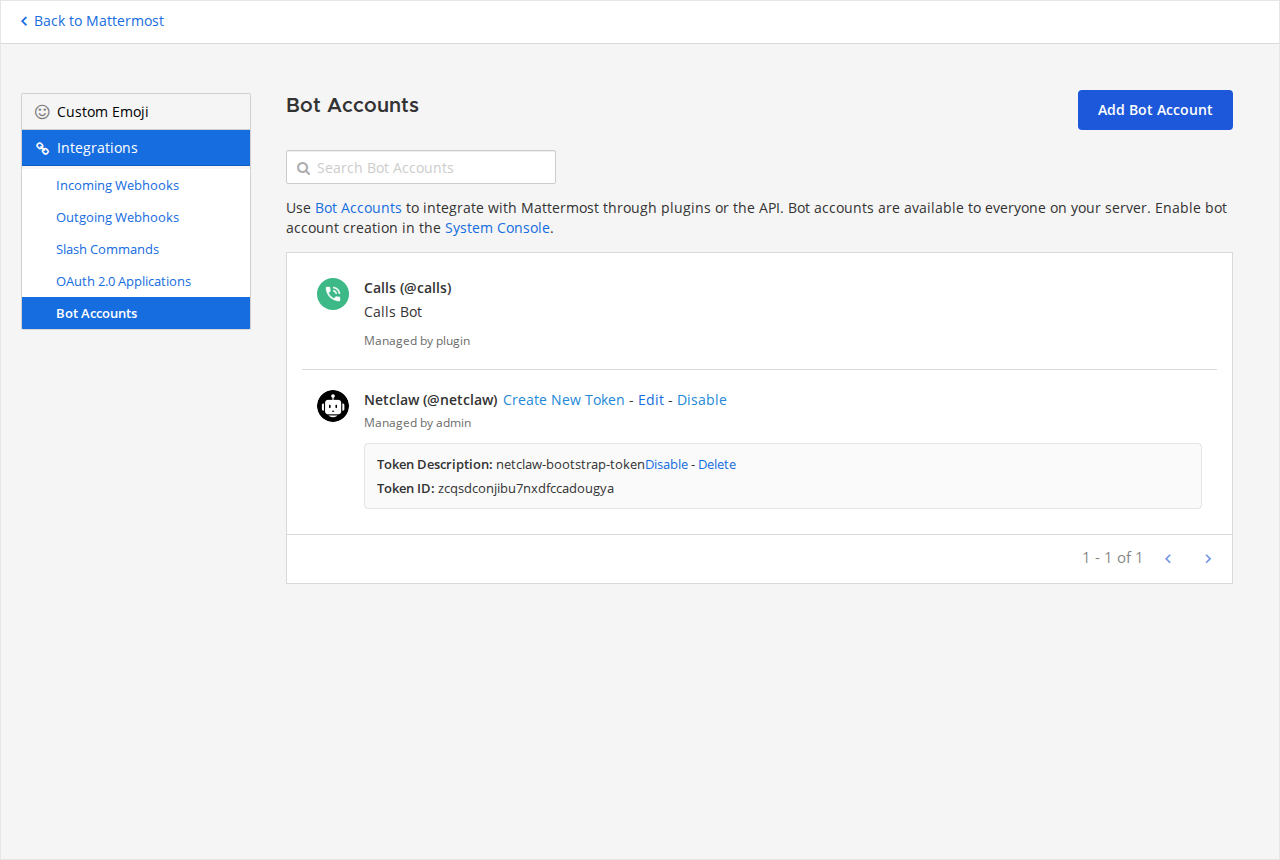
Section titled “2. Create the bot and copy its token”Under Integrations > Bot Accounts, click Add Bot Account and give it a username (e.g. netclaw) and display name. Then click Create New Token: Mattermost reveals the access token once, in a banner — copy it right then. That token (not the Token ID shown in the list) is the BotToken netclaw needs.
3. Add the bot to your team and channels
Section titled “3. Add the bot to your team and channels”A bot only sees channels it belongs to. Add it to the target team, then invite it to each channel where it should respond (/invite @netclaw, or through the channel member menu).
Configure netclaw
Section titled “Configure netclaw”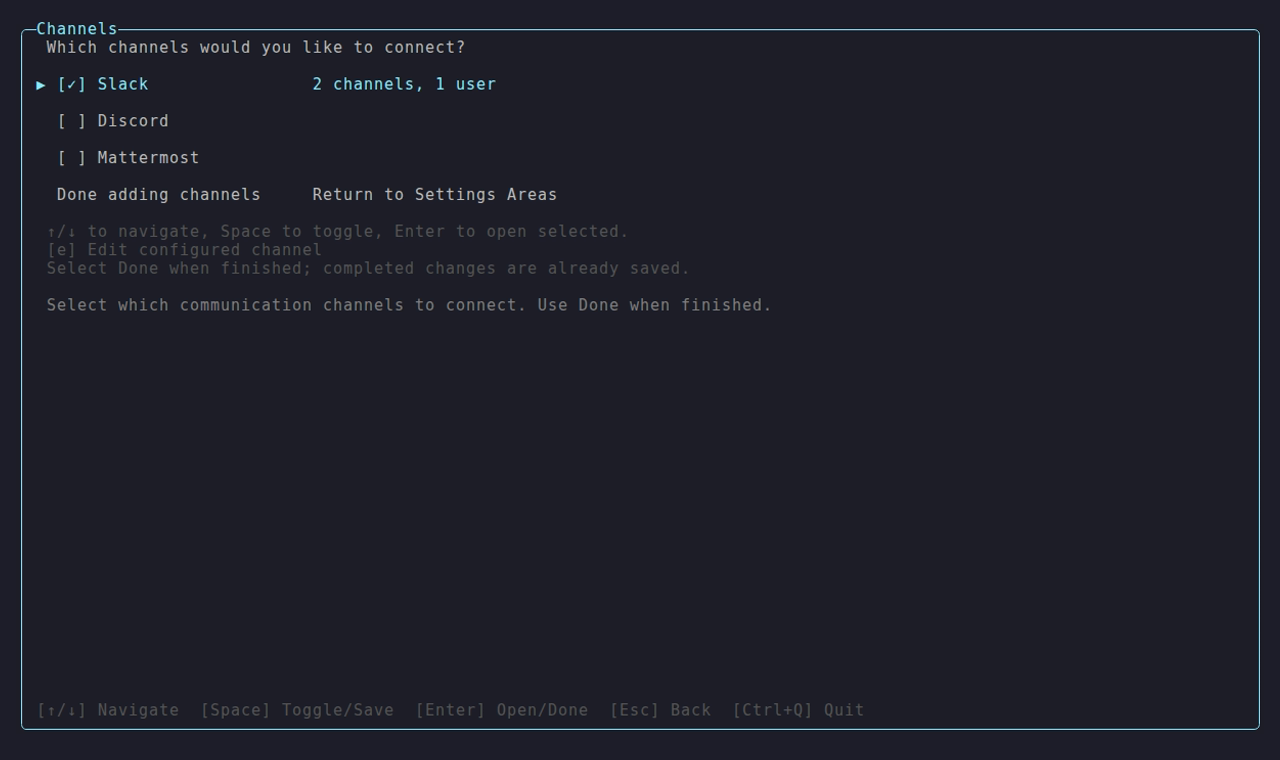
The Channels area in netclaw config — enable Mattermost and enter its server URL and token here (the adapter list also shows Slack and Discord).
Manual setup
Section titled “Manual setup”For scripted deployments or Docker installs where a TUI isn’t available, store the token with netclaw secrets:
netclaw secrets set Mattermost.BotToken your-bot-tokenThen enable Mattermost and point it at your server in ~/.netclaw/config/netclaw.json:
{ "Mattermost": { "Enabled": true, "ServerUrl": "https://mm.example.com", "DefaultChannelId": "abcdefghijklmnopqrstuvwxyz" }}Environment variables work too:
export NETCLAW_Mattermost__BotToken="your-bot-token"export NETCLAW_Mattermost__Enabled="true"How channel IDs are stored
Section titled “How channel IDs are stored”Add channels one at a time in netclaw config → Channels. Netclaw resolves each entry against the Mattermost REST API to its canonical channel ID before adding it to the list. The stored AllowedChannelIds field holds IDs, not display names; display names are shown dynamically in the config UI. Entries that cannot be resolved are flagged with a warning but saved verbatim in AllowedChannelIds — an unresolved name is inert at runtime because the ACL matches against canonical IDs only, so the name grants access to no channel until it resolves.
All config fields
Section titled “All config fields”| Field | Type | Default | Description |
|---|---|---|---|
Enabled | bool | false | Turn on Mattermost |
ServerUrl | string | — | Base URL of your Mattermost server. Required when enabled. |
BotToken | string | — | Bot personal access token. Store with netclaw secrets set. |
CallbackUrl | string | — | URL Mattermost can reach for interactive button callbacks. Set it to get approval buttons; leave it unset for text-reply approvals (see Tool approval). |
DefaultChannelId | string | — | A 26-character channel ID. Allows one channel without listing it in AllowedChannelIds. |
MentionOnly | bool | true | Only respond when @-mentioned in channels |
AllowDirectMessages | bool | false | Accept DMs |
MentionRequiredInDm | bool | false | Require @-mention even in DMs |
AllowedChannelIds | string[] | [] | Channel allow-list. Empty + no default = all channel messages denied |
AllowedUserIds | string[] | [] | User allow-list. Empty = everyone in allowed channels is accepted |
ChannelAudiences | object | {} | Per-channel audience overrides. Keys are channel IDs or "dm". Values: "personal", "team", "public". |
The token lives in ~/.netclaw/config/secrets.json (encrypted at rest). Mattermost channel and user IDs are 26-character alphanumeric strings — the System Console lists them, or pull them from the REST API.
Access control
Section titled “Access control”Mattermost ACL is default-deny, evaluated the same way as Slack and Discord.
Channels
Section titled “Channels”The bot only responds in channels that pass the allow-list:
DefaultChannelIdallows one channelAllowedChannelIdsallows multiple- If both are empty, every channel message is denied. This is the number one setup mistake.
{ "Mattermost": { "DefaultChannelId": "abcdefghijklmnopqrstuvwxyz", "AllowedChannelIds": ["abcdefghijklmnopqrstuvwxyz", "zyxwvutsrqponmlkjihgfedcba"] }}AllowedUserIds restricts who gets responses:
- Empty (default) — everyone in allowed channels is accepted
- Non-empty — only listed user IDs get responses, everyone else is silently dropped
Users in AllowedUserIds are treated as TrustedInternal by the security model. Everyone else is UntrustedExternal.
Direct messages
Section titled “Direct messages”DMs are off by default:
{ "Mattermost": { "AllowDirectMessages": true }}With DMs on, users type normally — MentionRequiredInDm defaults to false, so no @-mention needed.
Audience overrides
Section titled “Audience overrides”Audience resolves per message: ChannelAudiences[channelId] wins first, then ChannelAudiences["dm"] for direct messages, then a fallback that lands on Team for allow-listed channels and users and Public for everything else. Override it explicitly:
{ "Mattermost": { "ChannelAudiences": { "abcdefghijklmnopqrstuvwxyz": "team", "dm": "personal" } }}The "dm" key is reserved — it matches every direct message rather than a channel ID, and a channel-ID entry takes precedence over it. An unrecognized audience value is rejected outright: the message is denied rather than falling back to a default.
Security Model has the full breakdown on how audiences map to tools and permissions.
Behavior in Mattermost
Section titled “Behavior in Mattermost”Threads and sessions
Section titled “Threads and sessions”Each thread is its own isolated session, keyed by {channelId}/{rootPostId}, and the bot replies in-thread. On daemon restart, thread history is backfilled so in-progress conversations pick up where they left off.
Mention behavior
Section titled “Mention behavior”MentionOnly: true (the default) means the bot ignores channel messages that don’t @-mention it. Thread replies are the exception — once a thread has an active session, the bot responds to everything in it without a mention. Netclaw strips the @-mention before passing text to the LLM.
Tool approval
Section titled “Tool approval”When a tool call needs approval, how netclaw asks depends on CallbackUrl:
CallbackUrlset — netclaw posts interactive buttons. The full prompt offers five choices, in order: Once, This chat, Always here, Always anywhere, Deny. Clicks come back over an inbound HTTP POST to/api/mattermost/actions, which the daemon only exposes when a callback URL is configured. Each button carries a one-time, post-bound token that expires after 12 hours.CallbackUrlunset — approvals fall back to text replies: reply with the letter shown next to each option. No inbound HTTP surface is opened.
netclaw shows fewer than five when some don’t apply — a command it can’t cleanly parse (shell control flow, or unbalanced quotes) collapses to just Once and Deny, and the reply letters track whatever is shown. Always anywhere is the broadest grant: it approves the command’s verb for every session everywhere and persists to tool-approvals.json. Reach for Always here or narrower unless you really mean it.
The token store is in-memory: buttons posted before a daemon restart return “no longer valid” when clicked afterward. The pending request survives on the session, so ask the agent to re-issue the prompt.
Proactive messaging
Section titled “Proactive messaging”The LLM can start a conversation with the generic send_channel_message tool — pass channel_key: mattermost and a destination resolved via lookup_channel_user or lookup_channel_destination. It posts a new thread root and routes replies in that thread back to a live session. ACL rules still apply — DMing a user also requires AllowDirectMessages: true.
Reminders
Section titled “Reminders”Reminders reach Mattermost through channel delivery with delivery_transport: "mattermost". (In-thread current_session delivery isn’t available from a Mattermost session yet — set_reminder only accepts it for Slack, Discord, the TUI, and SignalR.) Because Mattermost user IDs and channel IDs are both 26-character strings, channel-delivery targets need a prefix:
@<userId>— delivers to that user’s DMchannel:<channelId>— delivers to that channel
A bare ID with no prefix is rejected with a disambiguation error. Unlike Discord, DM delivery works, because a Mattermost DM is itself an addressable channel.
Verify it works
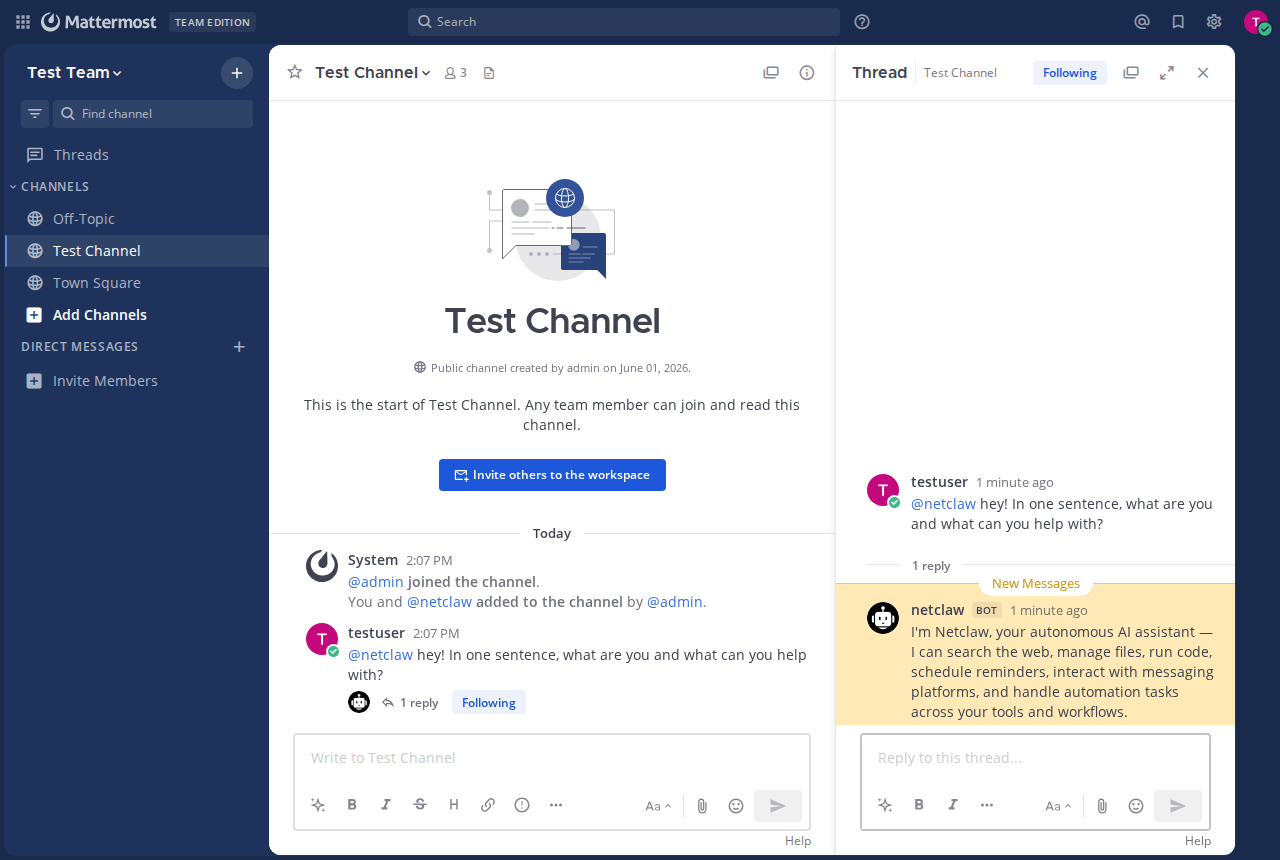
Section titled “Verify it works”Restart the daemon, then @-mention the bot in an allowed channel:
netclaw daemon stop && netclaw daemon startIf it replies in a thread, you’re set.
netclaw status reports Mattermost health (healthy, degraded, disconnected, or disabled). When something’s off, check its status first, then the daemon logs for detail. A bad token, an unreachable server, or any connection failure is contained there — the Mattermost channel degrades on its own and the daemon plus every other channel keeps running. See Troubleshooting below for the common messages.
Troubleshooting
Section titled “Troubleshooting”Common problems and fixes are in Channel Troubleshooting. The hits:
- Connected but silent —
AllowedChannelIdsis empty and noDefaultChannelIdis set, so all traffic gets denied; or the bot was never added to the channel. Mattermost is enabled but Mattermost:ServerUrl is not configured— addMattermost.ServerUrltonetclaw.json.Mattermost rejected the bot token (HTTP 401)— re-issue the bot token and updatesecrets.json.- Can’t create a bot or token — Enable Bot Account Creation and Enable Personal Access Tokens are both off by default in the System Console.
Next steps
Section titled “Next steps”- Configure audiences and approval gates to control what tools are available in each channel
- Set up systemd so the daemon stays running after reboots
- Add Slack or Discord if your team uses more than one
Related pages
Section titled “Related pages”netclaw config— Channelsnetclaw secrets— token managementnetclaw status— primary diagnostic for Mattermost- Security Model — audiences and approval gates
- Channel Troubleshooting — error codes and debug logging
External resources
Section titled “External resources”- Mattermost — the project, if you don’t already run a server
- Mattermost: Bot accounts — creating and managing bots
- Mattermost: Personal access tokens — enabling and issuing tokens
- Mattermost: Enable bot account creation — the System Console settings
- Mattermost: Install with Docker — container deployment, including the official images on Docker Hub
- Mattermost API reference — the REST endpoints netclaw uses for replies
 Built by Petabridge